The Last Few Things About Git
Large files, environment files, an ignore list only you can see, and why keeping a change under 150 lines matters more than any command in this series.
Tags were the last command worth a post of its own. This is the collection of practical things that come up once you are using git with other people, and then the series is done.
Large Files Are Genuinely Awkward
Everything about git's design that makes it good gets awkward with big binary files.
Every commit stores a pointer to every file's complete contents. For text that is close to free, because unchanged files reuse the same blob and text compresses well.
A 100 megabyte image is a different story. Change it a few times and you have several copies in the object store, each compressed but still large, and every clone downloads all of them.
Git Large File Storage exists for this. It replaces the file in your repository with a small pointer and keeps the real content elsewhere, fetching it when needed.
This is also the honest answer to why some teams use different version control entirely. The argument for tools like Perforce is almost always large binary assets, which is a real problem git was not designed around. Game studios with gigabytes of textures are not being stubborn.
History Size Is Not Worth Worrying About
A related question: should you squash to keep the repository small?
No. History is effectively free, and optimising for repository size is solving a problem you probably do not have.
The reason to keep history clean is entirely different, and it is the one from the revert post. You want a clean history so that undoing something is one command, not an archaeology project involving six commits and a merge.
That is a bet against your future self, not a storage decision.
Keep Changes Under About 150 Lines
If you take one process habit from this series, take this one.
Try never to make a change larger than roughly 150 lines.
The reason is not taste. There are studies suggesting people rubber-stamp reviews at much higher rates as the diff grows. Past a certain size, reviewers stop reviewing and start approving, because genuinely reading it is no longer feasible.
So a large change does not get more scrutiny than a small one. It gets less. The review happened on paper and not in reality.
Smaller changes, more of them. Every git technique in this series makes that easier: squashing to make one clean commit, cherry-pick to move a single change, worktrees to keep several small pieces of work alive at once.
Two more things worth saying about open source specifically. Do not open low-effort pull requests to inflate a contribution count, which has become a real annoyance for maintainers. And be kind about it: almost nobody is being paid meaningfully for this, and treating a maintainer like a vendor is a bad trade for everyone.
Environment Files
A recurring, genuinely annoying problem: your .env holds secrets, so it must not be committed, but everyone needs one to run the project.
The usual answer is a committed template. Commit .env.example with the keys and placeholder values, ignore the real .env, and let each person copy the template and fill it in.
Beyond that it is organisational rather than technical. Some teams have a default file, some have a setup script, some use a secrets manager. All of them work. Pick one and write it down.
One small protective habit worth knowing: editor plugins exist that mask the values in a .env file, showing asterisks instead of secrets. Given how often people screen-share and record, that is a cheap way to avoid leaking something permanently. Search for a "cloak" plugin for your editor.
An Ignore File Only You Can See
Last thing, and it is my favourite small feature in git.
You have scratch files. Notes, a scratchpad script, editor droppings. You want git to ignore them, but they are your business, not the project's, and adding them to the shared .gitignore means arguing about your personal workflow in a code review.
There is a second ignore file:
.git/info/excludeSame syntax as .gitignore. Same effect. Never committed, because it lives inside .git, and nothing in there syncs anywhere.
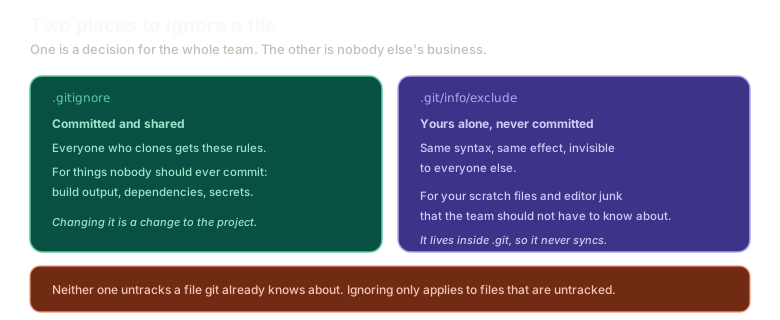 Expand.gitignore on the left, committed and shared with the whole team, next to .git/info/exclude on the right, which uses the same syntax but lives inside .git and is never committed, with a note that neither untracks a file git already knows about.
Add a pattern there and the file stops appearing in your status. Nobody else is affected and nobody else knows.
One limit applies to both: ignoring only works on untracked files. If git is already tracking something, adding it to either list changes nothing. You have to stop tracking it first.
That Is the Whole Series
Thirty-one posts, from git init to worktrees. Worth naming what actually happened, because it was not a command list.
We started at the object store and worked up. Blobs, trees, commits, refs, all of it plain files you can read with cat. Everything after that was a consequence.
Branches are cheap because a branch is forty characters in a file. Rebase produces new SHAs because a commit's identity comes from its contents. HEAD flips during a rebase because HEAD means where you are standing and rebase moved you. None of those needed memorising. They follow from the structure.
That was the whole bet: learn the data structure, and the commands stop being incantations.
There is more git than this. There always is, and there are 147 commands to prove it. But the last one percent is genuinely hard and almost never needed, and what is here is enough to handle nearly anything a real job produces.
Git should feel magical because it works so well, not because it is mysterious. Mysterious software is software you cannot debug at the exact moment you most need to.
The playground is still there whenever you want to break something safely.
The Essentials
- Large binary files are git's genuine weak point, and Git LFS exists to work around it.
- History size does not matter. Clean history matters, for reverting.
- Keep changes under about 150 lines, because large diffs get approved rather than reviewed.
- Commit an env template, ignore the real file, and consider a plugin that masks values on screen.
.git/info/excludeis a personal ignore file, never committed, invisible to everyone else.- Ignoring only affects untracked files.
- The data structure is the thing worth knowing. Every command in this series is a consequence of it.
Further Reading and Watching
- Four Ways to Ignore Files with Git: the shared, personal, and global ignore mechanisms and when each applies.
- gitignore Documentation: the pattern syntax and the precedence order git uses across all the ignore sources.
Keep reading