Walking A Commit Down To Trees And Blobs
Follow a commit to its tree, and the tree to its blob, and you arrive at your own file contents. Do it twice and you can see git reusing a pointer instead of storing a copy.
The commit object had an author, a timestamp, a message, and a reference to a tree.
It did not have your file. So where is it?
Follow the tree. That is the entire exercise, and by the end of it git stops being a black box.
Two Words, Then the Walk
Two terms come up constantly once you are down here, and both are simpler than they sound.
A tree is a directory. It holds a list of files and possibly other trees.
A blob is a file's contents. Not its name, not its permissions, just the bytes inside it.
That is the whole vocabulary. Now walk it.
Commit, Tree, Blob
Start at the commit and take the tree SHA it gave you:
git cat-file -p 4b8d21c100644 blob ec3f9a2b8d417c05e6a92f38b1d7c40e5a92f813 first.mdThere is your file name. Alongside it, something that looks like file permissions, the word blob, and another SHA.
The tree does not contain the file. It contains a pointer to it, plus the name. Names live in trees, contents live in blobs, and keeping those separate is what makes the next section work.
Follow it one more step:
git cat-file -p ec3f9a2hello thereThat is your file. You started with a commit SHA and walked down to your own text, by hand, using one command three times.
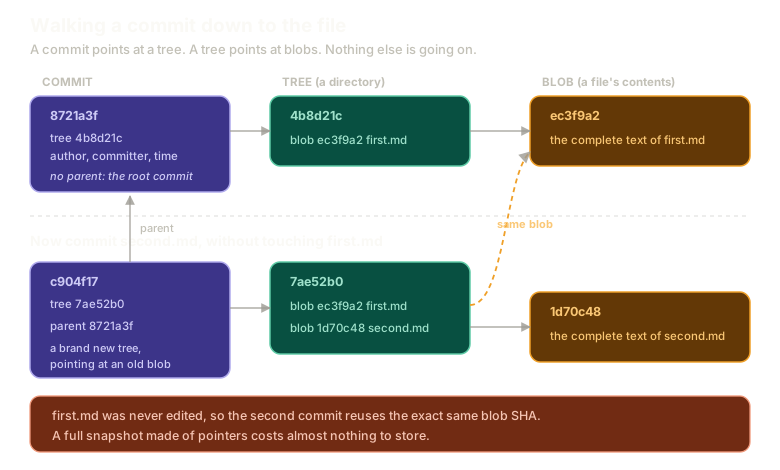 ExpandA commit pointing at a tree, the tree pointing at a blob holding the file contents, and below it a second commit whose new tree points at a brand new blob for second.md while reusing the identical blob SHA for the untouched first.md.
Add a Second File and Look Again
Now the part that proves something.
echo "second file" > second.md
git add second.md
git commit -m "Add second file"
Notice you did not touch first.md. It was not edited, not staged, not mentioned.
Take the new commit's SHA, which git printed for you in short form, and read it:
git cat-file -p c904f17tree 7ae52b0c1d84f9327a6b05e83c41d7092f6ba85e
parent 8721a3fbc94e2d6018af35b7c0e91d4a7f26bd83c1
author Denver <denver@example.com> 1714953720 +0000
committer Denver <denver@example.com> 1714953720 +0000
Add second fileTwo things changed. There is a different tree, and there is now a parent, which is the SHA of your first commit.
That is the graph being built in front of you. The first commit had no parent. Every commit from here on will have at least one, and following those pointers backwards is how git walks history.
The Detail That Matters Most
Read the new tree:
git cat-file -p 7ae52b0100644 blob ec3f9a2b8d417c05e6a92f38b1d7c40e5a92f813 first.md
100644 blob 1d70c48e93a5b2f70cd8146e35f9a02b7c4d81ea second.mdBoth files are listed. The second commit contains the complete project, exactly as promised.
Now compare the blob SHA for first.md against the one from the first commit.
They are identical.
The second commit did not copy first.md. It pointed at the same blob the first commit was already pointing at, because the contents did not change, so the hash did not change, so there was nothing new to store.
This is how the snapshot claim survives contact with reality. Every commit holds the entire project, but it holds it as a set of pointers. Unchanged files cost nothing beyond a line in a tree.
Which means the thing that sounded wasteful is not wasteful at all. You get a complete snapshot at every point in history and pay only for what actually changed.
Directories Are Just Nested Trees
One more thing worth confirming, because it explains a git behaviour that confuses people.
mkdir src
git status
Nothing shows up. Git reports no changes at all.
Put a file in it and try again:
echo "console.log('hi')" > src/index.js
git add src
git commit -m "Add src"
Now read that commit's tree. Instead of a blob, one entry points at another tree, and reading that tree shows index.js inside it.
A directory is a tree that contains other trees. And that explains the earlier silence: git has no way to represent an empty directory, because a tree must contain something. There is no object for "a folder with nothing in it", so git simply does not track it.
A Linked List That Is Not Quite
It is tempting to call this a linked list. Each commit points at the one before it, and you can walk backwards in a line.
The comparison breaks in one specific way. A linked list node has one pointer. A commit can have more than one parent, which is exactly what happens when two lines of work merge together.
So it is a directed acyclic graph that, for a repository with no branching yet, happens to be linear.
There is also an ordering built into it that matters more than it appears: time. Commits march forward. That property is what makes a later tool for finding which commit introduced a bug work as efficiently as it does, and it is worth carrying forward.
You Could Rebuild the Repository by Hand
Here is the thought that made all of this click for me.
Given nothing but git cat-file -p, you could write a small program that starts at a commit, reads its tree, walks every entry, creates directories for trees and files for blobs, and reconstructs the entire project.
No git required beyond reading the objects. The structure is completely open, completely inspectable, and simple enough to reimplement in an afternoon.
That is the point of this whole detour. Git should feel magical because it works well, not because it is mysterious. Mysterious software is software you cannot debug, and everything in the next chapters is easier once you know there is a plain graph of files underneath.
Walk it yourself here, with real objects and real hashes:
Introduction
Inside the object store
Solved. Try resetting and doing it a different way.
Type a command, or click a suggestion below. `help` lists what works.
What This Sets Up
You have the full picture of git's storage: commits pointing at trees, trees pointing at blobs and other trees, parents linking commits into a graph.
What is missing is names. Right now the only way to reach a commit is its SHA, which is not how anyone works.
Before getting to branches, there is one more piece of git that turns out to be plain text on disk. Next: your git config is just a file, including the setting that renames the default branch for every repository you make from now on.
The Essentials
- A tree is a directory, a blob is a file's contents. Names live in trees, contents live in blobs.
- A commit points at one tree, and following it leads to every file in the project.
- The second commit gains a parent, and those parent pointers are the history graph.
- Unchanged files reuse the exact same blob SHA, so a full snapshot costs almost nothing.
- Directories are nested trees, which is why git cannot track an empty folder.
- A commit can have more than one parent, so it is a graph, not a linked list.
- You could rebuild an entire repository by walking objects with
cat-file, which is the best evidence that none of this is magic.
Further Reading and Watching
- How Git ACTUALLY Works (Blobs, Trees, Commits): traces what happens on commit through the low level commands that build each object.
- git-cat-file Documentation: every mode of the command, including type and size lookups that are handy when exploring.
Keep reading