Finding Your Commit Inside The Git Folder
Your commit is a file on disk, and you can go find it by hand. The first two characters of the SHA are the directory name, which is the moment git stops being abstract.
Reading the log gave you a SHA. Copy it somewhere, because this post is about going and finding it.
Not with a git command. With find.
This is where we leave the porcelain and start on the plumbing, and it happens faster than you might expect.
Look Again at objects/
When you ran find .git right after git init, the objects/ directory was empty.
Run it again now:
find .git/objectsThere is content in there that was not there before. Somewhere in that output are directories with two character names, and one of them matches the first two characters of your commit's SHA.
If your commit is 8721a3f..., look for a directory called 87. Inside it is a file whose name is the remaining 38 characters.
The SHA Is a File Path
That split is not a coincidence, and once you see it you cannot unsee it.
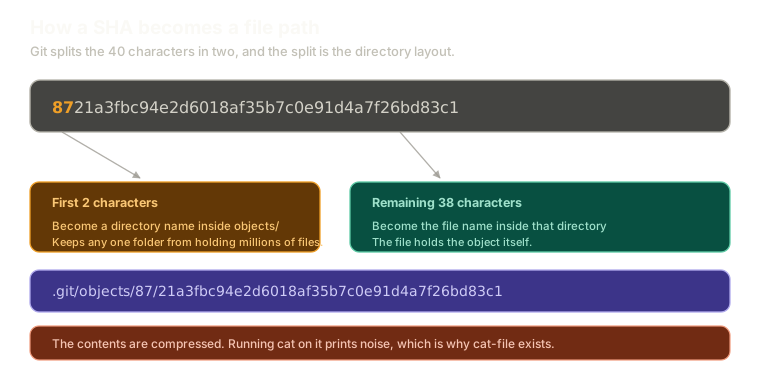 ExpandA 40 character SHA split into two parts: the first two characters become a directory name inside .git/objects, and the remaining 38 characters become the file name inside it, forming a path like .git/objects/87/21a3f and so on.
Every object git tracks is stored at .git/objects/<first 2 chars>/<remaining 38 chars>.
The reason for the split is mundane and practical. A repository can accumulate hundreds of thousands of objects, and filesystems get unhappy when a single directory holds that many entries. Fanning them across 256 subdirectories keeps every directory small.
The useful consequence is that you can navigate git's storage by hand. Given a SHA, you know exactly where the file is, with no command required.
Now Try to Read It
You found the file. Naturally, you cat it:
cat .git/objects/87/21a3fbc94e2d6018af35b7c0e91d4a7f26bd83c1And you get garbage. Unprintable characters, terminal beeps, nonsense.
That is correct, and it is not a problem. Git compresses object contents before writing them to disk, so what is in that file is a compressed blob of bytes, not text.
This is worth sitting with for a second, though. All of git's state is in files like this one. Every commit you have ever made, every version of every file, all of it sitting in .git/objects as compressed files named after their own hashes. There is nowhere else.
The Tool That Reads Them
Git ships a command whose whole job is decompressing and printing objects:
git cat-file -p 8721a3fThe -p means pretty print. Give it a SHA and it works out what kind of object it is, decompresses it, and shows you the contents in a readable form.
Note that the short SHA works here too. Seven characters, same as everywhere else.
There are more specialised commands for reading particular object types, and they exist for good reasons. In practice cat-file -p handles all of them, and not having to remember which subcommand reads which object type is worth whatever small cost git pays working it out.
There is a real cost, incidentally. Git has to look up the SHA, determine the object's type, and decompress it before it can decide how to display it. For interactive poking around, that cost is irrelevant.
What You Should See
Run it on your commit SHA and you get something like:
tree 4b8d21c9f3e07a5c8b2d146fa9e03bc7128d5fa4
author Denver <denver@example.com> 1714953660 +0000
committer Denver <denver@example.com> 1714953660 +0000

Batman
Your author line, your timestamp, your message. All of it plain text, all of it readable.
And a reference to something called a tree, which is a SHA you have not seen before.
That tree is where the actual files are, and following it is the next post.
Why the Hash Differs From Mine
The output above answers the question from the previous post about why your SHA never matches anyone else's.
Look at what is in the commit object: a tree, an author with a name and email, a committer, two timestamps, and a message. Every one of those is an input to the hash.
Change the email and the SHA changes. Commit one second later and the SHA changes. The identifier is a fingerprint of the entire object, which is why it can be trusted to name it uniquely.
What This Sets Up
You can find any object on disk and read it. What you cannot do yet is get from a commit to the contents of a file, because the commit does not contain your file. It contains a reference to a tree.
Next: walking a commit down to trees and blobs, where following those references by hand proves the snapshot claim from earlier in the series.
The Essentials
- Objects are stored at
.git/objects/<first 2 chars>/<remaining 38>, so a SHA is effectively a file path. - The two character fanout exists to keep directories small, since repositories accumulate huge numbers of objects.
- Object files are compressed, so
caton one prints noise. git cat-file -p <sha>decompresses and pretty prints any object, whatever its type.- A commit object contains a tree reference, author, committer, timestamps, and message, and all of them feed the hash.
Further Reading and Watching
- Git - Under the Hood: builds up the object store from first principles and shows what each file on disk holds.
- Plumbing and Porcelain: the Pro Git section explaining the split between the commands built for humans and the ones underneath them.
Keep reading