Reading History With Git Log
Two flags turn git log from a wall of text into a readable graph, and one of them behaves differently the moment you pipe the output somewhere.
The commit from the last post exists, but the only proof was a line git printed once and then lost to scrollback.
git log is how you get it back.
git logYou get the SHA, the author, the date, and the message. With one commit that is unremarkable. With four hundred, how you ask matters a great deal.
Look These Up Yourself
Before the flags, a small habit worth practising, because it is the actual skill from the manual post.
man git-logPress /, type graph, press Enter. Then search for decorate. Read what git says about each in its own words.
--graph draws a text based graphical representation of the commit history. --decorate prints the ref names of any commits that are shown.
Reading those two descriptions in the manual takes about forty seconds and is a better use of time than any blog post explaining them, including this one.
Ref Names, Since the Manual Assumes You Know
That word ref in the --decorate description is doing a lot of unexplained work.
Everything in git is a commit, and every commit has a SHA. But nobody wants to type forty characters to talk about a commit, so git lets you attach names to them.
A ref is a name pointing at a commit. Branches are refs. Tags are refs. And there is one special ref called HEAD, which gets a post of its own later.
--decorate is the flag that says: when you print a commit, also print any names attached to it.
The Two Flags Together
git log --graph --decorate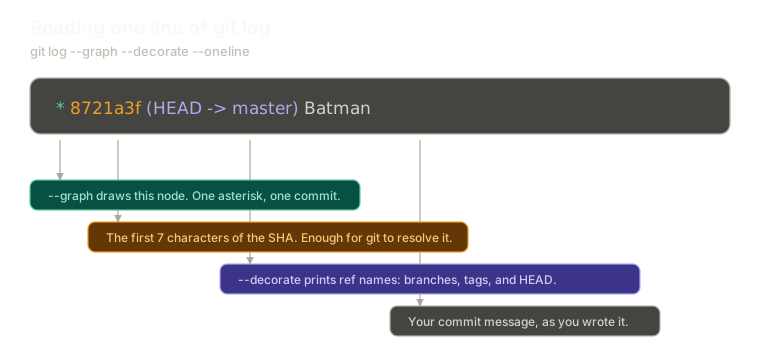 ExpandAnatomy of a single git log line, labelling the asterisk drawn by --graph, the seven character short SHA, the ref names printed by --decorate showing HEAD pointing at master, and the commit message.
With one commit, the graph is underwhelming. There is nothing to branch, so there is nothing to draw.
What you do get is a single asterisk on the left. That asterisk is a node in the graph, and right now it is the only one. Once branches and merges exist, that column fills up with lines showing how history actually forked and rejoined, and it becomes the fastest way to understand a repository you have never seen.
The decoration appears next to the SHA, something like (HEAD -> master). That is git telling you where HEAD is pointing and which branch sits on that commit.
The Trap With decorate
Here is a genuinely useful thing that almost nobody knows.
Run git log --graph without --decorate in your terminal and you will still see (HEAD -> master) in the output. So you conclude the flag is redundant and stop typing it.
Now send that same output to a file:
git log --graph > log.txt
cat log.txt
The decoration is gone.
Git applies decoration automatically when it detects it is writing to a terminal for a human. The moment output goes to a file or through a pipe, it assumes a program is reading, and it stops adding things that were not explicitly asked for.
So the flag matters exactly when you are not looking at the screen:
git log --graph --decorate > log.txtIf you are scripting, piping, or saving log output, --decorate is not optional. In interactive use you will rarely notice it missing, which is precisely why this catches people out.
Short SHAs Are Enough
One more thing the log gives you, and it saves an enormous amount of typing.
You can refer to any commit by the first seven characters of its SHA, and git will resolve it to the full one. Seven characters is enough to be unambiguous in essentially any repository you will work in.
That short form is what git log prints in its compact modes, and it is what git prints back at you when you make a commit. Which means the SHA you need is usually already on your screen.
You will use this constantly for the rest of this series, starting with the next post.
What This Sets Up
You can now find any commit's SHA. That is the key to a door most people never open.
Next: finding your commit inside the .git folder, where we stop using git's polished commands and go look at the file it actually wrote.
The Essentials
git logis how you read history, and it is worth knowing before you need it urgently.--graphdraws the commit graph as text, with each asterisk representing one node.- A ref is a name pointing at a commit: branches, tags, and
HEAD. --decorateprints those ref names alongside each commit.- Decoration is applied automatically only when writing to a terminal. Pipe or redirect the output and you must pass the flag explicitly.
- The first seven characters of a SHA are enough for git to resolve a commit.
Further Reading and Watching
- Git log options - oneline, graph, stat: a run through the formatting flags and what each one changes about the output.
- git-log Documentation: the full flag list, including the filtering options that become useful once history gets long.
Keep reading