What Git Init Actually Creates
Most developers have cloned a hundred repositories and created zero. Running git init once, then reading what it produced, explains more about git than any tutorial.
With config out of the way, there is nothing left between you and an actual repository.
Which raises something slightly embarrassing that took me a while to notice about my own habits.
I Had Never Made One
Think about how repositories usually enter your life. Someone sends a link. You clone it. Or you create it on GitHub first, then clone that down.
Either way, the repository already existed before you touched it. Some interface made it for you, and the moment of creation happened somewhere you were not looking.
I had years of git experience and had genuinely never run the command that makes one.
One Command, One Directory
mkdir my-first-git-repo
cd my-first-git-repo
git init
That is the whole thing. Git creates a hidden .git directory, and the existence of that directory is the only thing that makes this a repository. Not a remote, not a GitHub page, not a config entry somewhere. A folder.
If you unset init.defaultBranch in the previous post, git will also print a hint here about the default branch name and how to set your own. That message is not an error. It is git noticing you have not expressed a preference, which is exactly the state we want to be in for now.
Deleting That Folder Deletes the Repository
This is the answer to a question that comes up the first time someone runs git init in the wrong place.
Say you meant to initialise a project folder and instead ran it in your home directory. Now git thinks your entire home directory is a repository.
Delete the .git folder and it is undone.
rm -rf .gitYour actual files are untouched. Everything git knew is gone, because everything git knew lived in there. There is no registry, no hidden index elsewhere on the system, nothing to clean up afterwards.
That cuts both ways, and it is worth saying plainly. If a repository has history you care about and you delete .git, that history is gone. There is no other copy on your machine.
Look Inside It
The exercise worth doing right now is listing what is actually in there:
find .gitYou will get a wall of paths. It is less intimidating than it looks.
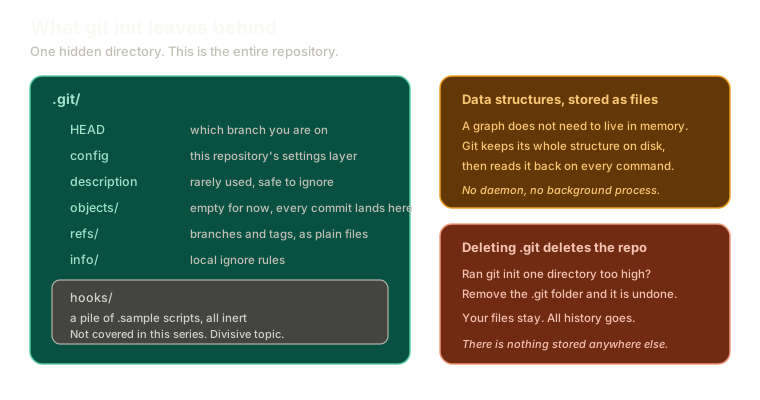 ExpandAnatomy of the .git directory after git init, showing HEAD, config, description, objects, refs, info, and a hooks folder of inert sample scripts, with notes that git stores its data structures as files and that deleting .git deletes the repository.
The pieces worth knowing today:
HEADrecords which branch you are currently onconfigis this repository's layer of the config from the previous postobjects/is empty right now, and is where every commit will landrefs/holds branches and tags, stored as plain fileshooks/is full of.samplescripts
Those hook samples are inert. They do nothing unless you deliberately rename and enable them, and this series does not cover them.
That is a deliberate skip, not an oversight. Hooks are one of the genuinely divisive topics in git, with people who build their whole workflow on them and people who think that work belongs in CI instead. Either way, none of it is needed to understand how git works, which is what we are here for.
A Data Structure That Lives in Files
Here is the part that reframed git for me.
When you learn data structures, they live in memory. A tree, a hash map, a linked list, all of it built up while a program runs and gone when it exits.
Git's data structures live in files. The graph of commits, the branch pointers, the file contents, all of it sitting on disk in that hidden directory.
Which means git has no running process. Nothing is watching your folder. When you type a git command, the program starts up cold and has to work out where it even is:
- It looks in the current directory for
.git - Not there? It checks the parent directory
- Still nothing? It keeps walking up
That search is why running a git command outside a repository gives you not a git repository (or any of the parent directories). It is telling you exactly what it did: it walked all the way up and never found the folder.
Once it finds .git, it reads the files and knows everything. Then it exits. Every command starts from nothing and reconstructs its understanding from disk.
Peak Empty Repository
Right now you have a directory containing nothing but .git. No files, no commits, objects/ sitting empty.
It looks like nothing happened. Everything that follows is just filling that folder in, and because it is only files, you can open any of it and look.
Try it here without touching your own machine. Run git init, make a file, and commit it:
Introduction
Empty directory
Initialise a repo, create a file, and make your first commit.
Type a command, or click a suggestion below. `help` lists what works.
git commit the graph appears here.What This Sets Up
An empty repository is not much use. The next step is the loop almost every developer runs a dozen times a day, usually without thinking about what each part does.
Next: the three commands that cover most of git, and what actually happens between typing git add and getting a SHA back. The claim from the earlier post that a commit is a whole snapshot is something we can start proving shortly.
The Essentials
git initcreates one hidden.gitdirectory, and that directory is the entire repository.- Deleting
.gitremoves the repository completely and leaves your files alone. objects/starts empty and is where every commit you make will be stored.- The
hooks/samples do nothing until deliberately enabled, and this series skips them. - Git has no running process. Each command walks up the directory tree looking for
.git, reads it, and exits.
Further Reading and Watching
- Understanding the git internals, a deep dive into the .git folder: opens the directory file by file and explains what each part is for.
- git-init Documentation: the official page, including what gets created and the templates git copies in.
Keep reading