Configuring Git Before You Use It
The setup step you did once years ago and never thought about again. Git's config is layered, and knowing that is what stops personal commits going out under a work email.
The previous post ended on the fact that a commit's identity is built partly from its author. That raises a small practical question before making a single repository.
Where does git get your name from?
The answer is a config file you almost certainly set up once, on a machine you may no longer own, and have not thought about since.
Every Key Has the Same Shape
Git's config is a flat set of keys, and every one of them follows a single pattern:
section.keyuser.name. user.email. init.defaultBranch. rerere.enabled.
This sounds like trivia until you get it wrong once. Miss the section and git's error message will be genuinely unhelpful, because it is looking for a shape you did not give it. Keeping section.key in your head turns a category of arcane failures into typos you can spot instantly.
Two Layers, and the Specific One Wins
Git's config is not one file. It is layered, and the layers merge.
The global layer applies to every project on your machine. The local layer applies only to the repository you are standing in. When both define the same key, the local one wins.
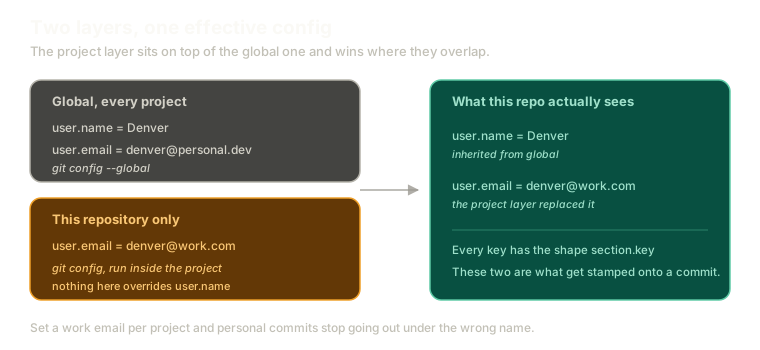 ExpandTwo config layers merging. A global layer sets user.name and a personal user.email, a project layer overrides only user.email with a work address, and the resulting effective config inherits the name while taking the project's email.
That merge is more useful than it first appears.
Say Denver commits to open source under a personal address and to work repositories under a company one. He sets the personal email globally, then overrides it inside each work repository. Name inherited, email replaced, no chance of the wrong address ending up in a public commit history.
The same applies to workflow preferences. One project might want rebase behaviour that another one should not have. Layering means you set the sane default once and deviate deliberately, per project, rather than flipping a global switch back and forth and forgetting which state you left it in.
The Two Keys That Actually Matter Today
Of everything you can configure, exactly two are required before you can make a commit:
git config --add --global user.name "Denver"
git config --add --global user.email "denver@example.com"
These are not cosmetic. They are stamped into every commit you create, they feed into the identifier that names it, and they are what shows up when someone runs git blame on a line six months from now.
That someone is very often you. The name you set here is the name future-you will see next to a decision you no longer remember making.
Reading a value back uses --get:
git config --get user.nameDrop --global and the same commands operate on the current repository only. That is the entire mechanism: same keys, different layer.
Clearing Defaults You Set Years Ago
There are two settings worth deliberately turning off before working through this series, because both of them hide behaviour you want to see happening.
The first is init.defaultBranch. If you have set it, new repositories quietly start on a branch name of your choosing. Branch naming gets configured later on purpose, and it is easier to follow when nothing is doing it for you:
git config --global --unset init.defaultBranchThe second is rerere.enabled. This one records how you resolved a conflict and replays that resolution automatically the next time the same conflict appears. It is genuinely excellent, and it is covered properly later.
But if it is on now, git will silently solve conflicts you were supposed to watch happen:
git config --global --unset rerere.enabledTurning both off is not a downgrade. It is removing two things that would do work invisibly while you are trying to learn what that work is.
You can check what you are starting from with:
git config --listWhat This Sets Up
Config is the last piece of setup. Your identity is set, the invisible helpers are off, and the vocabulary from the earlier post is in place.
Next comes the first real repository: what git init creates, what lands inside .git, and what happens to a file as it walks from untracked to committed.
If you want to run that walk without touching your own machine, the git playground starts from an empty directory.
The Essentials
- Every config key has the shape
section.key, and forgetting that produces confusing errors. - The config is layered: global applies everywhere, local applies to one repository, and local wins.
user.nameanduser.emailare required to commit, and they are whatgit blamereports later.--addwrites a value,--getreads one, and--globalchooses the layer.- Unset
init.defaultBranchandrerere.enabledwhile learning, so nothing happens invisibly.
Further Reading and Watching
- Git and GitHub for Beginners - Crash Course: covers first-time setup including identity configuration before the first commit.
- git-config Documentation: the full list of configuration keys, their scopes, and which files each layer is written to.
Keep reading