Why Distributed Version Control Changed Everything
Before git, one person editing a file could block everyone else. Understanding what replaced that explains most of git's vocabulary, and the three states every file moves through.
The previous post was about looking things up. This one is about the thing you are looking up, because git's vocabulary only makes sense once you know what problem it was built against.
And the problem it was built against sounds made up now.
Someone Could Take a File Hostage
In a centralized version control system, there is exactly one copy of the truth, and it lives on a server.
To edit a file, you check it out. While you hold it, nobody else can touch it. That is not a bug in the workflow, that is the workflow. The lock is how the system prevents two people from conflicting.
Now picture Denver checking out payments.js on a Friday afternoon and leaving for a two week holiday.
James needs to change that file on Monday. So does Neal. Neither of them can, because the file belongs to someone who is currently on a beach.
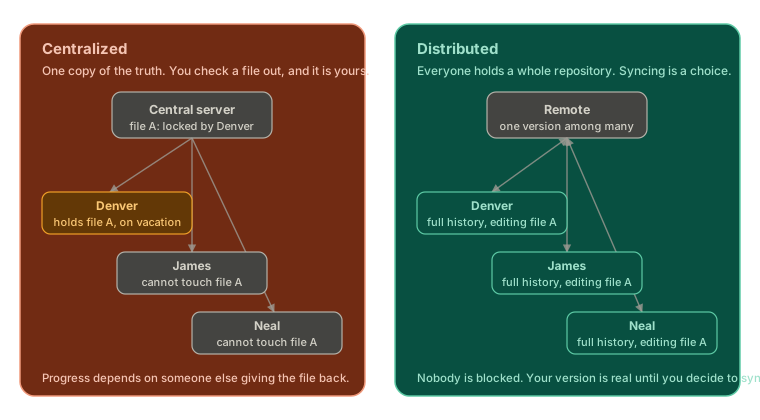 ExpandCentralized version control on the left, where a server holds one locked copy of a file and two developers are blocked waiting for it. Distributed version control on the right, where every developer holds a full repository and syncs with a remote by choice.
That was normal. That was how most professional software was written for a long stretch of time.
Your Version Is a Real Version
Git is distributed, and the shift that word describes is bigger than it sounds.
You do not check anything out. You have the whole repository, all of its history, sitting locally. So does everyone else. So does the server, if there even is one.
Denver, James, and Neal can all edit payments.js at the same time, and none of them is blocking anyone. Each of them has a complete, valid, working version of the project.
Here is the part that took me longest to internalize:
Your version does not have to represent the reality of any remote version.
It is not a draft waiting for approval. It is not out of sync in some broken sense. It is simply your version, and it stays your version until you decide to sync. Syncing is a deliberate act you perform, not a condition you are constantly failing to meet.
That single idea is why git feels different from anything that came before it, and it is why reconciling versions later needs its own set of tools.
Two Levels of Commands
Git commands come in two flavours, and the names are unusual enough to stick.
Porcelain commands are the ones you use daily. add, commit, status, log. They are the polished surface, designed for humans.
Plumbing commands sit underneath. They are what the porcelain is built out of, and they expose git's raw data structures directly.
Most of this series lives in porcelain. But we drop into the plumbing on purpose, because the goal is not to memorise commands, it is to understand the data structure they operate on.
That is the whole bet of learning git this way. Once the underlying structure is clear, rebase and revert and cherry-pick stop being scary incantations and become obvious operations on a thing you can picture.
The Vocabulary git Assumes You Already Know
Four words show up constantly in git's own documentation, and none of them are ever defined for you.
Repo. A project tracked by git. Practically speaking, a directory with a .git folder inside it. That hidden folder is what makes it a repo rather than just a pile of files.
Working tree. Your stuff. The actual files sitting in the directory, being tracked by git, with history attached. The manual uses this phrase relentlessly, and it means nothing more exotic than that.
Index, also called staging. The area where you prepare the changes you want in your next commit. This is the reason you can commit one file and not another.
Squash. Taking multiple commits and collapsing them into fewer. Two commits into one is squashing. Five into two is also squashing. It comes up later, and it is worth knowing the word now.
Every File Is in One of Three Places
This is the mental picture that makes git click, and I wish someone had drawn it for me on day one.
At any moment, a file in your project is in one of three states.
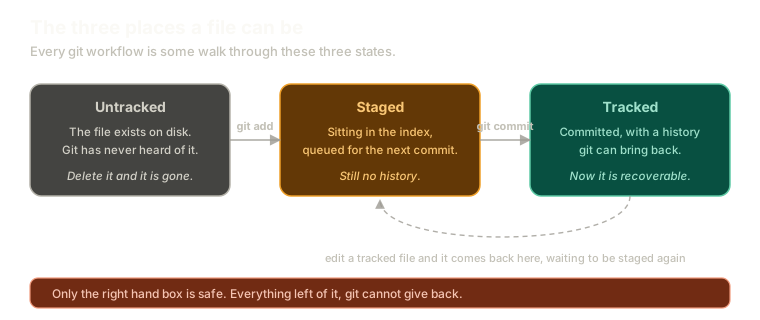 ExpandThree boxes showing a file moving from untracked, to staged in the index, to tracked with history, with git add and git commit as the transitions, and a dashed arrow showing that editing a tracked file returns it to the staging step.
Untracked. The file exists on disk. Git has never heard of it and is not watching it.
Staged. You have added it to the index. Git knows about it, and it is queued for the next commit. It still has no history.
Tracked. You committed it. It now has history, and git can bring it back.
Every git workflow you will ever run is some walk through those three boxes. Untracked becomes staged, staged becomes committed. Three steps, every time.
Once a file is tracked, editing it drops you into a fourth situation worth naming: tracked, but with unstaged changes. Git already knows the file, so it can now tell you exactly what changed, which is a capability it simply does not have for untracked files.
If you do not carry this picture in your head, git will feel harder than it is. Almost every confusing git message is really telling you which of these boxes something is in.
The One That Bites People
There is a consequence of that diagram that deserves its own line.
Delete an untracked file and it is gone forever.
Not recoverable. Not in the reflog, not in some cache, not retrievable by any clever command. Git never had a copy, because you never gave it one.
Only the rightmost box is safe. Everything to the left of it, git cannot give back, and the number of developers who have learned this the expensive way is not small.
Git Is a Graph, and It Never Loops
One more structural fact, because it constrains everything that follows.
Git is a directed acyclic graph. Every commit is a node. Every pointer is a child pointing at its parent.
A commit can have more than one parent, which is exactly what happens when you merge two lines of work together. What it can never have is a cycle. There is no arrangement of commits where you follow parents long enough to arrive back where you started.
That constraint is what makes history something you can always walk backwards through, deterministically, from any point.
What This Sets Up
You now have the vocabulary and the three-state picture. What is still missing is the thing sitting inside those nodes.
Most people, including me for an embarrassingly long time, assume a commit stores the changes you made. It stores something quite different, and that difference explains more of git's behaviour than any other single fact.
The Essentials
- Centralized systems lock files. One person holding a file could block an entire team.
- In git, everyone holds a complete repository, and your version is legitimate whether or not it matches a remote.
- Syncing is a choice you make, not a state you are failing to maintain.
- Porcelain commands are the daily surface, plumbing commands expose the data structure underneath.
- Every file is untracked, staged, or tracked, and every workflow is a walk through those three states.
- Untracked files deleted are gone permanently, because git never had a copy.
- Git is a directed acyclic graph where commits point at parents and cycles cannot exist.
Further Reading and Watching
- Tech Talk: Linus Torvalds on git: the original 2007 talk explaining why distributed version control was worth building, from the person who built it.
- About Version Control: the Pro Git book's comparison of local, centralized, and distributed systems, with diagrams of each.
Keep reading