The Three Commands That Cover Most Of Git
Add, commit, and status will carry you through most of a career. Running them slowly once, checking status between every step, is what makes the rest of git legible.
The empty repository from the last post has a .git folder and nothing else. Time to put something in it.
Three commands do this, and I want to be honest about how far they go.
If these three are all you ever learn, you will be fine. Not exceptional, but genuinely productive on a real team for a long time. Most people never go past them, and most people ship software anyway.
What Each One Does
git add stages a file. It takes something from your working directory and puts it in the index, which is the queue for your next commit.
git commit takes whatever is in the index and turns it into a commit: your changes, your author name, the time, all bundled together, producing a SHA.
git status tells you the state of the repository right now. Which files are untracked, which are staged, which have changed since you staged them.
That third one is the underrated one. git status is the command that keeps git from feeling like guesswork, and the habit of running it between every other command is the cheapest thing you can do to stop being confused.
The Walk, One Step at a Time
Do this slowly. The point is not to make a commit, it is to watch a file move through each state.
Create a file:
echo "hello there" > first.md
git status
Git reports it as untracked. It has never seen this file and knows nothing about it, not its contents, not its history, nothing.
Stage it:
git add first.md
git status
Now it shows up under changes to be committed. The file is in the index. It is part of git's world, but only barely: it is queued, and it still has no history behind it.
Commit it:
git commit -m "Batman"Git tells you this is a root commit. A root commit is one with no parent, which only happens once per repository, because every commit after this one will point back at something.
That is also why the message is worth a moment. Batman is a reasonable name for a commit with no parents, and if that makes you groan, it will at least be memorable when you see it in the log later.
Check one more time:
git statusNothing to commit, working tree clean. The change is in the repository now.
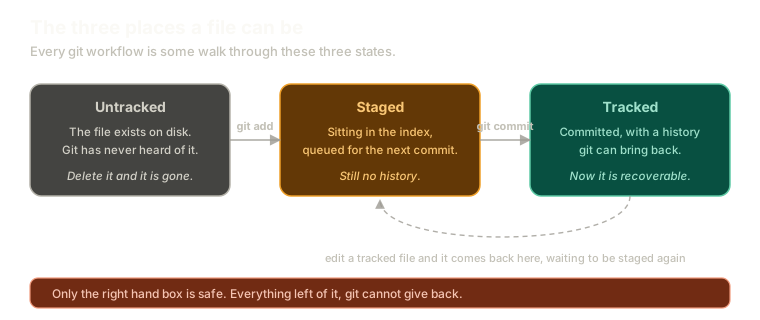 ExpandThe three states a file moves through, from untracked, to staged in the index, to tracked with history, with git add and git commit as the transitions.
That is the whole loop. Everything else in git is either a variation on it or a way of rearranging what it produced.
SHA Is a Boring Acronym
The commit produced a SHA, and it is worth deflating the term now rather than letting it stay mysterious.
SHA stands for Secure Hashing Algorithm. That is it. It is a family of hashing functions, and it is somewhat disappointing to learn that a string you have treated as magic for years just means "the output of a hash function".
The result is that string of 40 characters using 0 through 9 and a through f, which you already met when we said a commit's identity comes from its contents.
Why Your SHA Is Not Mine
Run these exact commands on your machine and mine, and we get different SHAs. Same file, same content, same message.
The reason is that the hash is computed from more than the file:
- the contents of the change
- your
user.nameanduser.email - the time you committed
Two people committing identical content at different seconds get different SHAs. So do two people committing identical content at the same instant, because their names and emails differ.
This has a practical consequence for following along with anything, including this series. You cannot copy a SHA out of a post and paste it into your terminal. You always have to read your own SHAs out of your own repository, which is what the next post is about.
Stage Selectively, Because You Can
One thing the index buys you that is easy to miss: you do not have to commit everything you changed.
Say Denver fixed a bug in parser.js and, while he was in there, also renamed some variables in utils.js because they annoyed him. Those are two different changes that deserve two different commits.
git add parser.js
git commit -m "Fix crash on empty input"
git add utils.js
git commit -m "Rename confusing variables in utils"
The staging area exists precisely so that what you changed and what you commit can be different things. That is the whole reason there are three states instead of two.
Do It in the Command Line
A note that matters more than it sounds.
If you use an editor's git panel, or a plugin that wraps git commands behind keystrokes, put it away for now. Those tools are not doing anything different. They are translating your clicks into exactly these command line arguments.
That is fine once you know what is being translated. Right now the goal is understanding the thing being wrapped, and you cannot see it through a wrapper.
What This Sets Up
You have one commit. Right now the only evidence of it is the line git printed when you made it, and that line scrolls away.
Next: reading history with git log, including the two flags worth knowing from day one and a small trap involving one of them.
The Essentials
- Add, commit, and status cover most of everyday git, and knowing only these will still make you productive.
git addmoves a file into the index,git committurns the index into a commit,git statusreports where everything stands.- A root commit is one with no parent, and a repository has exactly one.
- SHA just means Secure Hashing Algorithm, and the hash is computed from the content, the author, and the time.
- Your SHAs will never match anyone else's, so always read them out of your own repository.
- The index exists so you can commit less than you changed.
Further Reading and Watching
- Introduction to Git - Core Concepts: a walkthrough of the working directory, staging area, and repository as three distinct places.
- Recording Changes to the Repository: the Pro Git chapter on the add and commit cycle, with the full status output explained.
Keep reading