Your Git Config Is Just A File
Config commands look like a database API and turn out to be a text file with sections in brackets. Which explains the one behaviour that surprises everybody.
Walking objects by hand took the mystery out of commits. Config gets the same treatment, and it takes about a minute.
We covered the two keys you need to commit earlier. This is the rest of it, and the reason it is worth a second pass is that config has one genuinely surprising behaviour that will bite you eventually.
Adding Values
The command is --add, and the key is always section.key:
git config --add team.lead "Denver"
git config --add team.reviewer "James"
Quote the values. You may not always need to, but a value with a space in it will fall apart without quotes, and forming the habit costs nothing.
Reading Them Back
Two ways, and I will be honest about which one I actually use.
git config --listThat dumps everything. To find one section in it:
git config --get-regexp teamThat is the proper way. It takes a regular expression, so t.am would also match, along with anything else that happens to fit the pattern. Regular expressions being over-eager is the usual reason a search returns more than you wanted.
The other way is to give up and pipe it:
git config --list | grep teamNot elegant. Completely fine. Nobody is grading your shell usage, and the first time you run --list | grep on a config you have not touched in three years, you will probably find some stale entries you forgot about.
The Surprise
Now change a value. You know --add, --list, and --get, so use those.
git config --add team.lead "Neal"
git config --get-regexp team
Two team.lead entries. Both still there.
--add means add. It does not mean set. And there is no --set, which is genuinely irritating once you notice it: git gives you --add and --unset as a pair, and the obvious middle option simply does not exist.
So duplicate keys are not an error state. They are a thing git allows, and you will create them by accident. It is entirely possible to have three usernames sitting in your config right now.
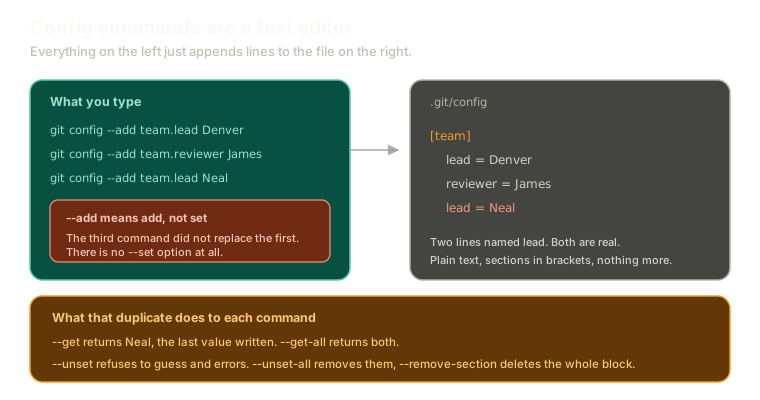 ExpandThree config commands on the left writing into a .git/config file on the right, showing that adding team.lead twice produces two separate lines, plus what --get, --get-all, --unset, --unset-all, and --remove-section each do about it.
Reading a duplicated key gives you one answer:
git config --get team.leadYou get Neal, the last one written. Later values win, which is the only sensible rule. To see all of them:
git config --get-all team.leadRemoving Them Is Fussier Than You Expect
Try the obvious thing:
git config --unset team.leadGit refuses. team.lead has multiple values, and git will not guess which one you meant.
List it again and both are still there. The failed unset changed nothing, which is the right call but does mean you have to be explicit:
git config --unset-all team.leadNow they are both gone. And to remove an entire namespace:
git config --remove-section teamThere are many more options than this, including unsetting by index. You will probably configure git about three times in your life, so knowing that the options exist matters more than memorising them. The manual has the rest.
It Is a File
Here is the payoff, and it is the same payoff as every other post in this series.
cat .git/configThere it is. Sections in square brackets, keys indented underneath, values after an equals sign. It looks a lot like TOML, and it is exactly as unremarkable as it looks.
Your config commands are editing a text file. Every --add appends a line. --remove-section deletes a block. That is why duplicate keys are possible in the first place: nothing was ever stopping two lines from having the same name.
Run --remove-section and then cat the file again, and you can watch the block disappear. The magic is gone, and what is left is disappointingly simple, which is the best possible outcome.
Locations
Config exists at several levels: system, global, local, worktree, and you can point at an arbitrary file too.
In practice you will use two.
--globalapplies to every repository on your machine--localapplies to the current repository only, and is the default when you omit a flag
Add the same key to both and watch what happens:
git config --add --global team.lead "Denver"
git config --add --local team.lead "Peter"
Both exist. You can see each one on its own:
git config --list --localBut ask for the value and there is only one answer:
git config --get team.leadLocal wins. The more specific layer always does, which is the layering from the earlier config post working exactly as advertised.
Rename the Default Branch
Time to actually change something about how git behaves for you.
git config --add --global init.defaultBranch trunkThis has to be global. A local setting cannot affect repositories that do not exist yet, and the whole point is that every new repository gets the name.
Now make the repository the next several posts will use. The name matters here, because everything that follows builds on it:
mkdir hello-git
cd hello-git
git init
The branch is called trunk.
A warning that is only half a joke: you have now changed this permanently. Months from now you will create a repository, see trunk instead of master, and have no memory of why. Now you have a note.
What This Sets Up
You have a fresh repository on a branch called trunk and no commits in it yet.
Next: branches are just a file with a SHA in it, which explains why creating one appears to do nothing at all.
The Essentials
--addadds, it does not replace, and there is no--set.- Duplicate keys are legal, and you will create them by accident.
--getreturns the last value,--get-allreturns every one.--unsetrefuses when a key has multiple values. Use--unset-all, or--remove-sectionfor a whole block.- The config is a plain text file with sections in brackets, which is why all of the above is possible.
- Global and local are the two levels you will actually use, and local wins.
init.defaultBranchmust be global to affect repositories you have not made yet.
Further Reading and Watching
- How to reset your Git Settings: walks through clearing values out of the config when it has drifted.
- Customizing Git Configuration: the Pro Git chapter covering the settings worth knowing beyond identity.
Keep reading