Branches Are Just A File With A Sha In It
Creating a branch prints nothing and moves you nowhere, which feels broken the first time. Finding the file it wrote explains both the silence and why branches are free.
The hello-git repository is on trunk with nothing in it. An empty repository cannot even have a branch yet, so start with a commit.
Use these exact messages. Every post from here builds on this repository, and matching commit letters is the difference between following along and getting lost.
echo "a" > README.md
git add README.md
git status
git commit -m "a"
That git status before committing is not filler. Get in the habit of it, because the alternative is discovering you committed a stray file while demonstrating something to other people.
Branch First, Ask Questions Later
Before the mechanics, the advice, which comes with an honest caveat.
You should not develop everything on the main line. With other people involved, branch. Branches are close to free, so there is no reason to be sparing with them.
On a solo project, though, I will commit straight to main and not feel bad about it. The rule exists because of other people, not because of git.
Creating One Looks Like Nothing Happens
git branch fooNo output. You are still on trunk. Nothing appears to have changed.
If you have used git for years, this feels normal because you are used to it. If you are new, this is genuinely confusing, and the confusion is reasonable: you asked for a branch and got silence.
Two things happened, neither of them visible:
- A branch was created at the commit you are currently on
- You were not switched to it
That second one catches people forever. git branch makes a branch. It does not move you.
Confirm both:
git branchYou get trunk and foo, with an asterisk next to trunk showing where you are. And:
git log --oneline --decorateOne commit, with both HEAD -> trunk and foo sitting on it. Both branches point at exactly the same commit, because a branch starts wherever you were standing.
Go Find It
The branch is a file. You already know where to look.
cat .git/refs/heads/fooA SHA. Forty characters and a newline.
That is the whole branch.
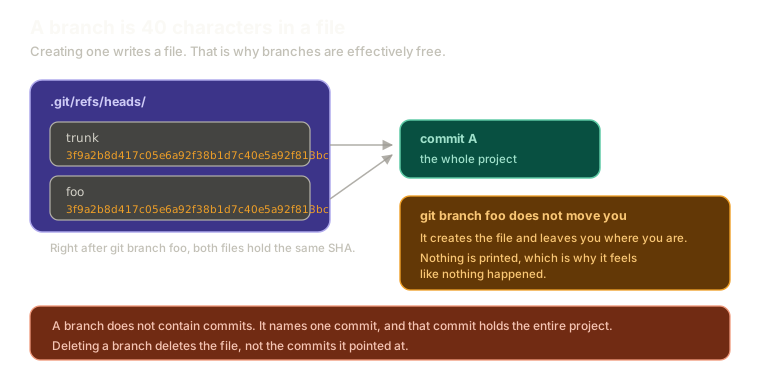 ExpandA refs/heads directory holding two files, trunk and foo, each containing the same 40 character SHA, both pointing at commit A, with notes that git branch does not move you and that deleting a branch removes the file rather than the commits.
And you know what to do with a SHA:
git cat-file -p $(cat .git/refs/heads/foo)Commit, tree, blobs, your files. A branch name resolves to a SHA, and a SHA is the complete state of the repository, which is why git can switch branches as fast as it does. It is not replaying anything. It reads one commit and lays out the project.
This is why branches are free. A branch costs a filename and forty characters. Forty-five bytes or so, for a complete independent line of development. Create a hundred of them and you have not meaningfully used any disk.
Switching
Two commands do this:
git switch foo
git checkout foo
For switching branches they are effectively the same. checkout is the older and more versatile one, doing several jobs beyond branches, and plenty of people use it out of habit for creating branches, switching branches, and dealing with merge conflicts.
Either works:
git checkout fooGit confirms it this time: switched to branch foo.
Put Some Work on It
Two commits, b and c. Not in the README. Use a new file, because a later post depends on README.md differing between branches:
echo "b" > second.md
git add second.md
git commit -m "b"

echo "c" >> second.md
git add second.md
git commit -m "c"
Check it:
git log --onelineYou get c, b, a. And trunk is still sitting back at a, untouched.
That is the setup: trunk at a, foo at c. Your SHAs will differ from anyone else's, which is expected for the reasons covered earlier.
Try the same thing here, where you can see the graph move as you go:
Branching
Branches are just pointers
Create a branch called feature, commit on it, and switch back to trunk.
Type a command, or click a suggestion below. `help` lists what works.
Deleting
Worth knowing now, because a later post needs it:
git branch -d foo
git branch -D foo
Lowercase -d is the safe one. It checks whether the branch has been merged into what it is tracking and refuses if that work would be orphaned.
Uppercase -D deletes regardless.
I reach for -D, because I usually already know what I am deleting and do not want git checking against a remote first. That is a habit, not a recommendation, and if you are less sure about what you are deleting, -d exists for a reason.
Either way, remember what a branch is. Deleting a branch deletes a file containing a SHA. The commits are still in .git/objects, exactly where they were. That fact becomes very useful in a couple of posts.
What This Sets Up
Two branches, diverged, with different work on each. The obvious question is how to get foo's work into trunk.
Next: why some merges make a commit and some do not, which is the git behaviour most people have noticed and never had explained.
The Essentials
git branch <name>creates a branch at your current commit and does not switch to it.- A branch is a file in
.git/refs/heads/containing one 40 character SHA. - That is why branches are free, and why switching is instant.
git switchandgit checkoutboth move you, and are interchangeable for this purpose.-drefuses to delete unmerged work,-Ddoes not.- Deleting a branch removes a name, not the commits.
Further Reading and Watching
- Git Branches Explained: covers what a branch is and why creating one is so cheap.
- Branches in a Nutshell: the Pro Git chapter showing the pointer model with diagrams of each step.
Keep reading