Rebase And When Not To Use It
Rebase has a bad reputation earned mostly by one mistake people make once. The mechanics take four steps to explain, and the rule that keeps you safe takes one line.
Merging left trunk at y and foo still sitting back on b and c, branched from a.
There is another way to combine those, and it is the one people are afraid of.
The Reputation Is Mostly Secondhand
Two things produce most of the fear around rebase.
Someone read that rebase is dangerous and absorbed it as a rule without the reasoning. Or they used it once, made a mess, and concluded the tool was at fault.
Rebase is not bad. It is a tool for manipulating your repository, it does exactly one thing, and that thing is genuinely useful. There is a real rule about when not to use it, and we will get to it, but it is one rule and not a reason to avoid the command.
What Problem It Solves
foo was written against a. Trunk is now at y, several commits later.
So b and c were built and tested against a version of the project that no longer exists. Whatever confidence you have in that work is confidence in how it behaved against an old reality.
Rebase updates what sits underneath your changes. Instead of your work hanging off an outdated base, it gets replanted on top of what the project actually looks like now. Then you can find out whether it still works.
There is a second benefit. After rebasing, foo is trunk plus two commits in a straight line, which means the merge base becomes the tip of trunk. Which means merging foo fast-forwards, and no merge commit is created at all.
That is the main reason people who like rebase like it.
The Four Steps
Worth knowing precisely, because it explains the behaviour that surprises people mid-rebase.
git rebase <target-branch>- Git checks out the tip of the target branch. You are no longer on your own branch.
- It takes the commits from the branch you were on and replays them one at a time, in order, onto the target.
- It checks your original branch back out.
- It updates that branch to point at the last replayed commit.
You genuinely leave your branch during the operation. If a rebase stops partway through, that is where you are, and knowing this is the difference between understanding a conflict message and panicking at it.
Do It
Keep foo intact by working on a copy:
git checkout foo
git checkout -b foo-rebase-trunk
git rebase trunk
Then look:
git log --onelinea, d, e, x, y, b, c. Linear. Your two commits now sit on top of everything trunk had.
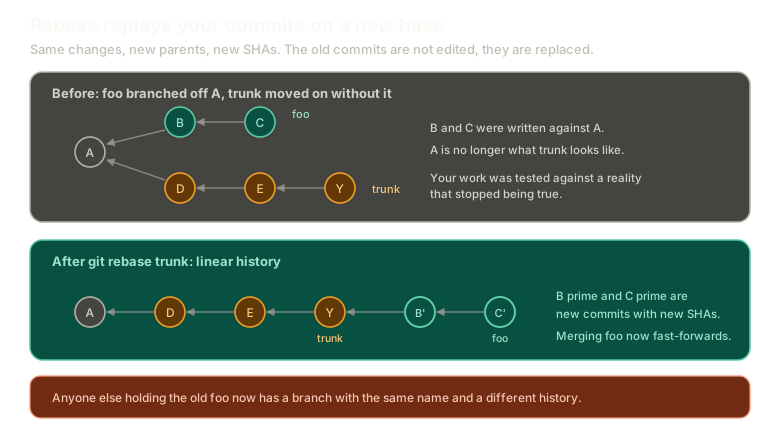 ExpandBefore and after a rebase. Before, foo hangs off commit A while trunk has moved on to Y. After, B and C are replayed on top of Y as new commits with new SHAs, producing a straight line and making a fast-forward merge possible.
foo no longer diverges from trunk. It walks history forward from it.
Try it and compare the graph against the merge scenario:
Rebasing
Rebase instead of merge
Rebase feature onto trunk, then compare the graph to the merge scenario.
Type a command, or click a suggestion below. `help` lists what works.
The Part That Matters
Look closely at those replayed commits.
They have different SHAs than b and c did.
They have to. A commit's identity comes from its contents, and one of those contents is the parent. New parent, new hash, new commit.
So rebase did not move your commits. It created new ones with the same changes and threw the old ones away. That is what people mean when they say rebase rewrites history, and it is the source of both the benefit and the danger.
The Cost
The upside is a clean history. No merge commits cluttering the log, so walking backwards through changes means reading fewer entries that exist only to record a join.
The downside follows directly from those new SHAs.
If that branch exists anywhere else, there are now two branches with the same name and different histories. Yours and theirs no longer agree about what foo is, and git has no way to reconcile that automatically.
This is where git push --force comes from. You are telling the remote that your version of the branch is the correct one and everything else should be discarded.
The One Rule
Never change the history of a public branch.
Not "be careful with". Not "prefer to avoid". Do not do it.
The moment you rewrite history other people have based work on, everyone with that branch breaks. Their history and yours disagree about commits that were supposed to be shared, and untangling it is a genuinely miserable afternoon for everybody involved.
The practical version is a sentence worth memorising:
Merge on public branches. Rebase on private branches.
Your own feature branch, that nobody else has pulled, is yours to rewrite. Rebase it forward, run the tests against current reality, resolve anything that breaks, and merge cleanly. Anything shared gets merged, never rebased.
Why Cloning Big Repositories Is Slow
A small aside that follows from everything so far.
Cloning a repository with long history takes a while because it is downloading every object needed to reconstruct the project at any point in that history. Not just the current state, all of it.
Which is why there is a shortcut:
git clone --depth 1 <url>That fetches only the most recent commit. And because a single commit holds the entire project, one commit is enough to give you a complete working copy. You lose the history, not the code.
What This Sets Up
You have seen HEAD in every log output so far and it has been quietly ignored.
Next: HEAD and reflog are both just files, which turns out to be the last piece needed before recovering work that looks lost.
The Essentials
- Rebase replays your commits onto a new base, so your work sits on current reality instead of an old one.
- It checks out the target, replays one commit at a time, then moves your branch to the result.
- Replayed commits get new SHAs, because the parent changed.
- After rebasing, merging fast-forwards, which is how you avoid merge commits.
- The cost is a rewritten history, and a branch that exists elsewhere now disagrees with yours.
- Never rewrite the history of a public branch. Merge on public, rebase on private.
--depth 1clones one commit, which is enough for a complete working copy.
Further Reading and Watching
- Git Merge vs Rebase: When to Use Each: compares the two side by side and covers when each is the right call.
- Rebasing: the Pro Git chapter, including its own section on the perils of rebasing shared work.
Keep reading