Head And Reflog Are Both Just Files
HEAD has been in every log line so far without explanation. It is one line of text, and the reflog next to it is a plain append-only file that git prints backwards.
Every git log since the first one has printed something like HEAD -> trunk, and rebase moved it around without ever saying what it is.
Time to fix that, and it takes two cat commands.
Watch It Move
git checkout trunk
git log --oneline
HEAD -> trunk.
git checkout foo
git log --oneline
HEAD -> foo.
HEAD follows whatever branch you have checked out. Switch branches, and it points somewhere else. That is the entire behaviour.
Read the File
You know by now that it will be a file.
cat .git/HEADref: refs/heads/fooOne line.
And notice what it does not contain: a SHA. HEAD holds the name of a branch, not a commit. That indirection is the whole design. Checking out a branch rewrites this one line, and committing updates the branch file rather than this one.
Follow it one more step and you are back on familiar ground:
cat .git/refs/heads/fooA SHA. Which you can walk down to a tree, then a blob, then your file, exactly as before.
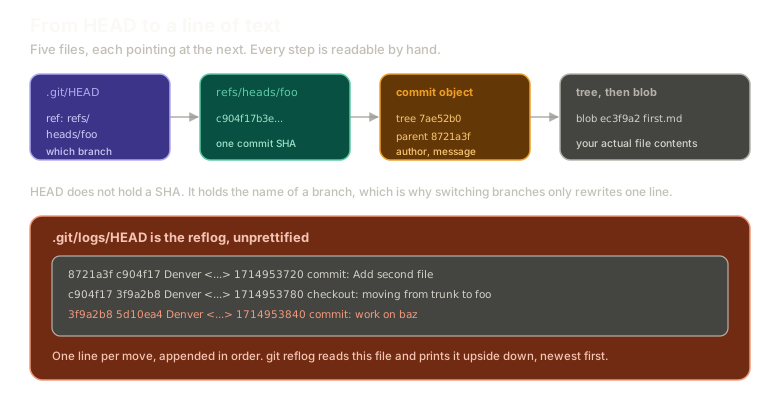 ExpandThe chain from .git/HEAD holding a branch name, to the branch file holding a SHA, to the commit object, to the tree and blob holding file contents, plus a panel showing .git/logs/HEAD as the raw append-only reflog file.
HEAD to branch to commit to tree to blob. Five hops from "where am I" to "the text in my file", every one of them readable with cat.
Use It Sparingly
A practical note, because HEAD is easy to get carried away with.
You should rarely need to reference it directly, and reaching for it tends to create problems, particularly when it comes to checking things out.
That said, it is genuinely useful once you know what you are doing. HEAD~6 means six commits back from where you are, and that kind of relative reference is exactly what you want when reaching for a range of recent commits to tidy up. That use comes later in the series.
The Reflog
git log shows the history of your commits. There is a second history nobody thinks about: the history of where HEAD has been.
git reflogEvery branch switch. Every commit. Every rebase, reset, and merge. A line for every time HEAD moved, each with the SHA it moved to.
Scroll it and you can watch yourself work. The branch switches, the mistakes, the resets that undid them.
It feels like a wizard tool the first time you see it. It is completely one-dimensional. It is a log of moves, in order, and nothing else.
Of Course It Is a File
ls .gitThere is a logs directory. Inside it:
cat .git/logs/HEADFamiliar. Each line has the SHA moved from, the SHA moved to, who did it, when, and what kind of operation it was.
git reflog is that file, prettified and reversed. The last line of the file is the first line of the output, because you almost always want the most recent move first.
Prove it to yourself:
git reflog -3
tail -3 .git/logs/HEAD
Same three entries, in opposite order. -3 limits the reflog to that many lines, which is what you want when the thing you are looking for happened a minute ago and the full log is thousands of lines.
There are far more options, including building reflog-style output out of git log itself, but the plain command covers essentially every real use.
Why This Matters More Than It Looks
Here is what makes the reflog the most valuable file in .git.
It records SHAs that nothing else points at any more.
Reset a branch backwards and the commits you moved off are still in the object store, but no branch names them. git log will never show them, because git log walks from refs.
The reflog remembers them anyway, because it recorded where HEAD was at the time.
That is the difference between "I lost my work" and "I need to look up a SHA."
What This Sets Up
The next post is the payoff for the whole internals detour. We are going to delete a branch on purpose, watch the work vanish from every normal view, and get all of it back.
Next: recovering a deleted branch, three different ways, one of which is genuinely worth showing off.
The Essentials
- HEAD is one line in
.git/HEADand it holds a branch name, not a SHA. - That indirection is why switching branches is one line rewritten.
- HEAD to branch to commit to tree to blob is the full chain, all readable with
cat. HEAD~ncounts back n commits from where you are.- The reflog is the history of where HEAD has been, not the history of your commits.
- It is
.git/logs/HEAD, printed in reverse.-3limits it. - The reflog remembers SHAs no branch points at, which is why it can recover things
git logcannot show.
Further Reading and Watching
- Git Internals: Demystifying References, Branches & HEAD: covers how refs, branches, and HEAD relate as files on disk.
- Git References: the Pro Git section on refs and HEAD, including the symbolic reference that makes HEAD work.
Keep reading