Why Some Merges Make A Commit And Some Dont
Sometimes a merge opens an editor demanding a message, and sometimes it silently finishes. That is not random. One question about your history decides it every time.
Two branches exist: trunk at a, foo at b and c. Getting foo's work into trunk means merging.
But first, something you have probably noticed and never questioned.
Sometimes merging opens an editor and demands a commit message. Sometimes it just finishes. For years I assumed this depended on something I had done wrong, or on the size of the change.
It depends on one thing, and once you know what, it is completely predictable.
Give trunk Some Work Too
Right now only foo has moved. Both branches need commits for the interesting case, so switch back and add two:
git checkout trunkThis time edit the README, so the two branches touch the same file:
echo "d" >> README.md
git add README.md
git commit -m "d"

echo "e" >> README.md
git add README.md
git commit -m "e"
Now check both:
git log --oneline
git log --oneline foo
That second one is worth noticing on its own. git log takes a branch name, so you can read another branch's history without leaving the one you are on.
trunk is a, d, e. foo is a, b, c.
What a Merge Actually Is
A merge is an attempt to combine two histories that may or may not have diverged.
Diverged means both branches added commits since they last agreed. trunk and foo share a, then each went its own way. That is divergence.
To combine them, git first has to find the point where they agreed. That commit is the best common ancestor, and the docs usually call it the merge base.
Here it is a, obviously. Less obviously, the algorithm to find it is something you could write yourself:
- Walk parents backwards from both tips
- Keep every commit you have seen in a set
- The first commit that appears on both sides is the merge base
It is always a hash set. Once you notice how many graph problems reduce to "keep a set of what you have seen", the answer stops feeling clever.
With the merge base found, git takes both sides, replays their changes on top of it, and creates a new commit. That new commit has two parents, one from each branch, and that is a merge commit.
Which Branch Is Which
The direction confuses people, so here is the framing that stuck for me.
The target is the branch you are on. The source is the branch you name.
git merge fooThat brings foo into wherever you currently are. You are always merging something into your current position, never the other way round.
Do It Without Wrecking trunk
We need trunk intact for later posts, so merge on a scratch branch:
git checkout -b trunk-merge-foo
git merge foo
-b creates the branch and switches to it, which is the shortcut for the two-step version from the last post.
An editor opens with a prepared message. Git already worked out the merge, it just wants the commit described. Save and close.
You will see something like Merge made by the 'ort' strategy. That is the name of the algorithm git uses to combine the two sides. It used to say something about a three-way merge, and the name changed relatively recently.
Look at the Two Parents
git log --oneline --graph --parents--parents prints each commit's parent SHAs alongside it, and on the merge commit there are two.
Compare them to where trunk and foo point. One is e, one is c. The merge commit reaches back into both branches, which is exactly what lets --graph draw the two lines converging.
That drawing is not decoration. Git can render it because the parent pointers are genuinely there in the object.
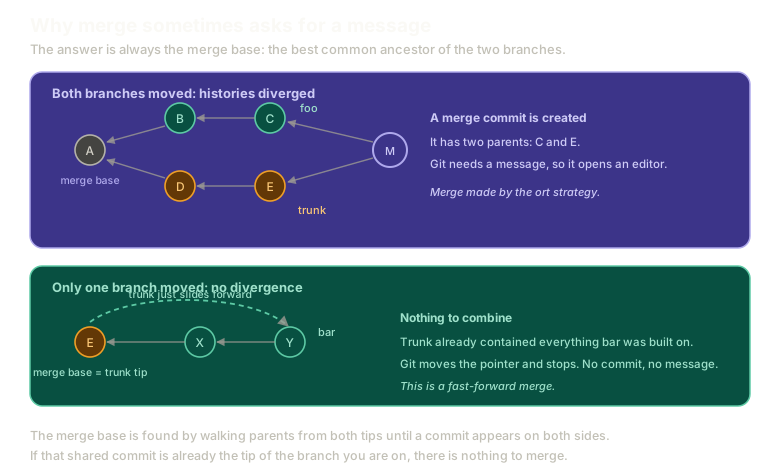 ExpandTwo scenarios compared. In the first, trunk and foo both moved after commit A, so the merge base is A and git creates a merge commit M with two parents. In the second, only bar moved after E, so the merge base is trunk's own tip and git simply slides the pointer forward.
Now the Other Case
Build a branch that has not diverged:
git checkout trunk
git checkout -b bar

echo "x" > bar.md
git add bar.md
git commit -m "x"

echo "y" >> bar.md
git add bar.md
git commit -m "y"
Before merging, look at the shape:
git log --oneline --graph --allWhat is different about this setup?
With foo, both branches had moved past their shared commit. Here, only bar has moved. trunk is still at e.
Which means the merge base is e, and e is the tip of trunk itself.
The Fast-Forward
This time merge onto trunk directly:
git checkout trunk
git merge bar
No editor. No message. It just finishes.
There was nothing to combine. trunk already contained every commit bar was built on, so bar is trunk plus two more commits in a straight line. Git does not need to reconcile anything, work out a strategy, or create a commit to record a decision, because no decision was made.
All it does is move the trunk file to point at y.
That is a fast-forward merge, written ff-merge in the documentation. It means the history was linear with no divergence, so the pointer could simply slide forward.
Watch both outcomes here, on the same starting repository:
Merging
A real merge commit
Merge feature into trunk and inspect the resulting commit's two parents.
Type a command, or click a suggestion below. `help` lists what works.
The Rule
Everything above collapses into one question.
Is the merge base already the tip of the branch you are on?
- Yes: nothing diverged, so git moves the pointer. Fast-forward, no commit, no message.
- No: both sides moved, so git builds a merge commit with two parents and asks you to describe it.
That is the entire mechanism. No heuristics, no size thresholds, nothing about how much changed.
What This Sets Up
Merging is not the only way to combine branches, and the merge commits it produces are not universally loved.
Next: rebase and when not to use it, which gets you a linear history and comes with one rule you genuinely must not break.
The Essentials
- A merge combines two histories that may or may not have diverged.
- The merge base is the best common ancestor, found by walking parents from both tips until one appears on both sides.
- The branch you are on is the target. The branch you name is the source.
- Diverged histories produce a merge commit with two parents, which is why git asks for a message.
- If the merge base is already your branch's tip, git fast-forwards and only moves the pointer.
--parentsingit logshows both parents of a merge commit.
Further Reading and Watching
- Git Merge vs Git Rebase part 1 - Merge Commits: a visual walkthrough of what a merge commit records and when one gets created.
- Basic Branching and Merging: the Pro Git chapter working through both outcomes with the graph drawn at each step.
Keep reading