Recovering A Deleted Branch
Delete a branch with unmerged work and every normal git view stops showing it. Here are three ways to get it back, including one that rebuilds the file by hand from a SHA.
The reflog remembers SHAs nothing else points at. Time to prove that is worth something.
We are going to lose work on purpose.
Set Up the Disaster
git checkout trunk
git checkout -b baz

echo "bazzy" > baz.md
git add baz.md
git commit -m "definitely my best work"

git checkout trunk
git branch -D baz
The branch is gone. git branch does not list it. git log will never show that commit, because log walks from refs and no ref points there any more.
One commit of work, unmerged, with no name attached to it. If you believe a deleted branch means deleted commits, this is the moment you start feeling ill.
It is not gone.
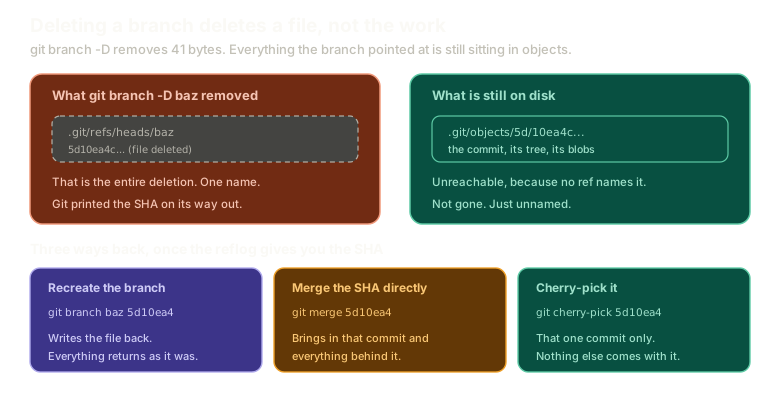 ExpandDeleting a branch removes one file in refs/heads containing a SHA, while the commit, its tree, and its blobs remain in .git/objects, unreachable but intact. Three recovery routes are shown: recreating the branch, merging the SHA, and cherry-picking it.
Get the SHA Back
git reflog -5There it is: the commit, with its message, and the SHA it landed on.
Git even printed that SHA when you deleted the branch, in the was 5d10ea4 part of the confirmation. Both routes get you the same forty characters.
A SHA is all you need, because you already know what a SHA is worth.
The Show-Off Route
Do it the hard way first, because it is genuinely satisfying and it proves there is nothing hidden.
git cat-file -p 5d10ea4The commit object. Take the tree SHA:
git cat-file -p 7c31fa9There is baz.md and the blob it points at. Take that:
git cat-file -p 2ba81c4bazzyYour file, recovered from a branch that does not exist, by walking three objects by hand.
You can go the whole way and put it back:
git cat-file -p 2ba81c4 > baz.md
git status
Untracked file, ready to stage. Nothing was lost because nothing was ever deleted.
There are easier ways. This one is worth doing once so you know the object store is the truth and every command above it is convenience.
The Sensible Routes
Now stop flexing.
Recreate the branch. A branch is a file containing a SHA, and you have the SHA:
git branch baz 5d10ea4
git checkout baz
Everything is back exactly as it was.
Or merge the SHA directly. Merge does not require a branch name, it requires a commit:
git merge 5d10ea4Git still has the state, so the work lands in trunk. That is a surprising thing to be allowed to do the first time you see it.
Why Merging a SHA Can Be Too Much
There is a catch with that second option, and it follows from how merges work.
Merge finds the best common ancestor and brings across everything between there and the commit you named.
With one lost commit branched off your current tip, that is fine. But if a lot of history had diverged, or there were twenty commits between your position and the one you want, you get all of it. Plus a merge commit if the histories diverged.
Sometimes you want exactly one commit and nothing else.
Cherry-Pick
git cherry-pick 5d10ea4That takes one commit, or several if you name several, and applies it where you are.
Not the history behind it. Just that change.
It has two requirements, and both come back to vocabulary from earlier in the series:
- Your working tree must be clean, meaning no uncommitted changes to tracked files
- Your index must be clean too, meaning nothing staged
Those are different things, and cherry-pick will refuse for either. If it says no and your working tree looks fine, check what is staged.
Cherry-pick also works with remotes, as long as you have fetched their commits. You can lift a single commit out of someone else's branch without merging their work.
When You Will Actually Reach For It
Cherry-pick is one of those commands that sits unused for months and then saves an entire afternoon.
The situation is this. Two branches have diverged so badly that the merge conflict is incomprehensible. Not "resolve fifteen files" incomprehensible, but genuinely unclear what the resolved result should even be.
If the work was committed in small pieces, you can move it across one commit at a time. Pick the two commits that matter, land them where they need to be, and rebuild the rest deliberately instead of fighting a merge you cannot read.
That is an argument for small commits as much as it is for cherry-pick. You can only lift out a change if it was committed as its own change.
Do the whole recovery here, from deletion to restored branch:
Recovery
Recover a deleted branch
Find the lost commit in the reflog and create a branch pointing at it again.
Type a command, or click a suggestion below. `help` lists what works.
What This Sets Up
That is branching, merging, rebasing, and recovery. The internals have now paid for themselves twice.
What has not come up yet is other people. Every repository so far has been yours alone, and the next chapter is about what changes when a copy of it lives somewhere else.
The Essentials
- Deleting a branch removes a file containing a SHA. The commits stay in
.git/objects. git refloggives you back the SHA, and so does the confirmation message git printed on deletion.- You can walk commit to tree to blob by hand and recover file contents with no branch at all.
git branch <name> <sha>recreates the branch, which is the simplest fix.git merge <sha>works without a branch name, but brings everything between the merge base and that commit.git cherry-pick <sha>takes one commit and nothing else.- Cherry-pick needs a clean working tree and a clean index.
- Small commits are what make cherry-pick a rescue tool rather than a curiosity.
Further Reading and Watching
- How to Rescue Your Commits with Git Reflog: several recovery techniques built on reading the reflog.
- Maintenance and Data Recovery: the Pro Git chapter on finding unreachable objects, including what eventually cleans them up.
Keep reading