Searching Git Logs Before Reaching For Bisect
Something worked a month ago and is broken now. Before the systematic approach, there is a one minute gamble worth taking, and three different things you can search.
Squashing commits finished the rebase material. This chapter is about the tools you reach for when something has gone wrong and you do not know when.
Here is the situation, and it happens a few times a year.
Something works. A while later it does not. Nobody knows which change did it.
There is a systematic answer to this, and it is the next post. First, the gamble.
Why the Test Cycle Decides Everything
How much any of this matters depends entirely on one number: how long it takes to find out whether the code is good or bad.
If your test suite runs in one second, you can walk back ten commits at a time by hand and never notice the waste. Plenty of people do exactly that, and never learn there is a better way, because nothing forced them to.
If verifying takes ten minutes, everything changes. Every unnecessary check costs ten minutes, and being efficient about which commits you look at stops being an academic concern.
Assume the slow case for the rest of this chapter. A test suite that takes half a minute is enough to make the point, and real ones are far worse.
Searching Commit Messages
The first gamble is that someone described the change.
git log --grep fooThat searches commit messages for the pattern. If the broken behaviour lives in a function called foo, and anyone mentioned foo when they changed it, this finds them.
The word grep is worth knowing if you have not met it. Searching, in Unix tooling, is called grep, and if you go looking for a flag called --search you will not find one.
Add the diffs so you can read the actual changes:
git log -p --grep fooNow you are not just seeing messages, you are seeing what each of those commits did. Sometimes one of them is obviously the culprit.
Searching by File
If you know which file is involved, narrow to it:
git log -p -- src/index.jsThat -- matters. It separates paths from everything else, so git does not have to guess whether src/index.js is a file or a branch name.
You can pass several paths, and you can combine this with --grep. A file with only two commits in its whole history is a very short list to read.
Searching the Changes Themselves
The third one is less known and the most surprising when it works:
git log -S "someFunction"That searches the content of the changes, not the messages. It finds commits where the number of occurrences of that string changed, which in practice means commits that added or removed it.
If you know a line of code that used to exist, or a value that appeared from nowhere, this points straight at the commit responsible.
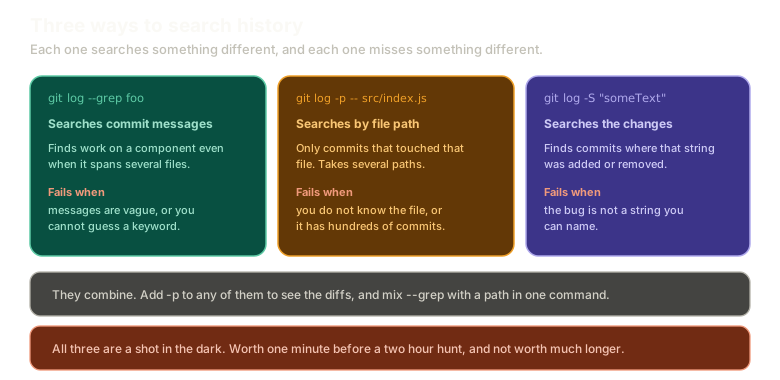 ExpandThree search strategies side by side: --grep searches commit messages, a path argument narrows to commits touching that file, and -S searches the content of the changes. Each panel lists what that approach misses.
Be Honest About the Odds
Log searching mostly does not work, and I would rather say that than oversell it.
The failure modes are all common:
- You do not know a keyword to search for. You know there is a bug, not what to call it.
- Commit messages are not good. Everyone intends to write better ones starting tomorrow. Tomorrow keeps not arriving.
- The problem does not reduce to any single word.
- The file has three hundred commits and the list is not a list, it is a haystack.
So why do it at all?
Because the payoff is asymmetric. One minute of searching against a bug that might otherwise take two hours is a trade worth making every time, even at bad odds. If it works, you saved the afternoon. If it does not, you lost a minute.
Where I actually reach for it is slightly different: when I half-remember making a change and want to go look at it. Not hunting an unknown bug, but navigating to something I know exists. For that, it works most of the time.
What This Sets Up
When the gamble fails, you need something that works regardless of commit messages, filenames, or knowing anything at all about the bug.
Next: bisect finds the bad commit in log n steps, which needs nothing from you except a way to tell good from bad.
The Essentials
- The value of all of this scales with how long your test cycle takes.
git log --grep <pattern>searches commit messages.git log -padds the diffs, and combines with any of these.git log -- <path>narrows to commits touching a file, and the--separates paths from revisions.git log -S <string>searches the changes themselves, finding where a string was added or removed.- It usually does not work, and it is still worth one minute against a two hour bug.
Further Reading and Watching
- Search All of Your Git History for Code and Commits with 2 Commands: searching messages and content, with the flags applied to a real repository.
- Searching: the Pro Git chapter on grep and log searching, including line-level history with
-L.
Keep reading