Reset Soft And Hard And Commit Amend
Both resets walk the branch backwards. One hands your work back as staged changes, the other destroys it. And there is exactly one way to lose work git cannot recover.
Revert is how you undo something public. Reset is how you undo something private, and it is the command you will actually use most.
It has appeared several times already in this series as a fix-up. Time to look at it properly.
Soft: Undo the Commit, Keep the Work
git reset --soft HEAD~1The branch pointer walks back one commit. The commit you were on is no longer in your branch's history.
The changes from it are not gone. They are sitting in your index, staged, exactly as they were before you committed.
git log --oneline
git status
git diff --staged
The commit has vanished from the log. The changes are staged and ready.
That is genuinely useful. Commit too early, commit the wrong message, commit before running the tests: --soft puts you back one step with everything intact.
Why That Was --staged and Not Just diff
Worth pausing on, because the two forms of git diff answer different questions and the difference catches people out.
git diff on its own shows unstaged changes, meaning your working tree compared against the index.
git diff --staged shows staged changes, meaning the index compared against your last commit.
After a --soft reset the work is staged, so a bare git diff prints nothing at all. Which looks alarming if you were expecting to see your changes, and is simply git answering the question you asked: nothing is unstaged.
git diff             # nothing, because it is all staged
git diff --staged    # there it is
The rule is short. Have you run git add yet? If yes, you need --staged to see it.
The Long Way I Used to Do It
Worth mentioning, because plenty of people are still doing this.
Before knowing about --soft, the way to walk a branch back was: find the SHA in the log, check it out, delete the branch, recreate the branch there. Four steps, one of which is deleting a branch, which always feels worse than it is.
git reset does that in one command, and it works with --soft or --hard, forwards or backwards, to any commit at all:
git reset --hard <any-sha>
git reset --hard origin/trunk
Anything that names a commit works.
Hard: Undo the Commit, Destroy the Work
git reset --hard HEAD~1Same pointer movement. Different treatment of your changes: the index and working tree are wiped.
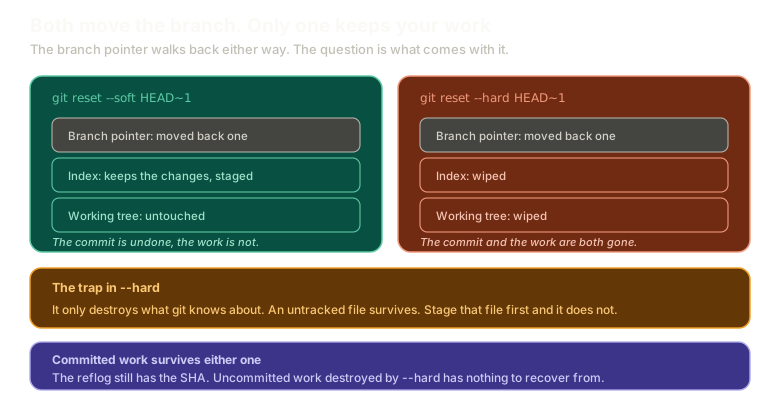 Expandgit reset --soft on the left, moving the branch pointer while keeping the index staged and the working tree untouched, next to git reset --hard on the right, which moves the pointer and wipes both. Notes cover the untracked file trap and that committed work is still in the reflog.
This is how I use reset most of the time, and not for walking back commits. It is how I throw away current changes I no longer want:
git reset --hardNo commit argument. Just: whatever I have been doing, get rid of it.
The One Way to Actually Lose Work
Everything else in this series has had a recovery path. This one does not, so read it carefully.
--hard destroys what git knows about.
Make a change to a tracked file and create a brand new untracked file:
echo "some change" >> README.md
echo "scratch" > foo.md
git reset --hard
git status
The README change is gone. foo.md survived, because git never knew about it, so there was nothing for reset to reset.
Now do it again, but stage the new file first:
git add foo.md
git reset --hard
foo.md is gone, and there is no way back.
That file was never in a commit. It has no blob in the object store, no entry in the reflog, no previous version to restore. Staging it told git it existed, and --hard took git at its word.
This is the one genuine data-loss trap in everyday git. Committed work is always recoverable through the reflog. Work that was staged but never committed, then hard reset, is simply gone.
Try both resets safely here:
Recovery
Soft, mixed, and hard reset
Undo the last commit with --soft and confirm the changes are still staged.
Type a command, or click a suggestion below. `help` lists what works.
Amend: Change the Commit You Are On
Related, and often what you actually wanted:
git commit --amendThat takes your current staged changes and folds them into the previous commit, and opens the message for editing.
If the message is fine and you only want to add the changes:
git commit --amend --no-editWhich is exactly the same thing --soft plus a fresh commit would do, in one step. Both rewrite history, and both produce a new SHA, for the usual reason.
That equivalence is worth sitting with, because the --soft route makes it easy to rewrite history without noticing you did.
Reset back one commit, then commit again with a different message, and you have quietly replaced a commit. Different SHA, different message, no record that the original existed anywhere except the reflog. It does not feel like rewriting history the way rebase does, and it is exactly the same act.
The workflow this unlocks is one you will use constantly once CI is involved. Change something, amend, force push. The branch keeps exactly one commit no matter how many times you poke at it, instead of accumulating nine commits called fix ci.
Same rule as always: private branches only.
Getting It Back
You reset something you should not have. Assuming it was committed:
git reflogFind the SHA from before the reset. Then either recreate the branch there, or the direct route:
git reset --hard <sha>Reset undid it, and reset undoes the undo. The reflog is what makes that possible, and this is the third or fourth time in this series it has been the answer. That is not a coincidence, it is the point.
What This Sets Up
You now have every recovery tool git offers. What is left is the workflow improvement that makes half of this unnecessary.
Next: worktrees are the answer to stashing, which removes the need to put work aside at all.
The Essentials
--softmoves the branch back and keeps the changes staged.git diffshows unstaged changes,git diff --stagedshows staged ones. After a soft reset you need--staged.--hardmoves the branch back and wipes the index and working tree.- Reset targets any commit, including a remote-tracking branch, not just
HEAD~n. git reset --hardwith no argument throws away current changes, which is its most common use.--hardonly destroys what git knows about, so untracked files survive.- Staging an untracked file and then hard resetting deletes it permanently. This is the one unrecoverable loss.
git commit --amend --no-editfolds changes into the last commit without touching the message.- Committed work is always in the reflog, so a bad reset is undone by another reset.
Further Reading and Watching
- Git - Reset (soft, mixed, hard) Vs. Checkout Vs. Commit: what each mode does to the branch, the index, and the working tree.
- Reset Demystified: the Pro Git chapter tracing each reset mode through all three trees step by step.
Keep reading