Bisect Finds The Bad Commit In Log N Steps
You need no keyword, no suspect file, and no theory about the bug. Only a way to tell working from broken. Git does a binary search through history and hands you the commit.
Searching the log is a gamble. This is the method that always works.
Bisect searches history for you. You mark commits as good or bad, and it works out which one to show you next. When it finishes, it names the exact commit that broke things.
Why It Can Do This
Two properties make it possible, and both have come up already in this series.
Commits are ordered. Not by any special mechanism, just by time. Going back one commit goes back in time. That has been quietly true since the very first chapter, and this is where it pays off. History behaves like a sorted array.
You need two known points. One commit where things work, one where they do not. How far apart they are does not matter at all. A thousand commits is fine.
The Property That Makes It Work
Here is the reasoning that turns a sorted array into a search.
If the current commit fails, and ten commits back it also fails, what about nine commits back?
Fails. So does eight, seven, six, all the way forward. A bug that exists at some point and still exists later did not un-break itself in between.
So the space is not random. It is good for a while and then bad for the rest, with one boundary.
Which means you can test the middle:
- If the middle passes, everything before it passes. The boundary is in the second half.
- If the middle fails, everything after it fails. The boundary is in the first half.
Either way, half the remaining commits are eliminated by one test.
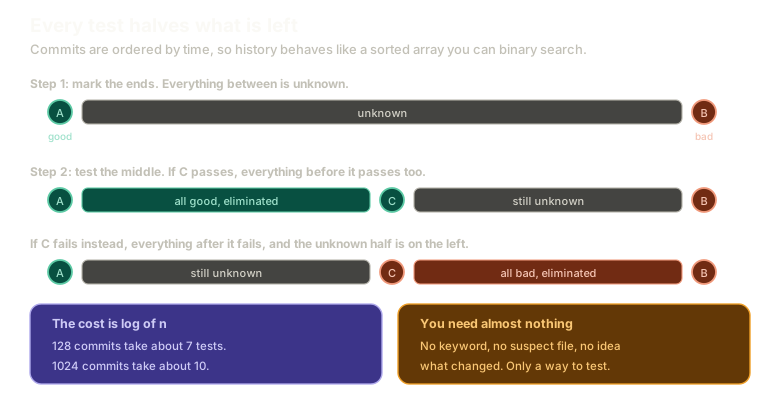 ExpandThree rows showing the search space narrowing: first a known good commit and known bad commit with everything unknown between, then testing the middle commit C and eliminating the first half when it passes, then eliminating the second half when it fails instead.
That is binary search, run against commits instead of array indices. 128 commits take about seven tests. A thousand take about ten. The cost grows logarithmically, which is to say it barely grows.
The Commands
git bisect start
git bisect bad
With no argument, bad means the commit you are on. Then find a commit you know was fine and mark it:
git log --oneline
git bisect good b56ed57
Git checks out a commit in the middle and tells you roughly how many steps remain.
Now the loop. Test whatever you are on, then tell git the answer:
git bisect good
git bisect bad
Repeat. The remaining count halves each time. When it finishes, git prints the first bad commit.
To get back to where you started:
git bisect resetPractise it here, on nine commits with one that broke things:
Recovery
Find the bad commit
Solved. Try resetting and doing it a different way.
Type a command, or click a suggestion below. `help` lists what works.
Automate the Loop
Sitting through that manually is tedious, especially with a slow test suite. You do not have to.
git bisect start
git bisect bad
git bisect good b56ed57
git bisect run npm test
git bisect run takes a command. It runs it at each step and reads the exit code: zero means good, non-zero means bad. Then it moves on by itself.
You walk away. It comes back with the commit.
One practical trap: make sure your test command actually exits. A test runner in watch mode never returns, so bisect waits forever. Most have a flag for a single run, and using it is the difference between automation and a hang.
If you have a slow suite and a reproducible failure, this is the single highest-value thing in this chapter.
It Is Not Just for Bugs
Worth stating explicitly, because the framing is usually about bugs and the tool is more general.
Bisect finds when anything changed, as long as you can write a test for it.
A performance regression. A performance improvement you want to understand. A behaviour that appeared and nobody knows when. Anything you can express as a pass or fail check, bisect can locate.
It is change detection, not bug hunting specifically.
What It Costs You
The advantages are unusual for a debugging tool:
- You need to know nothing about the bug. No keyword, no suspect file, no theory.
- Commit messages are irrelevant. They can all say
wipfor all bisect cares. - It is provably the fastest way to search a sorted space without an index.
The one real cost is testing time multiplied by the number of steps. If a single test takes twenty minutes, even ten steps is most of a day, and a one-minute log search first starts looking sensible.
That is the actual decision: gamble on a log search, or commit to a bounded number of tests. Knowing both means you can choose.
What This Sets Up
You found the commit that broke things. Now you have to decide what to do about it, and the answer depends on whether that commit is public.
Next: revert adds the opposite commit, which undoes a change without pretending it never happened.
The Essentials
- Bisect binary searches history, using the fact that commits are ordered by time.
- You need one good commit and one bad one, and the distance between them does not matter.
- Each test eliminates half the remaining commits, so the cost is logarithmic.
start,bad,good, then repeat, andresetto return to where you were.git bisect run <command>automates the whole loop using exit codes.- Make sure the command exits, or a watch-mode runner will hang the bisect.
- It finds any change you can test for, not only bugs.
Further Reading and Watching
- Using git bisect to Help Find Which Commit Broke Something: a full run through both the manual loop and the automated version.
- git-bisect Documentation: every subcommand, including custom good and bad terms for non-bug searches.
Keep reading