Revert Adds The Opposite Commit
Reverting does not delete anything. It appends the exact inverse of a commit, which is the only way to undo published work without breaking everyone who has it.
Bisect named the commit. Now comes the decision every team faces eventually: push forward, or roll back.
Sometimes you roll back.
Revert Is Not Restore
Two similarly named commands, doing different jobs.
Restore takes a file back to a previous state. It is about the contents of your working tree right now.
Revert creates a new commit that is the exact inverse of an existing one. Every line that commit added, the revert removes. Every line it removed, the revert adds back.
The way I think about it: revert is the antimatter version of a commit. You put the opposite in front, and the two cancel out.
Find the Commit
You need the SHA of what you are undoing, and you already know how to find it:
git log --grep e -pRead the change before you undo it. Confirming you are removing what you think you are removing takes ten seconds and occasionally saves you from reverting the wrong thing.
Do It
git revert <sha>And a thing worth being ready for: reverts can conflict.
That feels unfair. You already made a mistake, and now git wants you to do conflict resolution about it. But it makes sense: if commits after the one you are undoing touched the same lines, git cannot cleanly subtract the old change.
It is the same resolution process as always:
git statusboth modified. Open the file, decide what it should say, remove the markers. In a revert the goal is specific: the file as it would look if that commit had never happened.
Git also tells you your other options at this point. git revert --skip abandons this one commit and moves on, and git revert --abort walks the whole thing back, exactly like the aborts from the conflict chapter.
git add README.md
git revert --continue
Git offers a prepared message, something like Revert "e", including the SHA being reverted. Keep it. That message is a record that the undo was deliberate, and future-you will want it.
Nothing Was Deleted
git log --onelineThe original commit is still there. Right where it was, with everything after it.
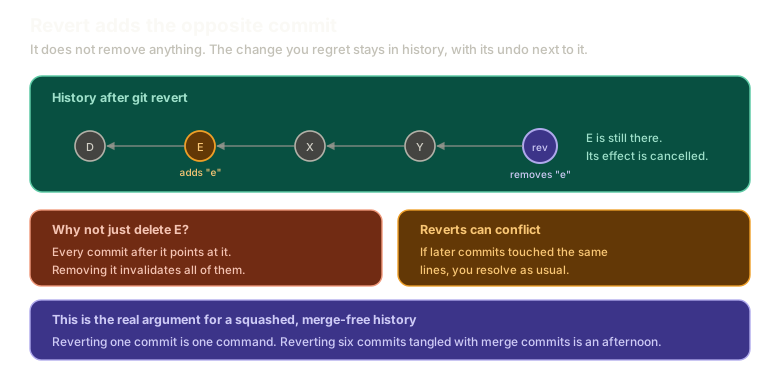 ExpandA linear history where commit E adds a line, several commits follow, and a revert commit at the tip removes it. E remains in history with its effect cancelled, alongside notes on why deleting E outright is impossible and that reverts can conflict.
This is not git being conservative. It is the only thing that can work.
Think about what removing a commit from history would mean. Every commit after it names its parent. Change or delete one, and every descendant points at something that no longer exists. Everyone else's clone becomes invalid.
So revert appends. The change stays in history, its effect cancelled by the commit in front of it. Your history remains a true account of what happened, including the part where something got undone.
The Argument This Makes for Squashing
Doing a revert once is the clearest case for keeping history clean, and it is worth stating now that you have felt it.
Reverting one commit is one command.
Reverting a feature that landed as six commits tangled with merge commits is not. You have to work out which commits belong to that feature, which changes came from elsewhere and must survive, and how to unpick them without taking unrelated work with you. Every merge commit in the middle makes it worse.
This is the real reason to prefer a squashed, merge-free history. Not aesthetics. You are betting against yourself, planning for the day you need to pull something out under pressure.
If every feature lands as one commit, that day is a single command. That is worth a lot at the wrong hour on a bad afternoon.
When You Use It
Honestly, not often. Revert is for changes that are already public.
If a commit only exists on your machine, you have easier options: amend it, drop it in an interactive rebase, reset past it. Nobody else has seen it, so nothing needs to record that it existed.
Once something is pushed and other people have it, rewriting is off the table for all the reasons covered earlier. Revert is how you undo published work without breaking anyone.
What This Sets Up
Revert is the public option. Next comes the private one, which is faster, more destructive, and something you will use far more often.
Next: reset, soft and hard, and commit amend.
The Essentials
- Revert creates a new commit that is the inverse of an existing one.
- Restore changes file contents. Revert adds a commit. Different jobs.
- Reverts can conflict, and resolve exactly like any other conflict.
- Finish with
git revert --continue, keeping the generated message. - Nothing is removed from history, because every later commit points at what came before it.
- Reverting one squashed commit is one command. Reverting six tangled ones is an afternoon.
- Revert is for public commits. For private ones, rewrite instead.
Further Reading and Watching
- Git revert vs reset: What's the difference?: the split between undoing publicly and rewriting privately.
- git-revert Documentation: the options, including reverting a merge commit, which needs a parent specified.
Keep reading