Resolving A Merge Conflict By Hand
Conflicts feel like git failing. They are git refusing to guess. Reading the markers directly, with no tool in the way, is what turns dread into a two minute job.
Stashing works when two sets of changes do not touch. This post is about when they do.
I want to say something first, because it is true and rarely admitted.
Conflicts produce an unreasonable amount of anxiety. Even knowing exactly what is happening, seeing that message during a pull triggers a small dread response. That reaction is nearly universal and it is not proportional to the actual difficulty.
The way out of it is doing a few by hand.
Close the Tool
For this post: no editor conflict UI, no git plugin, no merge tool. Open the file, read the text, edit it.
Those tools are fine once you understand what they are doing. Right now they hide the thing worth seeing, and the differences between merge conflicts and rebase conflicts are exactly the sort of subtlety a three-panel view smooths over.
Make One
A conflict needs two changes to the same line that cannot both be true.
Both repositories have a on the first line of README.md. Change it to different things.
In the remote:
cd ../hello-gitEdit README.md so the first line reads a + 1, then:
git add README.md
git commit -m "a + 1"
And locally, edit the same line to a + 2:
cd ../remote-git
git add README.md
git commit -m "a + 2"
Then pull:
git pullThere it is.
Find What Actually Conflicted
The pull output tells you a conflict happened, but in a real pull you are bringing in dozens of commits touching dozens of files. Picking the conflicted one out of that wall of text is annoying.
git statusLook for both modified. That is git saying: this file changed on both sides, in the same place, and I will not choose for you.
That phrase is the thing to scan for. Everything else in the status output during a conflict is noise by comparison.
The Escape Hatch
Before going further, know that you can always walk away:
git merge --abortThe same exists for the others: git rebase --abort, git revert --abort, git cherry-pick --abort. Nothing you are about to do is one-way.
Stash is the exception. There is no git stash --abort, because a stash pop is not an operation you are in the middle of.
Read the File
cat README.md<<<<<<< HEAD
a + 2
=======
a + 1
>>>>>>> 7b00a1c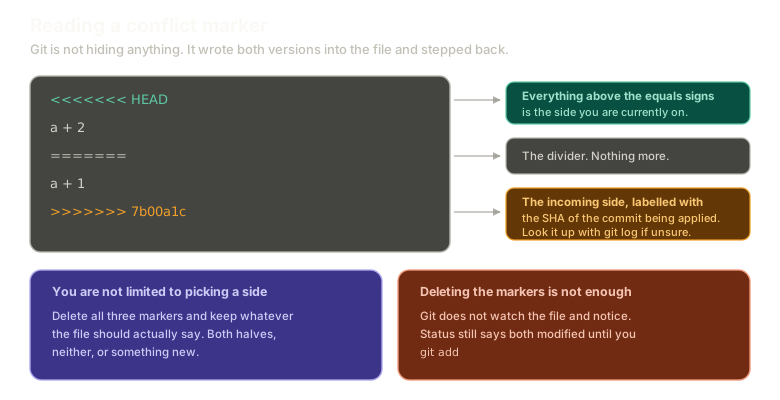 ExpandAnatomy of a conflict marker: everything above the equals signs is the side you are currently on, the equals signs are just a divider, and the closing marker is labelled with the SHA of the incoming commit. Notes explain you can keep any combination, and that deleting the markers is not enough on its own.
Three markers, and each one means something specific.
From <<<<<<< HEAD to the equals signs is your side, the branch you are currently on.
From the equals signs to >>>>>>> is the incoming side.
That trailing 7b00a1c is a SHA, and it is not decoration. It names the commit being applied. You can go look it up:
cd ../hello-git && git log -1 --oneline && cd ../remote-gitSame SHA. Git is telling you precisely which commit you are resolving against, which matters when you are twelve commits into a pull and have lost track.
You Are Not Picking a Side
The framing that makes conflicts easier: git is not asking you to choose A or B.
It is asking what the file should say.
Delete all three marker lines and write whatever is correct. Keep your version. Keep theirs. Keep both, one after the other. Write something new that combines them.
This is why visual merge tools have a third editable panel in the middle. A real conflict often is not one side or the other, it is two changes that both need to survive, mashed together carefully so the result still works.
For this one, keep the local change. Edit the file until it reads a + 2 with the markers gone.
Deleting the Markers Is Not Enough
git statusStill both modified.
Git did not notice you fixed it. It is not watching the file. It waits for you to say you are done, and the way you say that is by staging:
git add README.md
git commit -m "merged in upstream"
That is the resolution.
The Empty Commit Surprise
Run git status between the add and the commit and something odd shows up. README.md is not listed as modified.
Of course it is not. You kept your own version, so relative to your last commit the file did not change at all.
The merge commit records the merge, not a change. Its content is identical to what you already had, and it exists to record that the two histories came together and how. That is a real thing a commit can be.
git log --oneline --graphThe two lines converge, and --graph can draw it because the merge commit genuinely has two parents.
Do the whole cycle here, markers and all:
Conflicts
A merge conflict
Merge feature, resolve notes.md by hand in the editor, then stage and commit.
Type a command, or click a suggestion below. `help` lists what works.
The Trap Nobody Warns You About
Now make a completely unrelated change upstream, one that cannot possibly conflict:
cd ../hello-git
echo "no conflict change" >> bar.md
git add bar.md
git commit -m "a change to bar"
cd ../remote-git
git pull
You get a merge commit again.
Nothing conflicted. The change touched a different file entirely. Yet git still had to reconcile two histories, because your resolution commit exists locally and was never pushed upstream.
Once your history diverges and stays diverged, every single pull produces a merge commit. Pull ten times, get ten merge commits, none of which represent a decision anyone made.
That is how a repository history turns into an unreadable mess, and it is the strongest practical argument in the whole merge and rebase debate.
The fix is not a strategy. It is staying in sync. Push your resolutions back. Do not let a branch sit diverged for days.
What This Sets Up
You resolved that with merge. Rebase handles the same situation differently, and one label in the conflict markers will be the exact opposite of what you just read.
Next: rebase conflicts and why ours and theirs flip.
The Essentials
- A conflict is git refusing to guess, not git failing.
git statusand the phraseboth modifiedis how you find the conflicted file.- Every conflicting operation has an
--abort, so nothing is one-way. - Above the equals signs is your side, below is incoming, and the trailing SHA names the incoming commit.
- You can keep any combination, not just one side.
- Deleting the markers does not resolve anything. Staging the file does.
- A merge commit can contain no change at all, when you kept your own version.
- A diverged history produces a merge commit on every pull until you push your work back.
Further Reading and Watching
- How To Manually Fix Git Merge Conflicts: resolving markers directly in the file rather than through a merge tool.
- git-merge Documentation: the section on how conflicts are presented, including the alternative marker styles git can produce.
Keep reading