Rebase Conflicts And Why Ours And Theirs Flip
During a rebase, HEAD is the other branch. That inversion confuses everyone once, and it can quietly delete your own commit if you resolve on autopilot.
The merge conflict ended with a warning about diverged histories producing endless merge commits. Rebase is the usual answer to that, and it handles conflicts differently enough to be worth its own post.
First, get back in sync.
An Aside: Push Rejected Because It Is Checked Out
git pushIt fails, and the error is worth reading rather than skipping.
You are trying to push to trunk, and trunk is currently checked out in hello-git.
Think about what pushing would mean there. Someone has that branch checked out with a working tree full of files. Advancing the branch under them would change the code beneath a person who is possibly mid-edit.
It is hot reloading, except of an entire codebase, with no warning. Git refuses.
The workaround is to move the other repository off that branch:
cd ../hello-git && git checkout bar && cd ../remote-git
git push
cd ../hello-git && git checkout trunk && cd ../remote-git
You will essentially never hit this in real life, because you do not normally have two copies of the same repository on one machine, both with working trees. A hosting service faces the same constraint and solves it by keeping repositories without a checked-out working tree at all.
Make a Rebase Conflict
Two changes, in two files, one of which will clash.
Upstream, change the first line of README.md to a + 3, and append a line to the end of bar.md:
cd ../hello-git
git add .
git commit -m "a change from hello-git for a rebase conflict"
Locally, change the same first line to a + 4, and change the first line of bar.md:
cd ../remote-git
git add .
git commit -m "a change from remote for a rebase conflict"
Different regions of bar.md, same line of README.md. That combination is deliberate.
git pull --rebaseRead the output before the error. bar.md merged automatically. Different parts of the same file are not a conflict, and git handled it without asking.
README.md could not be merged. git status confirms: bar.md staged and green, README.md marked both modified.
Now Read the Markers
cat README.md<<<<<<< HEAD
a + 3
=======
a + 4
>>>>>>> a change from remote for a rebase conflictStop and look at that.
HEAD is a + 3. That is the upstream change. That is not your change.
Your change, a + 4, is on the incoming side.
If you resolved this on the same instincts you built in the last post, you would keep the wrong one.
Why It Flips
Nothing inconsistent is happening. HEAD always means where you are standing, and rebase moved you.
Recall what rebase does:
- Check out the target branch
- Replay your commits on top, one at a time
- Move your branch to the result
You are standing on the target branch. So HEAD is the target. Your commit is the thing arriving, which makes it the incoming side.
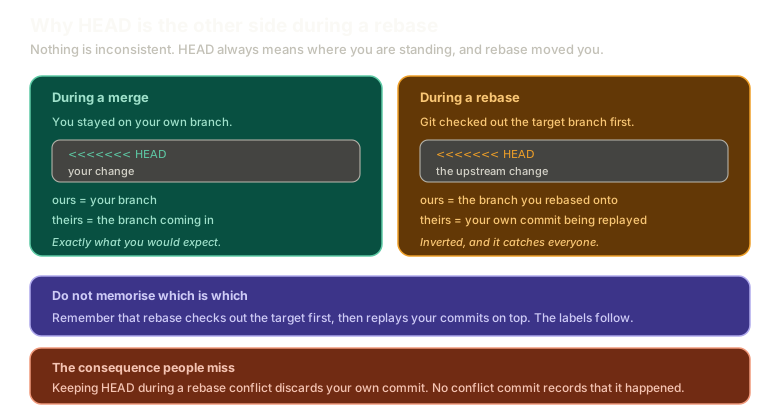 ExpandA merge on the left where HEAD is your own branch and ours means your change, next to a rebase on the right where git checked out the target first, so HEAD is the upstream change and theirs is your own commit being replayed.
During a rebase, ours is theirs and theirs is ours.
Do not memorise that sentence. Memorise what rebase does, and the labels follow every time.
I mean that seriously. If you learn it as a fact, you will eventually second-guess yourself: is merge the inverted one, or rebase? Then you flip your own answer and get it backwards. Reasoning from the mechanism never does that, and it is the difference between four years of confusion and thirty seconds of thought.
Resolve It
Keep the upstream change this time, a + 3. Delete the markers and the other line.
git add README.md
git status
README.md disappears from the changes. Same reason as last time: you kept the version that was already there, so there is nothing to record.
Now continue. Note that it is not git commit:
git rebase --continueGit offers you the commit message to edit, then finishes. Your branch is one commit ahead of origin/trunk.
Try it here, where the markers are labelled the same way:
Conflicts
A rebase conflict
Rebase feature onto trunk, resolve notes.md, stage it, then run git rebase --continue.
Type a command, or click a suggestion below. `help` lists what works.
What You Just Did to Your Own Work
git log --onelineThere is the upstream change, and there is your commit. But there is no conflict commit.
Look at what your commit actually contains:
git log -p -1The bar.md first-line change is there. a + 4 is not. It does not exist anywhere in the history.
You erased it. Not by accident, exactly: you replayed your commit onto a new base and then edited it during the replay to remove your own change. The result is a commit that no longer contains what you originally wrote.
And nothing records that this happened. A merge would have left a merge commit saying two versions met and one was chosen. A rebase leaves a straight line that looks like the conflict never existed.
The work is not permanently gone. It is in the reflog, and you know how to walk back to it:
git reflog
git log -p <sha>
But you have to know to look, and you have to know something was lost.
This is the best argument against rebase. Not that it is dangerous, not that it is complicated. That it discards information about decisions you made, and the history it leaves is cleaner partly because it is less complete.
If You Commit Instead of Continuing
A common slip during a rebase is typing git commit out of habit. The fix:
git reset --soft HEAD~1
git rebase --continue
--soft undoes the commit while keeping the changes staged, which puts you back exactly where --continue expects you to be.
What This Sets Up
You have resolved this conflict. You are about to resolve it again. And again.
Next: when the same conflict comes back every time, and the deliberately obscure feature that fixes it.
The Essentials
- Push is rejected when the target branch is checked out in the receiving repository.
- Different regions of the same file merge cleanly. Only overlapping edits conflict.
- During a rebase, HEAD is the branch you rebased onto, not yours.
- Ours and theirs are inverted compared to a merge. Reason from what rebase does rather than memorising it.
- Resolving in favour of HEAD during a rebase discards your own commit's change.
- No conflict commit is left behind, so the history does not record that a decision was made.
- Finish with
git rebase --continue, and if you committed by mistake,git reset --soft HEAD~1first.
Further Reading and Watching
- Resolve merge conflict during git rebase: a walkthrough of the stop, resolve, continue cycle.
- git-rebase Documentation: the section on recovering from conflicts, including what
--continue,--skip, and--aborteach do.
Keep reading