Stash Is A Stack Of Unfinished Work
You have half-finished work and need to pull. Stash is the usual answer, and knowing it is a stack rather than a drawer is most of what makes it usable.
Pushing and pulling assumed a clean working tree. Real work is never that tidy.
You are mid-change. Something upstream needs pulling in. Git will refuse, because it will not drop other people's changes on top of edits you have not finished.
You have three ways out.
Commit and rebase. Commit what you have, pull, and your work ends up replayed on top. Perfectly valid.
Stash. Set the work aside, pull, put it back. This post.
Worktrees. A second working copy of the same repository, which sidesteps the problem entirely. That comes later in the series, and it is genuinely the nicest of the three.
What Stash Does
The manual puts it well: it records the current state of the working directory and the index, then reverts the working directory to match HEAD.
Two details in that sentence matter.
It takes both the index and the working tree. Staged and unstaged changes both go.
It only takes tracked changes. Files git has never seen stay exactly where they are, untouched.
It Is a Stack
This is the part worth fixing in your head early, because it shapes every command.
Stash is a stack, not a drawer. You push things onto it and pop them off. There is a top, and everything else is underneath.
git stash
git status
Your changes are gone and the tree is clean. Look at the stack:
git stash listThere it is, described as work in progress at some commit. Which is not very informative. You can see the diff:
git stash showBetter, but still not a description of intent.
git stash popYour changes are back.
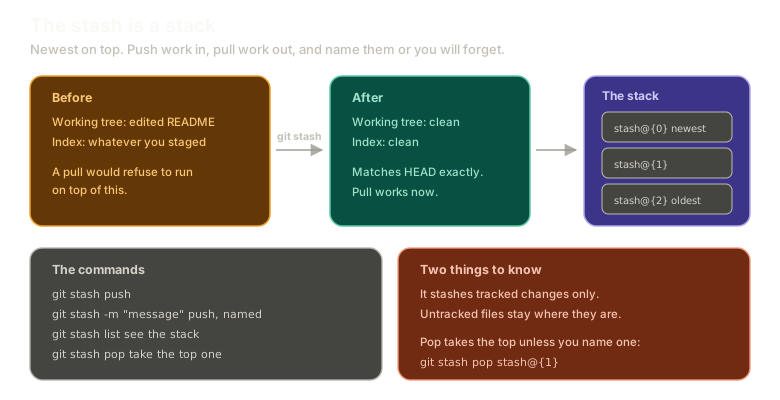 ExpandThe stash shown as a stack: a dirty working tree and index going in, a clean tree matching HEAD coming out, and a stack of entries with the newest at stash@{0}, alongside the push, list and pop commands and a note that only tracked changes are stashed.
Name Them
The single habit that makes stash pleasant instead of confusing:
git stash -m "readme changes"Now stash a second thing so there are two:
echo "another change" >> README.md
git stash -m "another change"
git stash list
Two entries, newest on top. another change sits above readme changes, because the stack grows upward and the most recent push is the one you land on.
The value of naming shows up in about a week. You will have three stashes and no memory of what is in any of them, and the alternative to a message is diffing each one until you recognise something.
Getting a Specific One Back
git stash pop takes the top. To take a different one, name it:
git stash pop stash@{1}The numbering is zero based. stash@{0} is the most recent, stash@{1} the one below it, and so on. Git also accepts the bare number as shorthand, so git stash pop 1 means the same thing.
One clarification worth having, because it trips people up: --index is not how you choose a stash. It is a separate flag that asks git to restore your staged changes as staged, rather than dumping everything into the working tree. The entry you want is the positional argument.
man git-stash has the rest, and this is a good command to practise looking up. RTFM, where the F stands for friendly.
The Actual Workflow
Put it together with a real pull. Make a change upstream:
cd ../hello-git
echo "upstream change" > upstream.md
git add upstream.md
git commit -m "upstream change"
And an unfinished change locally, without committing it:
cd ../remote-git
echo "downstream change" >> README.md
Now the sequence:
git stash -m "downstream readme edit"
git pull
git stash pop
Set aside, pull, put back. Three commands, and your work never had to be committed half-done just to get out of the way.
If you accidentally committed it, you are not stuck:
git reset --soft HEAD~1That walks the branch back one commit and leaves the changes sitting in your index, ready to stash. Reset gets a proper treatment later in the series; for now, --soft means the commit goes away and the work does not.
Practise the whole loop here:
Recovery
Stash and switch
Solved. Try resetting and doing it a different way.
Type a command, or click a suggestion below. `help` lists what works.
What This Sets Up
Stashing works because the two sets of changes did not touch each other. When they touch the same line, git stops and asks you to decide.
Next: resolving a merge conflict by hand, with the editor closed and the markers read directly, because the tools that hide them also hide why the conflict happened.
The Essentials
- Stash is a stack. Push work on, pop it off, newest at
stash@{0}. - It takes tracked changes from both the index and the working tree, and leaves untracked files alone.
git stash -m "message"is the habit worth forming, because unnamed stashes become unidentifiable fast.git stash listshows the stack,git stash showshows a diff.- Pop a specific entry by naming it:
git stash pop stash@{1}.--indexrestores staged state, it does not select an entry. - The workflow is stash, pull, pop, and it never requires committing unfinished work.
Further Reading and Watching
- Git STASH Tutorial: the push and pop cycle with the stack behaviour shown directly.
- git-stash Documentation: every subcommand, including what
--indexactually restores and how to stash untracked files.
Keep reading