Push Is Pull In Reverse
Fetch politely refuses to move your branches. Push moves someone else's without asking. That asymmetry looks inconsistent until you notice who is standing where.
Pull brought other people's work to you. Push sends yours the other way.
git pushSame tracking requirement as pull, for the same reason. No tracking, no push.
Checkout Sets Tracking For You
Here is a convenience worth knowing, because it is why you rarely have to think about tracking in practice.
git checkout barWatch the output. Git set up tracking automatically.
bar already existed in refs/remotes/origin/, brought down by the earlier fetch. When you check out a branch name that exists on a remote and does not exist locally, git creates the local branch and wires up tracking in one step.
Notice you did not create anything. The branch was already known, and checkout did the rest.
This works cleanly with one remote. With several, checking out an ambiguous name gets fussier, because git has to work out which remote you meant. That is the practical cost of interesting remote names, and a decent argument for boring ones.
Push Something
Make a commit on bar:
echo "change from remote" >> README.md
git status
git add README.md
git commit -m "change from remote"
Then send it:
git pushCheck the other repository:
cd ../hello-git
git log bar --oneline
cd ../remote-git
Your commit is there. bar in hello-git moved forward, and nobody in that repository did anything.
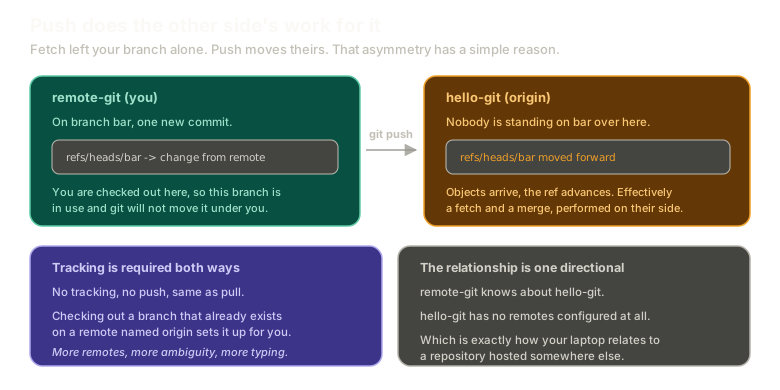 Expandremote-git on the left pushing a commit on branch bar to hello-git on the right, where the branch ref moves forward. Panels note that tracking is required in both directions and that the relationship is one directional: remote-git knows about hello-git, but not the reverse.
The Asymmetry
Something should feel inconsistent here.
Fetch downloaded everything and refused to move your branches. Push downloaded nothing and moved theirs immediately.
Why the different manners?
Because of who is standing where.
When you fetch, you are checked out. You have a working tree with your files in it, possibly uncommitted changes, definitely a position in history. Moving your branch under you would be reaching into work in progress, so git records what it learned and leaves the decision to you.
When you push, nobody is standing on bar in the other repository. No working tree is checked out there, no uncommitted changes are at risk, no one is mid-thought. There is nothing to disturb.
So git does on their side what you would have done on yours: it takes the objects, and it advances the ref. Effectively a fetch and a merge, performed on their behalf.
Push is pull in reverse, with the integration step already done for them.
Run the whole cycle here, fetch through push:
Remotes
Fetch, pull, push
Fetch, look at what changed, then push your local commit.
Type a command, or click a suggestion below. `help` lists what works.
The Relationship Only Runs One Way
Worth being precise, because it explains a class of confusion later.
remote-git has a remote configured, called origin, pointing at hello-git.
hello-git has no remotes at all. It does not know remote-git exists. It has never heard of it.
Check for yourself:
cd ../hello-git && git remote -v && cd ../remote-gitNothing.
The dependency is entirely one directional, which is exactly how your laptop relates to a hosted repository. Your machine knows about the server. The server has no idea which laptops have cloned it.
For everything that follows, hello-git is standing in for GitHub.
I will occasionally say upstream when I mean origin here. Both refer to hello-git, and the slip is common enough that you should expect it from other people too.
A Word on Push Defaults
Git's push behaviour has changed over the years, and the change was an improvement.
It used to push every branch you had. You would finish work on your own branch, type git push, and quietly update the company's main line with code nobody had reviewed or tested.
Modern git pushes the current branch to its tracked counterpart, and nothing else. If you learned git before that changed, some of your caution around push is a scar from a version that no longer exists.
What This Sets Up
You can move work in both directions between repositories. Which means you can now create the situation this whole chapter has been building toward: two people changing the same line and both being convinced they are right.
The next chapter is conflicts, starting with what to do when a pull lands on top of work you have not finished.
The Essentials
- Push requires tracking, exactly like pull.
- Checking out a branch that exists on a remote creates it locally and sets tracking, in one step.
- Push moves the remote's branch, because nothing is checked out there to disturb.
- Fetch refuses to move yours, because you are standing on it.
- Push is effectively a fetch and merge performed on the other side.
- The remote relationship is one directional.
hello-githas no idearemote-gitexists. - Push no longer sends every branch, which older habits still assume.
Further Reading and Watching
- Syncing with Remote Repositories: Push, Pull, and Fetch: the three sync commands covered together with what each one changes.
- git-push Documentation: refspecs, the push defaults that govern what gets sent, and the force options.
Keep reading