Git Pull And Why It Needs Tracking
Pull is fetch and merge run back to back. It fails the first time you try it, and the error is git refusing to guess something it genuinely cannot know.
Fetch then merge is two commands you will type together for the rest of your life. Git has a shortcut.
git pullThat is fetch, followed by merge, into your current branch. Nothing more.
You can be explicit about what to pull:
git pull origin trunkOr leave it off and let git use the current branch. Which is where it goes wrong the first time.
Make a Change on the Remote
Add a commit to hello-git so there is something to pull:
cd ../hello-git
echo "a remote change" >> README.md
git add README.md
git commit -m "a remote change"
A note on git add . while it is in view. The dot means every file git can find from your current directory that has changes. It is fine with a good ignore file in place, and it is how you commit something you did not mean to when there is not.
Naming the specific file is the safer habit. Running git status before either is the safest one.
Now Pull
cd ../remote-git
git pull
It errors.
Take a second with why before reading on, because the reason is more interesting than the fix.
Matching Names Prove Nothing
You have a branch called trunk. The remote has a branch called trunk.
Git will not assume those are related.
That sounds pedantic until you think about the setup from the previous post. Remotes are arbitrary. You could have origin, upstream, and three colleagues' machines configured, and every one of them could have a branch called trunk.
Which one should a bare git pull choose?
There is no correct answer, so git refuses to invent one. It needs tracking information: an explicit statement that this local branch follows that remote branch.
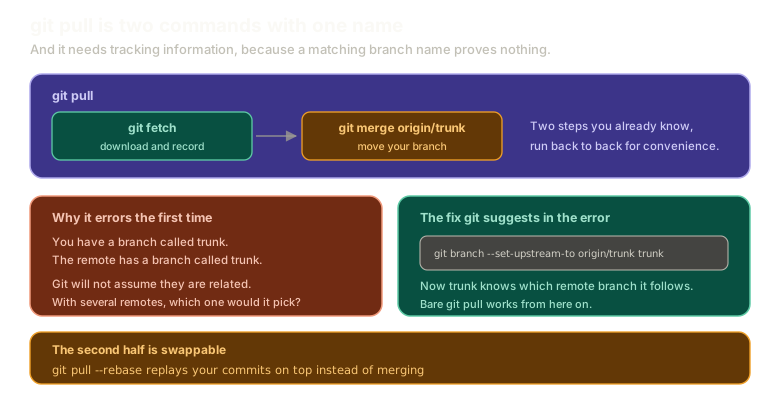 Expandgit pull shown as git fetch followed by git merge origin/trunk, alongside the reason it errors without tracking information and the git branch --set-upstream-to command that fixes it, plus a note that --rebase swaps the second half.
The Fix Is in the Error
Git prints the command you need. Run it:
git branch --set-upstream-to origin/trunk trunkRead it as: set the upstream of the branch trunk to be origin/trunk.
git pullIt works, and it will keep working. Tracking is set once per branch, and from here a bare git pull knows exactly what you mean.
What GitHub Actually Is
Stop and look at what you just did.
You made a change in one folder. You pulled it into another folder. Both are on your laptop.
That is the entire operation GitHub performs, with authentication and a web interface and pull request review bolted on around it. The git part is identical.
GitHub is your repository on someone else's computer.
There are specific things GitHub does that a folder cannot, and there is real machinery in how git talks to a server. But the model is not different, and treating the hosted repository as a magic authority rather than another copy is what makes remote problems feel unsolvable.
Pull With Rebase
The second half of pull is swappable:
git pull --rebaseInstead of merging the remote's work into yours, that replays your commits on top of theirs, using everything rebase does.
There is a solid argument for making this your default when pulling from an authoritative repository, and it is worth understanding even if you land somewhere else.
Your changes end up at the tip. Not buried in the middle of history behind a merge commit, but sitting at the end where you can still work on them: squash them, amend them, test them against what the project actually looks like now. They stay yours until they go public.
The argument gets stronger when something breaks.
A single commit at the tip, with no merge commits around it, is trivial to revert. Six commits interleaved with merges is not. Untangling which changes belong to your work and which arrived from elsewhere is a genuinely bad afternoon during an incident.
That reasoning is about planning for failure rather than success, which is usually the right way round for anything touching production.
It is a preference, not a rule. What is not a preference: a long-lived feature branch is painful either way. Merge or rebase, months of divergence hurts, and no strategy rescues you from it. Short branches are the actual fix.
Making It the Default
If you settle on rebase, you can stop typing the flag:
git config --add --global pull.rebase trueDo not set that yet. The conflict chapter deliberately walks through merges and rebases separately, and a global setting quietly changing what git pull does would hide exactly what those posts are trying to show.
git pull --rebase per invocation does the same thing without the surprise.
What This Sets Up
You can bring other people's work into your repository. The other direction is still missing.
Next: push is pull in reverse, including why fetch politely leaves your branches alone while push moves someone else's without asking.
The Essentials
git pullisgit fetchfollowed bygit mergeinto your current branch.- It fails without tracking information, because matching branch names do not prove two branches are related.
- With several remotes there is no correct guess, which is why git refuses to make one.
git branch --set-upstream-to origin/trunk trunksets it, once, per branch.- GitHub is your repository on someone else's computer. The git operations are the same ones you just ran between two folders.
git pull --rebasereplays your work on top instead of merging, keeping your commits at the tip and easy to revert.pull.rebase truemakes that the default, and long-lived branches hurt regardless of which you choose.
Further Reading and Watching
- 'Git Pull' vs. 'Git Fetch': Key Differences Explained: the split between downloading and integrating, and when you want one without the other.
- git-pull Documentation: the full option list, including the merge and rebase behaviours and how defaults are resolved.
Keep reading