When The Same Conflict Comes Back Every Time
Rebase replays your commits on every pull, so a conflict you already solved returns on every pull. Git has a fix, and it is hidden behind the worst name in the tool.
The rebase conflict is resolved. Pull again and find out how long that lasted.
Make a change upstream that touches the same region:
cd ../hello-gitAdd a line right below a + 6 in README.md, then commit it. Back in your repository:
cd ../remote-git
git pull --rebase
The same conflict. Again.
Not a new one. The one you already thought about, already decided, already fixed.
Why It Has To Happen
This follows directly from the mechanism, which is why it is worth being able to predict rather than being surprised by.
Rebase replays your commits one at a time, every time.
Your commit changes a line. Upstream changed the same line. Replaying your commit onto the new upstream produces the same clash it produced last time, because the same two changes are meeting.
Nothing about resolving it last time changed your commit. It was replayed and rewritten, and it still contains the change that conflicts.
So it conflicts on this pull. And the next one. And the one after that.
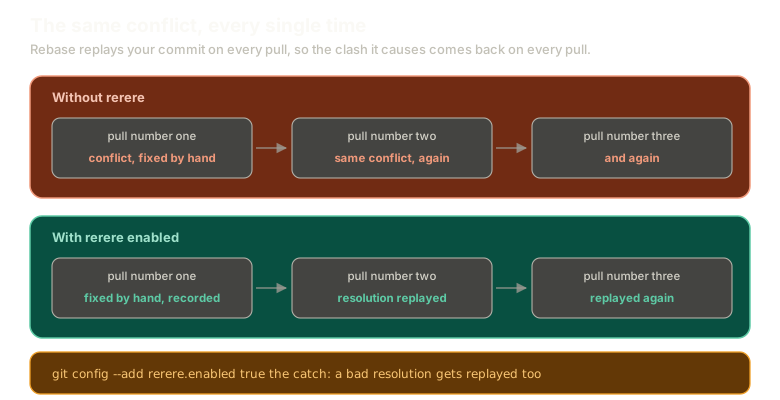 ExpandTwo rows compared. Without rerere, three successive pulls each hit the same conflict and each need fixing by hand. With rerere enabled, the first is fixed by hand and recorded, and the next two have the recorded resolution replayed automatically.
This Is a Real Argument Against Rebase
Sit with the experience for a second, because it is the honest case against a workflow this series has otherwise been fairly warm about.
Would you use rebase if this was what rebase felt like? Fixing an identical conflict on every single pull, for the life of a branch?
Most people would not, and they would be right.
There is a silver lining, which is that the pain is proportional to how long your branch has been diverged. A branch that lives for two hours barely notices. A branch that lives for three weeks is agony.
So it does push you toward short-lived branches, which you should be doing anyway. A cure by misery, but a cure.
Resolve It Once More
Fix the conflict, but properly this time: you want a + 6 and the new line. Both changes need to survive.
Delete the markers, keep both lines in the right order.
This is the genuinely difficult kind of conflict. Not "pick a side", but "reconstruct what this file should say", which gets harder the more the two sides have drifted.
Do not continue the rebase yet.
The Fix Has a Terrible Name
Git has a feature for exactly this. It has been there for years. Almost nobody uses it, and the reason is that it is called rerere.
It stands for reuse recorded resolution.
The git documentation itself describes it as a hidden feature. It is one of the best things in git and it is hidden behind a name that sounds like a typo.
You can say the word out loud to someone struggling with repeated conflicts and they will not realise you just gave them the answer.
Turn It On
Enable it for this repository only, so nothing on your system changes globally:
git config --add rerere.enabled trueConfirm it landed where you expect:
git config --list --local
cat .git/config
There it is in the file, exactly as config always is.
Now finish the rebase you are in the middle of:
git add README.md
git rebase --continue
Watch It Work
Make another upstream change that would have conflicted:
cd ../hello-git
echo "another change with rerere" >> upstream.md
git add upstream.md
git commit -m "rerere"
cd ../remote-git
git pull --rebase
It just rebases. No conflict, no prompt, no decision to make.
Git recognised the conflict as one it had seen, found the resolution you recorded, and applied it.
What It Actually Does
Rerere records the shape of a conflict and the resolution you produced for it. Next time an identical conflict appears, it replays your answer automatically.
You resolve a conflict once instead of once per pull. That is the entire feature.
I would turn it on. The cost is close to zero and the benefit shows up exactly when a workflow would otherwise become unbearable.
The One Catch
Read this part before enabling it globally.
A bad resolution gets replayed too.
Resolve something wrongly, and git faithfully remembers that wrong answer and applies it every time. You pull, expecting to be asked, and instead the mistake reappears silently.
You can delete recorded resolutions when that happens. But the failure mode is a resolution you did not consciously approve, which is a different kind of problem from the one you were solving.
Worth it, in my view. Worth knowing about, definitely.
What This Sets Up
Sometimes you do not want to reconstruct anything. You want one side, entirely, and to move on.
Next: picking a whole side with ours and theirs, which is faster and blunter than it first appears.
The Essentials
- Rebase replays your commits on every pull, so a conflicting commit conflicts every pull.
- Resolving it does not change the commit, which is why the clash returns.
- This is a genuine argument against rebase, and the pain scales with how long a branch stays diverged.
- rerere means reuse recorded resolution, and it is documented as a hidden feature.
git config --add rerere.enabled trueturns it on, locally or globally.- It records how you fixed a conflict and replays that fix when the same conflict reappears.
- A wrong resolution gets replayed too, silently, until you delete it.
Further Reading and Watching
- Git ReReRe Demo: a demonstration of recording a resolution and watching it replay on a later conflict.
- Rerere: the Pro Git chapter, including how to inspect and clear recorded resolutions.
Keep reading