Picking A Whole Side With Ours And Theirs
Sometimes you do not want to reconstruct anything, you want one version and to move on. The command is one line, and it takes more than you think.
Recording resolutions helps when the same conflict repeats. Sometimes the problem is different: you already know which version is right, and editing markers by hand is pointless ceremony.
Git lets you take a side wholesale.
git checkout --ours README.md
git checkout --theirs README.md
Ours means the branch you are currently on. Theirs means the incoming one.
Those definitions are stable. What changes is where you are standing, which is the whole inversion problem from two posts ago.
It Confuses Everyone
Worth saying plainly, because feeling stupid about this is common and unnecessary.
Ours and theirs is widely considered the most confusing naming in git. Experienced engineers get it backwards. It makes perfect sense once you reason it through and still manages to be a bad interface.
If it trips you up, you are in ordinary company.
Try It With Merge
Make one more conflict. Change the first line to a + 7 upstream and a + 8 locally, commit both, then:
git pullConflict. Now take your side:
git checkout --ours README.md
cat README.md
a + 8. No markers, no editing. Git rewrote the file to your version.
git statusStill both modified, because choosing is not resolving. Staging is:
git add README.md
git commit -m "merged"
The Part That Bites
Here is what --ours actually did, and it is more than picking a line.
It took the entire file from your side.
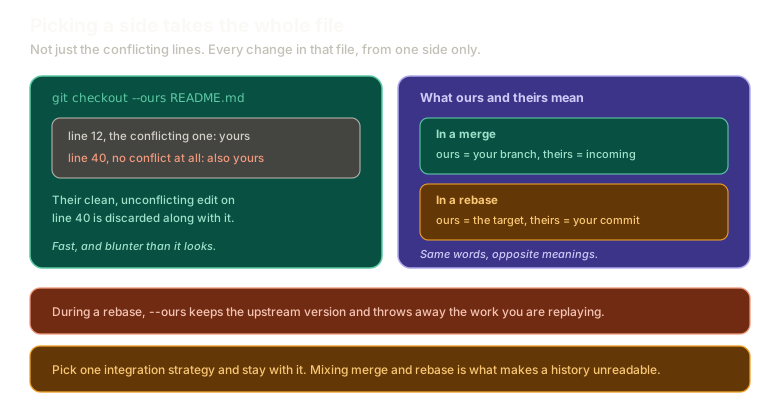 ExpandOn the left, git checkout --ours README.md taking not only the conflicting line 12 but also line 40, where the incoming side had a clean non-conflicting edit that is now discarded. On the right, the definitions of ours and theirs under merge and under rebase, which are opposite.
Suppose the incoming side also changed line 40 of that file, and that change did not conflict with anything. Git would have merged it cleanly if you had resolved by hand.
--ours throws it away. You did not choose to discard it. You chose your version of the file, and their unrelated improvement was inside the version you rejected.
That is the tradeoff. Fast, and blunter than it looks. For a file where one side is simply correct, it is the right tool. For a file where both sides made real changes, resolving by hand is not ceremony, it is the only way to keep both.
Now Try It With Rebase
Same setup, different integration. Change the line to a + 9 upstream and a + 10 locally, commit both:
git pull --rebase
git checkout --ours README.md
cat README.md
You get a + 9. The upstream change.
You asked for ours and received theirs.
Which is correct, and follows exactly from the mechanism. During a rebase you are standing on the target branch, so ours is the target and theirs is your own commit.
To keep your own work:
git checkout --theirs README.md
git add README.md
git rebase --continue
Same flag, opposite meaning, depending on which operation you are inside. This is why reasoning from what rebase does beats memorising a rule.
Pick a Strategy and Stay With It
One practical point that keeps coming up and deserves stating on its own.
Do not mix merge and rebase on the same branch.
Mixing them produces merge commits scattered through a history that is otherwise linear, which is the worst of both. The graph becomes hard to read, and reasoning about what happened when becomes guesswork.
Pick one. Get in sync. Diverge again from a clean base if you need to.
Honestly, Both Have a Case
I said earlier that rebase discarding conflict history is the best argument against it. There is a matching argument in favour of merge that I find genuinely persuasive.
A merge commit records that a conflict happened and that a human made a decision.
Six months later, tracing how a bug got introduced, that is real information. Two versions of this code existed, someone chose, and here is the choice. A rebased history erases that. It looks like the conflict never occurred, and the resulting linear history is a slightly fictionalised account of events.
So the case runs both ways, and I do not think there is a universal answer. Clean history versus complete history, and which one you want depends on whether you are optimising for reading the log or for reconstructing decisions.
What is not optional is picking one and being consistent.
What This Sets Up
That is conflicts. What remains from rebase is the version people actually use daily, and it has nothing to do with conflicts at all.
Next: interactive rebase and squashing, which is how a mess of checkpoint commits becomes one commit worth reviewing.
The Essentials
git checkout --ours <file>and--theirs <file>take one side without editing markers.- Ours is your current branch, theirs is incoming, and those definitions never change.
- Under rebase they invert, because you are standing on the target branch.
- Taking a side takes the whole file, including non-conflicting changes from the side you rejected.
- Staging is still what resolves the conflict, whichever way you chose.
- Do not mix merge and rebase on one branch.
- Merge preserves the record of a conflict decision. Rebase removes it. Both are defensible.
Further Reading and Watching
- The 2 Types of Git Merge Conflicts Explained & Fixed: the distinct kinds of conflict and which resolution approach suits each.
- Advanced Merging: the Pro Git chapter on merge strategies, including the ours and theirs options and how they differ from the checkout flags.
Keep reading