Where To Actually Put A Jwt
Every JWT storage option is a trade-off, but only one of them gets every protection this entire course has already covered.
The last post left one question hanging on purpose: once you actually have a JWT, where does it live in the browser? The options aren't equally good, and ranking them honestly matters more than listing them neutrally.
Local Storage: The Worst Realistic Option
Local storage is the option people reach for first, because it's the easiest to use from plain JavaScript. It's also the worst realistic choice.
This is the exact same vulnerability already covered earlier in this course for cookies: anything in local storage has no HttpOnly-equivalent protection, so a single successful XSS attack can read it out with one line of code. A JWT sitting in local storage tends to persist for a very long time too, since nothing forces it to expire the way a session cookie naturally can.
Session Storage: A Narrower Window, Not a Fix
Session storage improves on that in one specific way: it's scoped to a single tab, and it clears when the tab closes.
It's still fully readable by JavaScript, which means it doesn't actually solve the underlying problem, an XSS attack can still read it just as easily. What it does is narrow the exposure window somewhat, since a token that only lives as long as one tab session has less time to be useful to whoever stole it.
Cookies: The Best Realistic Option
A cookie can be HttpOnly, meaning JavaScript can't read it at all, exactly like the session cookies already covered earlier in this course. It can also be Secure, restricted to HTTPS only, and scoped tightly to the paths and origins that actually need it.
A JWT stored in a properly configured cookie gets every protection this entire course has already spent time building up. That's not a coincidence, it's the whole reason cookies are the recommended default here.
The real catch is size. Cookies are limited to somewhere around 4 to 5 kilobytes, and a JWT carrying a lot of claims, or multiple tokens stacked together, can genuinely blow past that limit depending on what's actually being encoded into it.
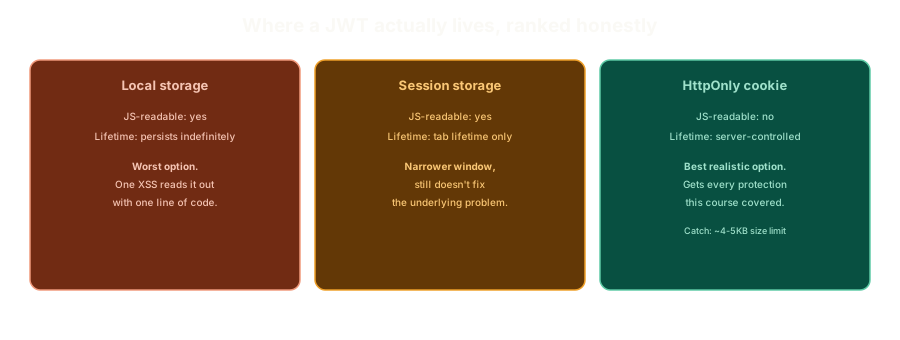 ExpandLocal storage, session storage, and a cookie shown side by side, comparing JavaScript readability and how long each one actually persists.
In-Memory: Legitimate, With a Real Trade-off
The last option is storing the token as nothing more than a JavaScript variable, never persisted anywhere at all. A page reload or navigation away means starting over and re-authenticating.
That's a real trade-off, not automatically a downside. For something genuinely sensitive, forcing re-authentication after a reload can be a desirable security property rather than a bug someone forgot to fix.
Think of a fictional admin console at James Corp, used only a few times a week to approve high-value refunds. Requiring a fresh login every time someone opens a new tab to it isn't friction for friction's sake, it's a deliberate choice that a token this sensitive shouldn't outlive the specific tab someone was actively using.
Multiple JWTs stacked in one request, or a single token carrying a long list of role and permission claims, are the two most common ways teams actually hit that ceiling in practice. Trimming what actually needs to live inside the token's claims is usually the first fix, before reaching for a workaround that reintroduces complexity elsewhere.
The Practical Recommendation
Cookies, configured with every protection already covered in this course, are the right default whenever the size limit isn't a blocker. It's not the flashiest answer, but it's the one that actually holds up.
Living With "You Can't Revoke a JWT"
The last post's biggest caveat was real: once a JWT is signed, there's no "delete the session" button. The practical mitigation is keeping tokens genuinely short-lived.
If a short-lived token does leak, that's a bounded amount of pain, minutes, not days. Pair that with a server-side refresh mechanism that periodically issues a fresh token, and you get back a meaningful amount of the revocation control a database-backed session would have given you, without abandoning the stateless architecture that made JWTs worth using in the first place.
The One Rule That's Actually Non-Negotiable
It isn't a stylistic preference, and it isn't a matter of taste between two roughly equal options. A missing verification check here is the difference between a signature that actually means something and one that's decorative.
What This Sets Up
Storage, revocation, algorithm verification, all of it protects a token that represents an identity. None of it says anything about how that identity got created in the first place, and this course still owes you an answer to that.
The Essentials
- Local storage is the worst realistic option, with no
HttpOnly-equivalent protection and no natural expiration. - Session storage narrows the exposure window but doesn't fix the underlying problem. It's still fully readable by JavaScript.
- Cookies are the best realistic option, since a properly configured cookie gets every protection this course has already covered.
- The real limit on cookies is size, roughly 4 to 5 kilobytes, which a large JWT can genuinely exceed.
- In-memory storage is legitimate for sensitive use cases, trading persistence for forced re-authentication on reload.
- Short-lived tokens plus a refresh mechanism recover most of the revocation control a database session would have had.
- Verifying with the wrong algorithm is the one truly non-negotiable mistake to avoid, and it's almost always an omission, not a deliberate choice.
Next up: the last gap this course has left open, how a password should actually be stored, and the throughline connecting everything covered so far.
Further Reading and Watching
- Where to Securely Store JWTs: Cookies, Local Storage, or Session Storage?: a direct comparison of the same storage trade-offs covered in this post.
- JSON Web Token Cheat Sheet: OWASP's reference on JWT storage, algorithm verification, and revocation strategies.
Keep reading