Tabnabbing And Breaking The Window Opener Link
Tabnabbing doesn't attack you the second a tab opens, it waits until you've stopped paying attention to it.
The last post covered both directions a window can be tricked into trusting the wrong thing. Tabnabbing is a subtler variant of that same family, one that doesn't need a message at all, just time and a live reference back to the tab it opened.
What Tabnabbing Actually Does
A page opens a new tab or window, and for a moment, it shows something completely unremarkable. A loading spinner, an article, anything that doesn't raise suspicion.
Then, after a delay, the content quietly changes underneath the user.
const newTab = window.open("https://harmless-looking-page.example");

setTimeout(() => {
  newTab.location = "https://fake-login-page.example";
}, 5000);
That setTimeout is doing the real work. The original page keeps a live reference to the tab it opened, and that reference is what lets it swap the content out from under the user well after the tab first loaded.
By the time the fake login page appears, the user isn't scrutinizing anything anymore. They already mentally filed this tab as "the thing I opened a minute ago," and that's exactly the window tabnabbing depends on. Nobody rereads a URL bar for a tab they think they already trust.
The same idea can work through certain iframe setups too, not just a spawned tab, since the core requirement is just a live reference and a delay.
Picture a fictional job board called Peter Jobs. A listing links out to what looks like a company's careers page, which opens in a new tab and briefly shows something completely ordinary, a loading state, a generic "redirecting" message.
Minutes later, while the user is back on Peter Jobs browsing other listings, that forgotten tab quietly becomes a near-perfect clone of a real login page. The user never clicked anything to make that happen. The tab did it on its own, on a timer, while their attention was somewhere else entirely.
The Defenses You Already Have
Every defense from framing also helps here, because both attacks are fundamentally about controlling how a page can be embedded or referenced by something else.
X-Frame-Options, frame-ancestors, and frame-busting JavaScript all restrict how a page can be wrapped or held onto by another window. That overlap isn't a coincidence. Both attacks succeed by keeping a connection alive between a malicious page and something it doesn't actually control.
The Fix Specific to This One
There's a defense that targets tabnabbing directly: severing the window.opener reference that a newly opened window carries back to whatever spawned it.
<a href="https://external-tool.example" target="_blank" rel="noopener">
  Open external tool
</a>
rel="noopener" breaks that link entirely. The new tab has no way to communicate back to, or be manipulated by, the page that opened it. As a side benefit, it also strips the referrer information that would otherwise get passed along to the destination page.
Without noopener, the spawned window's window.opener property points straight back at the tab that opened it, giving the original page a persistent handle it can use for exactly the kind of delayed swap shown above. rel="noreferrer" does the same job and adds one more restriction, stripping the referrer header entirely rather than just leaving it in place, which is worth reaching for when a destination shouldn't even learn which page sent the visitor.
Most modern browsers now apply something close to noopener behavior by default to links using target="_blank", which softens the risk considerably. That default is a reasonable safety net, not a reason to stop setting the attribute explicitly. Relying on a browser default to quietly do the right thing is exactly the kind of assumption that broke in the CSP posts earlier in this course, and it's worth being just as deliberate here.
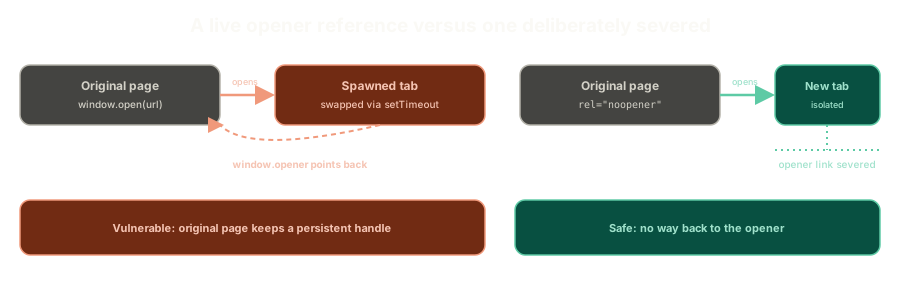 ExpandA spawned window with a live window.opener reference back to the page that opened it, next to one opened with rel="noopener" where that reference is severed entirely.
A Real Situation Where This Matters
Say you're building an internal workflow tool, something like a fictional app called Neal Ops, where users can embed links pointing to their own external systems inside their own content. The tool has to render those links somehow, and the links are entirely user-controlled.
That's a real, legitimate need to load dynamic, user-supplied content, and it exposes the page to a wide range of these attacks if handled carelessly.
One workable approach layers two things together instead of trying to sanitize raw HTML perfectly.
- Strip the content down to something minimal, like sanitized markdown, with no raw HTML allowed at all. There's nothing left to hide a malicious attribute inside.
- If anything does need to render inside an iframe, use the
sandboxattribute, which disables essentially everything by default, including form submission, unless you explicitly opt individual capabilities back in.
Neither piece alone is bulletproof. Together, stripped-down content plus a fully sandboxed iframe means there's very little surface left for a user-supplied link to actually exploit.
What This Sets Up
Framing tricks the click. Tabnabbing tricks the wait. Both rely on a live connection between an attacker's page and something the user trusts, and both get meaningfully harder the moment that connection gets cut.
Next up: a different kind of trust entirely, not trusting a window, but trusting an identity, without a database to check it against.
The Essentials
- Tabnabbing swaps a tab's content after a delay, relying on a live reference the opening page keeps to the tab it spawned.
- The psychological trick is distraction. By the time the fake page appears, the user has already stopped scrutinizing that tab.
- The framing defenses from the last post also help here, since both attacks depend on controlling how a page gets referenced by another window.
rel="noopener"severs thewindow.openerlink, and also strips the referrer sent to the destination page.- User-controlled dynamic links are a real, legitimate need, and a sandboxed iframe combined with stripped-down, HTML-free content is a workable way to allow them safely.
Further Reading and Watching
- What is Tabnabbing?: a short walkthrough of the delayed-swap mechanism and why it fools users who trust a tab they already opened.
- Reverse Tabnabbing: OWASP's reference on the
window.openerlink and therel="noopener"fix.
Keep reading