Clickjacking And The Invisible Frame Trick
Clickjacking doesn't trick your browser and doesn't trick your code, it tricks you, into clicking a real button you never meant to click.
The last post closed by naming what comes next: clickjacking, postMessage abuse, tabnabbing, and JWT security. All four share something the rest of this course didn't have to deal with directly, a human being on the other end of the attack, not just a browser following rules.
A Different Kind of Trick
Every attack so far has tricked something that isn't a person. CSRF tricked the browser into sending a request it never meant to send, using a cookie it attached automatically. XSS tricked the page itself into running code that was never supposed to be there.
Clickjacking is different. It tricks the user. No forged request, no injected script, nothing for a WAF or a sanitizer to flag, because from the browser's point of view, nothing unusual happened at all.
That's also why this attack sits later in the course rather than earlier. It depends heavily on who your users actually are and how much they scrutinize what's in front of them, which makes it harder to reason about in the abstract than a CSRF token or a CSP header.
What Clickjacking Actually Looks Like
Picture a fictional app called Meridian Pay. A logged-in user has a button on their dashboard that reads Send $200 to Verified Contact, and clicking it moves real money out of a real account.
An attacker builds a completely different page, something that looks like a giveaway: Claim Your Free Gift Card. Behind that decoy button, invisible and perfectly aligned, sits an iframe loading the real Meridian Pay page.
The trick has three parts working together.
- The real page loads in an iframe, set to
opacity: 0, so it's fully present and fully clickable, just invisible. - The iframe is positioned precisely so its real button sits exactly under the decoy's fake button.
pointer-events: noneon the decoy lets the click pass straight through the fake element to the real one hiding underneath it.
The user sees a gift card button. They click it once, like anyone would.
What actually happened underneath is a real click, on a real button, in a session the user is genuinely logged into.
This isn't a stolen credential. It isn't a forged request either, because nothing was forged, the request the browser sent was completely legitimate. The only thing fake was what the user believed they were clicking.
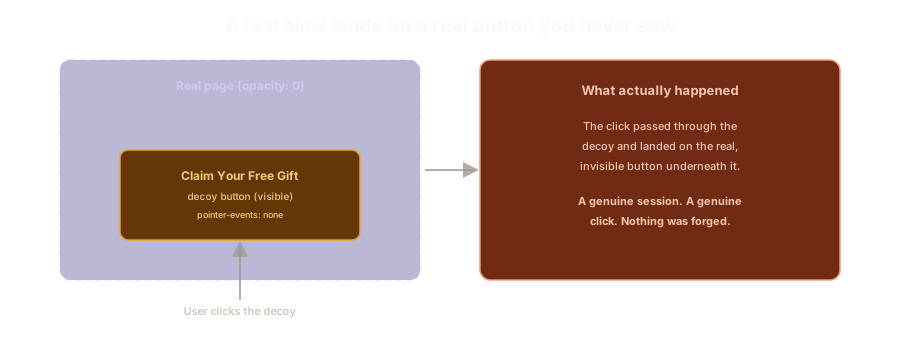 ExpandAn invisible real button stacked exactly beneath a visible decoy button, with the decoy's pointer-events disabled so the click passes through to the hidden element underneath.
Three Layers of Defense
The fixes for this line up in a natural order, from the strongest guarantee down to a fallback for when something upstream goes wrong.
X-Frame-Options
The oldest and still widely supported option is a response header that controls whether a page can be framed at all.
X-Frame-Options: DENYDENY refuses all framing, no exceptions. SAMEORIGIN allows framing only from pages on the exact same origin, which matters if part of your own app legitimately embeds another part of itself.
frame-ancestors
The modern equivalent lives in the Content Security Policy header, as the frame-ancestors directive.
Content-Security-Policy: frame-ancestors 'self' https://trusted-partner.exampleIt does the same job as X-Frame-Options, but as an allow list rather than a strict deny-or-same-origin choice, which is useful if a specific trusted partner legitimately needs to frame your page. Set both headers together. They cost almost nothing to configure, and having the older header in place covers any client that doesn't respect the newer CSP directive yet.
Frame-Busting JavaScript
The last layer is a fallback, not a primary defense: JavaScript that checks whether the page is sitting inside a frame, and forces its way out if so.
if (window.self !== window.top) {
  window.top.location = window.self.location;
}
window.self is always the page itself. window.top is the outermost window in the frame hierarchy, so the two are only equal when the page isn't framed at all.
Treat this as insurance, not the plan. The day a header gets misconfigured during a routine deploy, it's the frame-busting script that quietly saves you, not because it's the better defense, but because it's the one still standing when the primary one slipped.
When Deny Isn't the Right Answer
X-Frame-Options: DENY sounds like the obviously correct default, and often it is. It also breaks a real, legitimate pattern: an embedded widget that depends on being loaded inside someone else's page.
A comment section that relies on a logged-in cookie from a different origin, loaded inside an iframe on a third-party blog, is a completely normal use case that DENY would quietly kill. That's when SAMEORIGIN, or a tight frame-ancestors allow list naming exactly which origins are trusted, is the actual right call instead of the strictest possible setting.
Security headers aren't a single correct value you copy everywhere. They're a question about what your specific app actually needs to allow, answered as narrowly as the real use case permits.
A Debugging Trap Worth Knowing About
If you set one of these headers and it doesn't seem to work, the header itself might be fine. Browsers cache responses aggressively, including the headers attached to them, and a stale cached response can keep serving the old, unprotected version during testing.
Disabling cache in DevTools doesn't help if DevTools wasn't open when the original request happened, since caching decisions get made before you ever open the panel. A hard reload, or clearing the cache directly, is often the actual fix when a security header you just added seems to be doing nothing.
The Essentials
- Clickjacking tricks the user, not the browser or the page's own code. A real click, on a real button, in a genuinely valid session.
- The attack layers an invisible, correctly positioned iframe under a decoy element, using
opacity: 0andpointer-events: noneto route the click through. X-Frame-Optionsandframe-ancestorsshould both be set. They cost almost nothing and cover different levels of browser support.- Frame-busting JavaScript is a fallback, not the primary defense, useful for the day a header gets misconfigured.
DENYisn't always correct. A legitimate embedded widget might needSAMEORIGINor a specificframe-ancestorsallow list instead.- Stale caching can hide whether a header fix actually worked. Hard reload before assuming a fix failed.
Next up: a mechanism just as legitimate as framing itself, and just as exploitable when the code on either end forgets to check who it's actually talking to.
Further Reading and Watching
- Introduction to Frame-busting, X-Frame-Options HTTP Header and Click-Jacking: a walkthrough of the frame-busting technique alongside the
X-Frame-Optionsheader it backs up. - Clickjacking Defense Cheat Sheet: OWASP's reference on
X-Frame-Options,frame-ancestors, and when each one applies.
Keep reading