How Cookies Fake A Login On A Stateless Web
HTTP has no idea what 'logged in' means. Cookies are the mutually agreed hack that layers a session on top of a protocol that forgets you the instant a response is sent.
The last post made the case that identity on the web is a claim the server chooses to trust, not a verified fact. Cookies are where that claim actually lives, and understanding them properly starts with a fact that surprised me the first time I really sat with it: HTTP does not know what "logged in" means.
HTTP Forgets You on Purpose
Every HTTP request is independent. The server handles it, sends a response, and forgets it ever happened.
There is no built-in concept of a conversation, a session, or a returning visitor. Statelessness was a deliberate design choice, not an oversight, and it is what let the early web scale to millions of unrelated requests without every server needing to remember every visitor forever.
So how does a site know you are still logged in on your third click? It doesn't, not really. The browser and the server have quietly agreed to run a small trick on top of a protocol that was never built for this.
The Trick Is a Repeated Reminder
Here is the whole mechanism, stripped down: the server tells the browser to remember a value, and the browser repeats that value back on every request until told otherwise.
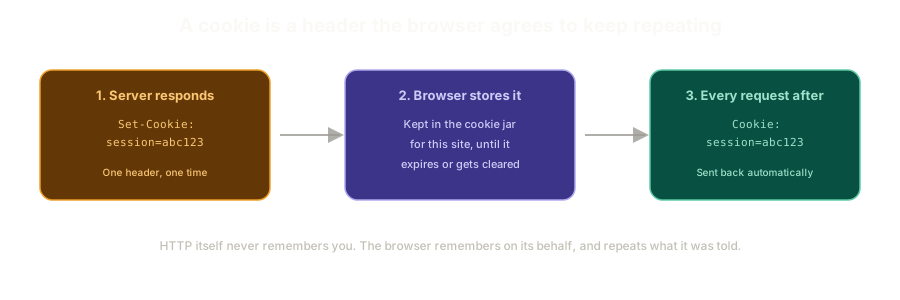 ExpandSet-Cookie response header, the browser storing the value, and the same value coming back in every request after.
That's it. There is no persistent connection, no memory on the server's side beyond whatever it chooses to look up using that repeated value. The entire idea of "being logged in" is the browser saying the same thing back to the server, over and over, until the cookie expires or gets cleared.
This repeated reminder is what this series calls a session, and it is the concept the rest of this course builds on.
Cookies Are Not Only for Login
It is easy to assume cookies exist purely for authentication, but that undersells them. A cookie is just a small piece of state the browser is willing to carry around and hand back to a specific site.
That covers a lot of ground:
- Tracking which products someone looked at, without knowing who they are
- Keeping items in a shopping cart across page loads, before any login happens
- Remembering a preference like dark mode, with no security implication at all
For this series, the interesting case is the one tied to an authenticated user, because the moment a cookie represents "who you are," losing control of it means losing control of the account.
Nobody Designed This Properly, At First
Cookies have a strange origin story worth knowing, because it explains a lot of their current weirdness.
Netscape shipped the original cookie implementation in 1994, in a matter of days, with no formal specification at all. Other browsers copied the behavior because it worked well enough, not because there was an agreed standard to follow. An attempt to formalize things in 1997 produced incompatible changes that never really caught on either.
A real specification did not exist until 2011. For nearly two decades, cookies ran the authentication layer of the entire web on nothing more than "this is roughly what Netscape did once."
That history matters here for the same reason it mattered in the last post: a lot of cookie behavior that feels arbitrary today is arbitrary, because it was never actually designed, just inherited.
document.cookie Does Something Nobody Expects
One of those inherited quirks shows up the moment you try to work with cookies from JavaScript.
document.cookie looks like a normal property. Set it once, you would expect it to hold that value. Set it a second time, and instead of replacing the old value, the browser appends to it.
document.cookie = "theme=dark";
document.cookie = "cart=empty";

console.log(document.cookie);
// "theme=dark; cart=empty"
Neither assignment overwrote the other. document.cookie is really a strange, non-standard-looking interface for adding to a semicolon-separated list, not a normal variable.
index.html in a browser with DevTools open.This is the kind of gap where attackers thrive. Someone who assumes document.cookie = X behaves like a normal assignment will misjudge what their own code is actually doing to a user's cookies, and small misjudgments like that are exactly where bugs turn into holes.
Watching Cookies Actually Work
You do not need any special tooling to see this play out. Open DevTools on any site, go to the Application tab, and look at the Cookies section in the sidebar.
The browser is doing real parsing work here that is easy to take for granted. A cookie is genuinely just one long string with semicolons in it, and the browser splits it apart and lays it out in a table for you. That table is worth checking often while building anything that touches auth: are the values what you expect, are there stray entries you did not set, does anything look like it survived a session it should not have.
You can delete cookies from that same panel too, which becomes useful once this series starts intentionally breaking things and needs a clean slate to test with.
What This Sets Up
A cookie by itself is just a key and a value. What decides how dangerous that value is, and how far its reach extends, are the attributes attached to it: when it expires, which paths can see it, and which domains it applies to.
Those attributes are where cookies stop being simple and start having real consequences.
The Essentials
- HTTP is stateless by design. Nothing about the protocol remembers a previous request.
- A session is a browser and server agreeing to repeat a value back and forth, layered entirely on top of that stateless protocol.
- Cookies are not exclusively for authentication. Tracking and shopping carts use the same mechanism, with none of the same risk.
- Cookies ran unspecified from 1994 until 2011. Most of their strangest behavior is inherited history, not intentional design.
document.cookieappends instead of overwriting. Treating it like a normal variable assignment is a quiet, common mistake.- The Application tab in DevTools is the fastest way to see exactly what a cookie holds. Check it often while building anything auth-related.
Next up: the attributes attached to a cookie, and why one small character in the domain setting can hand your session cookie to every other tenant on a shared hosting platform.
Further Reading and Watching
- Follow the Cookie Trail: Computerphile's walkthrough of how cookies work and why they became controversial enough to get their own regulation.
- Using HTTP cookies: MDN's reference on the
Set-Cookieheader and how the round trip actually works.
Keep reading