Cookie Attributes Expiry Path And Domain Traps
You can't actually delete a cookie, only lie to it about the date. And one leading dot in the domain attribute can hand your session cookie to every other app on a shared platform.
The last post treated a cookie as a plain key and value. That's true, but incomplete: a cookie also carries a set of attributes that decide how long it lives and who else gets to see it, and those attributes are where cookies stop being harmless.
A Cookie Is a Key-Value Pair With Rules Attached
Think of a cookie as two layers. The value is whatever data you put in it. The attributes are a set of instructions the browser agreed, informally at first and by spec since 2011, to actually honor.
Two of those instructions matter immediately: when the cookie should stop existing, and which requests it should be attached to.
Expiration: Two Ways to Say the Same Thing
A cookie can carry an Expires date or a Max-Age in seconds. Functionally they do the same job, telling the browser when to stop sending the cookie back.
Skip both, and the cookie becomes a session cookie, which lasts roughly until the browser closes. That default is a reasonable one for anything sensitive: a login cookie with no expiration set at all is at least bounded by "the user eventually closes their browser."
Longer-lived cookies are not automatically wrong, but the length should match what the cookie is for. A dark mode preference surviving for a year is fine. A session token surviving for a year is a much bigger attack window if it ever leaks.
Google once set a cookie with an expiration date in 2038, which is suspiciously close to when 32-bit timestamps run out of room to count. The lesson is not "never set a long expiration." It's that a cookie living for over a decade deserves a real reason, not a default nobody thought about.
You Cannot Delete a Cookie, Only Lie About the Date
This one surprised me. There is no "delete this cookie" instruction in the cookie system.
The only way to get rid of a cookie is to set its expiration date to some point in the past. The browser sees the date has already passed, treats the cookie as expired, and drops it on its next cleanup pass.
That's the entire mechanism behind every "log out" button that clears a session cookie. It isn't deleting anything. It's setting the same cookie again with a timestamp from last week and letting the browser do the rest.
Path: A Narrower Promise Than It Looks
The path attribute scopes a cookie to a subset of URLs on the same site, like restricting a cookie to only /admin instead of the whole domain.
It sounds like a clean way to limit exposure, and in a narrow sense it is. But path scoping gets undermined constantly by things like iframes and cross-page navigation, where the boundary you assumed existed turns out to be much leakier in practice. Treat path as a mild convenience, not a security boundary you can rely on by itself.
Domain: Where the Real Danger Lives
The domain attribute is the one worth slowing down for.
Leave it unset, and a cookie defaults to the exact host that set it. Add a leading dot, and the cookie becomes valid for that domain and every subdomain of it.
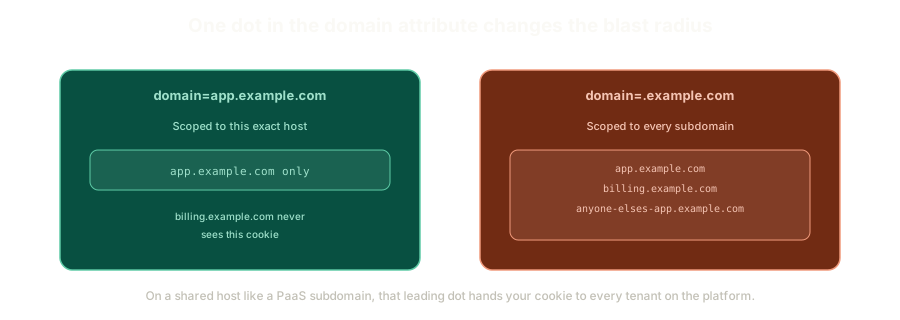 ExpandAn exact-host cookie staying scoped to one subdomain versus a leading-dot cookie reaching every subdomain of the same site.
For a company that fully owns its domain, this can be genuinely useful. A cookie scoped to .example.com lets login.example.com and dashboard.example.com share a session without extra work.
Here's where it turns dangerous: what if you don't own the entire domain?
Picture hosting on a shared platform, something like a free subdomain off a PaaS provider. If a cookie gets scoped to .platformname.io instead of your exact subdomain, every other project hosted on that same platform, under that same root domain, can now see that cookie too. You didn't grant anyone access on purpose. A single leading dot did it for you, silently, and the person setting the cookie may not even have realized their framework defaulted to it.
This is the pattern worth internalizing: a setting that looks like a minor convenience for your own use case can quietly become a shared vulnerability the moment your domain isn't fully yours to control.
What This Sets Up
Attributes decide the blast radius of a cookie. They say nothing about what happens once someone actually gets their hands on the value inside it.
That's the next problem, and it's a more basic one than domain scoping: what happens when the value itself is something as simple and readable as a username.
The Essentials
- A cookie is a value plus a set of attributes the browser is obligated to respect, not just a raw string.
ExpiresandMax-Agedo the same job: telling the browser when to stop sending the cookie.- Cookies cannot be deleted, only expired into the past. Every logout button relies on exactly this trick.
pathscoping is a convenience, not a real boundary. Iframes and navigation edge cases leak past it.- A leading dot on
domainscopes a cookie to every subdomain, which is dangerous the moment you don't own the whole domain yourself. - On shared hosting platforms, an overly broad domain attribute can leak a cookie to every other tenant, not just your own subdomains.
Next: what actually happens when the value inside that cookie is a username sitting in plain text, and why anyone with DevTools open can become someone else without writing a single line of exploit code.
Further Reading and Watching
- The essentials of HTTP cookie attributes: Chrome for Developers walks through expiration, path, domain, and the other attributes that control cookie behavior.
- Set-Cookie header reference: MDN's full breakdown of every cookie attribute and its exact scoping rules.
Keep reading