Csp The Second Layer After Sanitization
Having any Content Security Policy at all, even a permissive one, disables inline scripts by default. That one fact does more work than most of what comes after it.
The last post ended with a promise: a policy-level defense that can still save you the day a sanitizer misses something. This is that layer, and it starts from an idea I already understood without realizing it, because this course covered half of it two posts ago.
The Same Idea, Pointed the Other Way
CORS is an allow list for who gets to read your responses. You name the origins allowed to see what your API sends back, and everyone else gets refused by the browser, not your server.
Content Security Policy is the same idea, aimed in the opposite direction. Instead of controlling who can read what your page sends out, it controls what your page is allowed to load in the first place.
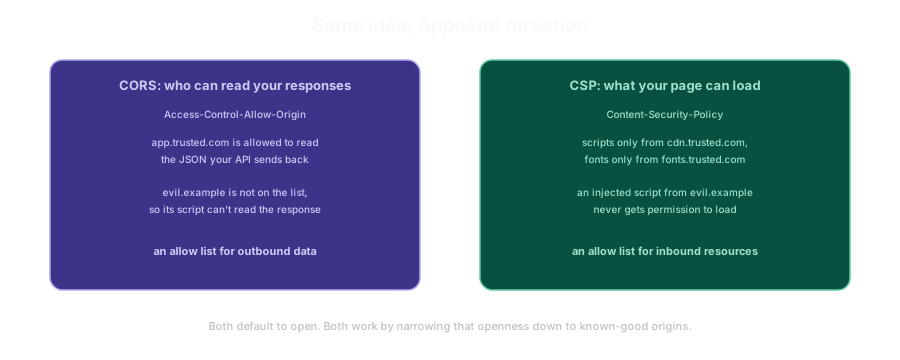 ExpandCORS as an allow list for who can read your responses, next to CSP as an allow list for what your page is allowed to load.
One governs outbound data. The other governs inbound resources. Same underlying mechanism, same browser enforcing it, different direction of traffic.
The Web's Best Feature Is Also the Risk
Nothing stops a page from loading a font from Google, a script from a CDN, and an image from a domain it has never talked to before. That openness is genuinely one of the best things about the web.
You can drop in a hosted library instead of vendoring it. You can pull fonts from a service instead of shipping the files yourself. You can embed a widget someone else built and maintains.
None of this asks permission, and by design, none of it has to. That's exactly what makes it dangerous the moment an attacker gets even a small foothold, because the same freedom that let you load a font from anywhere lets injected code load anything from anywhere too.
A Content Security Policy is you saying: not anymore, only from places I've actually named.
The One Fact That Does Most of the Work
Here's the part that surprised me the most about CSP, and it's almost counterintuitive if you're coming at this fresh.
Simply having a Content Security Policy at all, even a fairly loose one, disables inline <script> tags by default. A literal <script>alert(1)</script> sitting in your page's HTML will not execute once any CSP exists, full stop, unless a developer deliberately opts back into that behavior.
That opt-in has a name: unsafe-inline. It does exactly what it sounds like.
Reaching for unsafe-inline to make an error go away is not a quick fix, it's giving back the exact protection you just added. If a policy allows unsafe inline scripts, an attacker who gets a <script> tag injected onto your page runs it just as easily as if there were no CSP at all. Treat that flag as a deliberate, examined decision, made after you've actually looked for another way, not a setting you flip because the console is showing a red error.
Granularity Per Resource Type
CSP doesn't stop at one blanket allow-or-deny switch for the whole page. It restricts each resource type independently.
- A policy can allow scripts from one domain and styles from a completely different one.
- Fonts can come from a third, images from a fourth.
- Iframes can be blocked outright while everything else stays open.
Each category gets its own rule, which is what lets a policy be precise instead of all-or-nothing. You're not choosing between "trust everything" and "trust nothing," you're deciding, resource type by resource type, exactly what's allowed to load.
Two Ways to Ship It
A CSP is delivered one of two ways, and the browser enforces both identically.
The normal path is a real HTTP response header, Content-Security-Policy, set by your server on every response. If you genuinely don't have access to configure server headers, the same policy can go directly into the page as a <meta> tag in <head>.
Both are read and enforced the same way once the browser sees them. The meta tag exists specifically for the case where touching server config isn't an option, not as a lesser fallback.
Where the Meta Tag Actually Has to Sit
The browser parses a page top to bottom, so a CSP meta tag needs to appear before anything it's meant to restrict. An ESM script waits for the DOM regardless of where it sits in the document, so that part is predictable.
What happens with a CSP meta tag placed after other resource tags, or how it interacts with things loaded before the DOM is ready, is genuinely fuzzier territory. I don't have full confidence in the exact edge-case behavior there, and I'd rather say that plainly than state something I'm not certain of.
The safe, boring answer is the one worth actually following: put the CSP tag as early as possible in <head>, before anything else, and don't lean on ordering behavior you haven't verified yourself.
What's Next
Knowing that CSP exists and what it protects is only half the picture. The next post gets into the actual directives, default-src, script-src, and the rest, and the one philosophy that makes a policy sustainable instead of a maintenance headache: building it up from nothing instead of trying to block your way down from everything.
The Essentials
- CSP mirrors CORS in the opposite direction. CORS is an allow list for who reads your responses, CSP is an allow list for what your page loads.
- Having any CSP at all disables inline
<script>tags by default. A developer has to explicitly opt back in withunsafe-inline. unsafe-inlineshould be a deliberate, examined decision, not a quick fix. It hands back the exact protection a CSP was added to provide.- CSP restricts resource types independently. Scripts, styles, fonts, and iframes can each have their own allowed origins.
- A CSP ships as either an HTTP response header or a
<meta>tag. Both are enforced identically by the browser. - Meta tag ordering has real edge cases that aren't fully settled in my head. The safe move is putting it as early as possible in
<head>and not relying on anything more precise than that.
Further Reading and Watching
- Content Security Policy Explained: a foundational walkthrough of what CSP is and why it exists as a browser-enforced safety layer.
- Content Security Policy (CSP): MDN's full reference on CSP headers, directives, and delivery mechanisms.
Keep reading