Functional Components in Vanilla JavaScript
How to compose UI by wrapping element descriptions in reusable functions -- exploring the vanilla origins of React Functional Components.
Up to this point, our Virtual DOM arrays have been hardcoded inside createVDOM. If we wanted four div elements showing four different names, we manually wrote out four arrays.
function createVDOM() {
  return [
    ["div", "Ginger"],
    ["div", "Gez"],
    ["div", "Ursy"],
    ["div", "Fen"]
  ];
}
This works, but it breaks down completely when our lists get complex. If we needed a "post" to include a profile image, a username, the message body, and a like button, writing that massive nested array four times would be unreadable.
We need a way to reuse pieces of our visual representation.
Abstracting with Functions
The solution is deceptively simple: put the array inside a function. If we write a function that returns an array representing our element, we can call that function as many times as we need.
// Our first Functional Component
function Post(message) {
  return ["div", message];
}
This is profoundly important. It is a one-to-one vanilla JavaScript implementation of what frameworks like React and Vue call a Component.
The naming convention here matters: we use a capital 'P' for Post. By convention, any function whose primary purpose is to describe the relationship between underlying data (the parameter) and the visual UI it produces (the return value) is given an uppercase name. It signals that this function creates UI.
Creating Lists from Data
Now that we have a reusable Post component, we can generate a dynamic Virtual DOM based purely on a list of data.
Let's say our underlying state holds an array of messages: let posts = ["Ginger", "Gez", "Ursy", "Fen"];
Instead of manually writing out Post("Ginger"), we can map over our data array:
let posts = ["Ginger", "Gez", "Ursy", "Fen"];

function createVDOM() {
  // Map over the DATA, generating a list of UI COMPONENTS
  let postElements = posts.map(msg => Post(msg));

  return [
    ["input", "", handleInput],
    ...postElements
  ];
}
Here's exactly what happens:
posts.maploops over"Ginger","Gez","Ursy", and"Fen".- For each message, it calls our component:
Post("Ginger"). Postreturns a visual array:["div", "Ginger"].- Our
postElementsarray fills up with these returned arrays. - In the
createVDOMreturn array, we spread (...) those element arrays into the final layout right beneath our input.
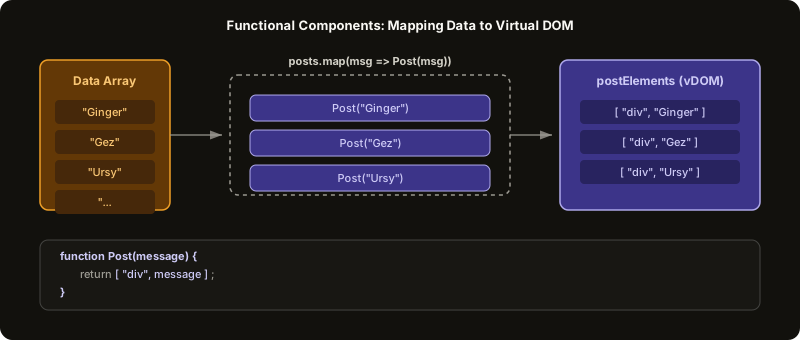 ExpandData mapping sequentially through a component returning an array of virtual elements
State Updates Drive the List
Now, watch what happens when we wire this up to user actions.
We redefine our input handler so that instead of replacing a single string, it pushes the user's input into the posts array. (For simplicity here, we push every keystroke, though normally we'd wait for an Enter press).
function handleInput(e) {
  posts.push(e.target.value);
}
The cycle is now perfectly aligned:
- The user types the letter "W".
handleInputruns, grabbing "W" frome.target.valueand pushing it to thepostsarray.- Our global
setIntervaltriggersupdateDOM(). updateDOMcallscreateVDOM().createVDOMmaps over our data list. Our list now has five items:"Ginger", "Gez", "Ursy", "Fen", "W".mapcalls ourPostcomponent five times.- The new array of five posts is converted into real C++ DOM elements and replaced on the screen.
The user typed a letter, and a new post instantly appeared below the previous four. The underlying data expanded, and the UI map instantly expanded to match.
JSX is just a wrapper around this idea
If this functional approach feels familiar, it’s because this is exactly how modern frameworks work. When you write React components, you write a capitalize function that takes data (props) and returns a visual description of the DOM (JSX).
Under the hood, JSX like <div>{message}</div> is transpiled by Babel into React.createElement("div", null, message). This translates directly into the array-style Virtual DOM structure we just built by hand: ["div", message].
We have essentially built the conceptual core of React entirely from scratch using arrays and functions. We have a declarative Virtual DOM, a replaceChildren sync loop, event delegation, and functional composition.
And, importantly, we now realize clearly why we need the diffing/reconciliation algorithm discussed at the end of the previous chapter. As our data structure grows--from 4 sisters to 50 Twitter posts to 5,000 table rows--replacing the entire replaceChildren tree on every keystroke becomes computationally brutal.
Handling that performance bottleneck is exactly where we go next.
Further Reading and Watching
Practice what you just read.
Keep reading