How the Browser Actually Renders Content
Before we write a single line of JavaScript, we need to understand how the browser takes simple text files and turns them into pixels on a screen.
Every piece of software starts with a visual interface. Whether it is a video call on Zoom, a Spotify playlist, or a massive spreadsheet in Google Sheets, we are always looking at data on a screen.
When we build these interfaces, our job boils down to two things:
- Show the data to the user.
- Let the user change that data.
Showing data is surprisingly easy. Letting users change it is where things get hard. But before we can begin to use JavaScript to let users interact, we first need to understand exactly how the web browser puts things on the screen in the first place.
The Pixel Problem
The end goal of a user interface is to display pixels. There are millions of pixels on your screen right now. If we had to tell the computer exactly where to draw every single dot of color to make a button, it would take us months just to build a login form. We would have to manually figure out the specific math for every screen size in existence.
To escape this math, we use HTML.
HTML is simple and forgiving. We don't worry about screen sizes or pixel grids. We just write standard text tags like <input> or <button> from top to bottom. But HTML is just a text file. The computer cannot show a text file directly on the screen as interactive buttons. It has to convert it.
Building the C++ DOM
When the browser loads your HTML file, it reads your text from top to bottom exactly once. As it reads, it creates a list in memory.
This list is called the Document Object Model (DOM). The browser is built using the C++ programming language, so the DOM is ultimately just a giant list of elements stored in C++.
You can think of the DOM as a simplified, behind-the-scenes blueprint of your page. Just like a plastic toy models a real car, the C++ DOM models your real webpage.
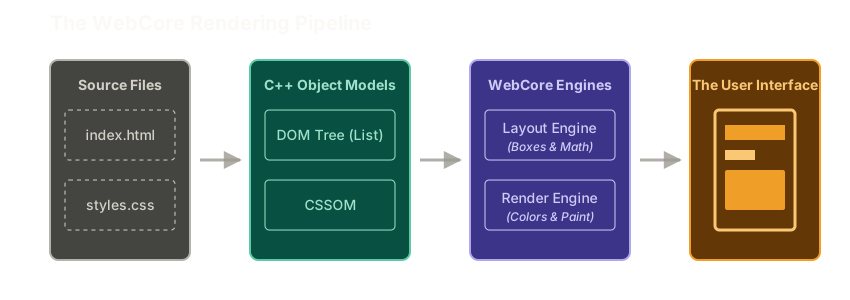 ExpandThe WebCore Rendering Pipeline
The CSS Object Model
HTML tells the browser what structure to build, but it doesn't say what it should look like. To make a button blue, we load a CSS file.
When the browser reads your CSS file, it creates a second, parallel blueprint in C++ called the CSS Object Model (CSSOM). This model maps all of your styling rules directly onto the structural elements in the DOM.
Painting the Screen
Even after building the DOM and the CSSOM in memory, we still don't have anything on the screen. This is where the browser's heavy lifters jump in.
First, the browser uses a Layout Engine. This engine looks at your DOM list and does all the hard math. It figures out exactly where each box should sit, how text should wrap, and how things should stretch depending on if you are holding a phone or using a huge monitor.
Next, it hands that math over to the Render Engine. The render engine is the painter. It looks at the layout boxes and the CSS rules, and it creates a flat picture out of colored pixels. It sends this picture to your graphics card up to 60 times a second. This speed is what makes scrolling feel smooth.
This entire pipeline from reading the HTML to painting the pixels is often called WebCore.
The JavaScript Wall
WebCore flawlessly handles goal number one: showing the data.
But what happens when the user clicks a button to like a post? We need the number of likes to go from 7 to 8.
This is where the browser's architecture becomes a problem. Our DOM is sitting in C++. But developers like us are completely blocked from writing any code in that specific C++ environment. We are not allowed to go directly into the browser's memory and change the number 7 to an 8.
HTML cannot help us because it only runs once when the page loads.
Since we are locked out of the C++ DOM, we have to use a different tool. We need a programming language that is allowed to run in the browser, listen for clicks, and explicitly tell the DOM to update itself.
That language is JavaScript.
Further Reading and Watching
- Article / Docs: Introduction to the DOM (MDN)
- Article / Docs: Render-tree Construction, Layout, and Paint (Google Web Fundamentals)
Keep reading