Declarative UI: Why Visual Code Matters
Declarative UI means writing code that looks like what you want to see. Here is the insight that makes React, Vue, and every modern framework possible.
The previous post left us with a working UI component. One function, dataToView, described the entire page. The handler only changed data. setInterval kept everything in sync.
But there was a lingering frustration: the code did not look anything like the page. When we write document.createElement('div'), there is no visual clue that this div will appear below an input. We have to run the code in our heads to figure out what the user will see.
HTML never had this problem. You write:
<input />
<div>Hello, Durgesh!</div>
And the page looks exactly like that. The code is a picture of the output. That is what declarative means.
The template literal lesson
Before we get to the full Virtual DOM solution, there is a smaller version of this insight hidden in JavaScript itself: template literals.
The old, imperative way of building a string:
let name = "Durgesh";
let text = "Hello, ";
text = text.concat(name);
text = text.concat("!");
// text = "Hello, Durgesh!"
That code has three steps. None of them look like the final output. Now the template literal version:
let text = `Hello, ${name}!`;The code looks exactly like the output. One line, and you can read the shape of the result. The closer code is to its output, the easier it is to reason about.
UI engineering has the same opportunity. If our output is a visual structure -- elements nested inside elements -- then our code should look like a nested visual structure.
Elements as data
What if we represented each DOM element as a simple JavaScript array? The first item is the type, the second item is the content:
let name = "Durgesh";
let divInfo = ["div", `Hello, ${name}!`];
This is a visual description. Without running any code, we can read divInfo and see: "a div, containing the text Hello, Durgesh!". That is enormously easier to scan than three lines of createElement, textContent, and appendChild.
We then write a generic convert function that acts as a translator -- turning our visual array into a real DOM element:
function convert(node) {
  let elem = document.createElement(node[0]);
  elem.textContent = node[1];
  if (node[2]) elem.oninput = node[2];
  return elem;
}
Now the "hard part" -- the ugly, imperative DOM manipulation -- is isolated in one place. The rest of our code stays clean and visual.
The Virtual DOM
We can extend this to describe our entire page as an array of arrays. This is our Virtual DOM: a JavaScript representation of the page structure, living entirely in memory.
let name = "";

function createVDOM() {
  return [
    ["input", name, handleInput],
    ["div", `Hello, ${name}!`]
  ];
}
createVDOM returns a blueprint. Each sub-array is an element. The order of the arrays mirrors the order elements will appear on the page. If we add a third array, a third element will appear. If we reorder the arrays, the elements reorder. The structure of the code reflects the structure of the UI.
function updateDOM() {
  let vDOM = createVDOM();                      // generate fresh blueprint
  let jsInput = convert(vDOM[0]);               // build input element
  let jsDiv   = convert(vDOM[1]);               // build div element
  document.body.replaceChildren(jsInput, jsDiv); // paint the page
}

setInterval(updateDOM, 15); // keep it in sync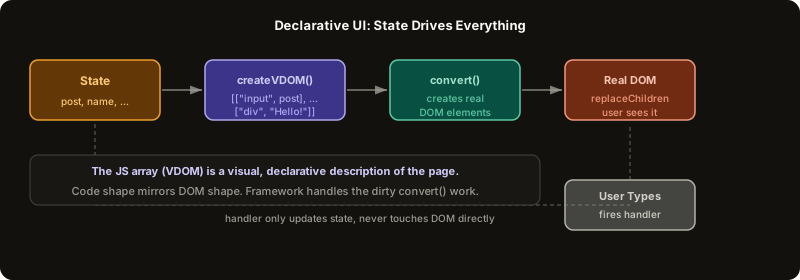 ExpandDeclarative UI: state drives VDOM drives real DOM
Why this matters
The Virtual DOM gives us two things at once.
First: visual, declarative code. createVDOM reads like an HTML file. We can see the full shape of the page in one function, conditional on data. A ternary inside createVDOM can decide whether a div exists at all. There is no need to hunt through handlers to understand what might remove or add elements.
Second: an archive we could compare. Before we call replaceChildren, we have both the old Virtual DOM (from the previous run) and the new Virtual DOM (just created). If we diffed them -- compared them item by item in JavaScript -- we could figure out exactly what changed. Then instead of replacing the whole DOM, we could make only the necessary changes to the real C++ DOM.
That second insight is why real frameworks do not call replaceChildren on every update. They run a diffing algorithm called reconciliation, and they only touch the DOM nodes that actually changed. This is also why the Virtual DOM exists in React: it is not magic. It is just an intermediate JavaScript representation that makes diffing cheap.
One source of truth
For this system to be reliable, two rules must hold:
-
Everything the user sees must be a consequence of state. If an element can appear or disappear, its presence must be conditional on a variable, inside
createVDOM. Not in a handler. Not in the HTML. IncreateVDOM. -
User actions can only change state, never the DOM directly. The handler updates
post. That is all.updateDOMhandles the rest on the next tick.
These two rules together mean we always know the answer to: "what does the page look like right now?" The answer is: "run createVDOM with the current state and look at what comes out." No guessing, no tracing through handlers, no surprises.
This is the paradigm that React, Angular, Vue, and Svelte all implement. The specifics differ -- JSX, templates, signals -- but the core idea is identical: state is the single source of truth, and the framework translates it to the DOM for you.
The "framework" part is really just a very well-engineered convert function and a very clever diffing algorithm.
Further Reading and Watching
Keep reading