A Show Is Not a Movie, and Neither Is a Question You Ask the Interviewer
Why the entity a seat's price attaches to is a Show, not a Movie, plus the difference between a requirement you ask about and a design decision you just make.
A SeatType needs a class to hold its price, because that price changes by theatre and by showtime. But what exactly is on the other side of that mapping — what does a price actually attach to? The obvious guess is wrong.
It's Not Movie. It's Not Even Just Time and Theatre. It's All Three Together.
The instinct is to say price depends on seat type and movie. That's wrong on two counts: the same movie can cost different amounts at a different theatre, and it can cost different amounts at the same theatre for a 9 AM show versus a 9 PM show. A Show is the combination of movie, theatre, and time — not any one of them alone.
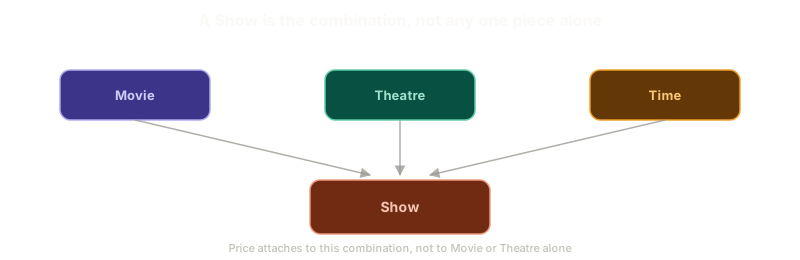 ExpandA Show is the combination of Movie, Theatre, and Time, not any one of them alone
Price is therefore a relationship between a seat type and a Show, not a Movie. No separate relationship to Movie or Theatre is needed, since Show already contains both.
A Requirement Is Something You Ask About. A Design Decision Is Something You Make.
Here's a question worth asking out loud: should Show be its own entity? It's tempting to treat that like every other clarifying question so far and take it to the interviewer.
Don't. This one isn't a requirement question, it's a design decision, and the difference matters. A requirement is what the system needs to do, something only the interviewer can confirm. A design decision is how you represent that requirement in code, entirely yours to make.
The same split applies to a smaller question: how do you tell a filled seat apart from an empty one? That's not a requirement either. It's an implementation detail you work out yourself, likely as a status field on the seat, once you get to the class diagram.
Interviewers notice when you hand them a decision that was always yours to make.
A Second Reason Seat Type Can't Be a String
The pricing relationship was one argument for making SeatType a full class instead of a plain string. There's a second, independent one, and it shows up the moment you think about how a theatre actually sets prices.
Picture the admin flow for creating a new show. An admin picks the movie, sets a start and end time, then prices each seat type for that specific show: Gold at 100, VIP at 200, Platinum at 250. That screen is exactly where the seat-type-to-show relationship gets filled in.
Now ask what happens if SeatType is just a string on that screen. Nothing stops someone from typing a seat type this particular show never defined. A typo turns into a valid-looking but meaningless value. And there's no way to check whether the "Gold" the admin just typed matches the "Gold" three other shows already use — strings have no shared identity to check against.
A class fixes both problems at once. Every show can declare exactly which seat types it supports, and any seat type entered against that show has to be one of those, not an arbitrary fourth option nobody approved.
The pricing relationship explains why SeatType needs an identity. Validation explains why it can't be left ungoverned once it has one.
What Actually Needs to Be True About a Movie
Not every attribute that sounds relevant to "a movie" belongs on this platform's Movie entity — only the ones that matter to booking a ticket, not just to watching the movie. Rating, duration, language, cast, and format features like 3D or IMAX pass that test. Subtitle files don't: they matter to a streaming platform, not a booking one, though whether a show supports subtitles is still a fair feature to list.
Two smaller requirements are worth locking down too:
- A user can select up to ten seats in a single booking.
- Different auditoriums can have completely different seat structures — there's no one fixed layout for every screen.
That second one looks small, but it's about to become one of the harder problems in this whole design: once every auditorium can be laid out differently, how do you even represent a seating chart in a way the frontend can draw correctly?
Keep reading