Amazon VPC
CIDR math, what actually makes a subnet public, NAT Gateway vs NAT Instance, security groups vs NACLs, Elastic IPs, and SSH agent forwarding, all in one place.
Picture a company migrating an on-premises network to AWS. On-prem, they had one address range split into two subnets behind two firewalls: a web server subnet reachable from the internet, and a subnet behind it holding the application and database servers, reachable only from the web tier.
Rebuilding that in a VPC means making the same handful of decisions explicit instead of leaving them implied by physical firewalls. This page walks through all of it.
A VPC is a private, isolated network you fully control
A Virtual Private Cloud is effectively a private data center inside AWS: full control over IP ranges, subnets, routing, and security, invisible to every other AWS customer unless access is explicitly granted.
A VPC belongs to exactly one region and can't span regions. A subnet inside it belongs to exactly one Availability Zone within that region and can't span AZs either. Every resource's placement is constrained by that hierarchy before a single server gets created.
CIDR blocks, and the math behind them
A VPC's address range is written as a CIDR block, 10.0.0.0/16. Everything after the slash is how many bits are fixed for the network portion; the rest is available for individual addresses. The total is always 2^(32 - prefix).
/16gives 65,536 addresses, the largest block a VPC supports./24, the common size for an individual subnet, gives 256./28gives 16, the smallest block a VPC supports.
The standard private ranges worth defaulting to (RFC 1918) are 10.0.0.0/16, 172.16.0.0/16, and 192.168.0.0/16. AWS reserves 5 addresses out of every subnet, the first 4 and the last 1, so a /24's 256 addresses really means 251 usable ones.
A VPC's CIDR block can't be changed after creation. That's the real argument for starting with a generously sized range instead of the smallest one that fits today's plan. (Up to 5 secondary CIDR blocks can be added later, but that's a workaround, not a substitute for planning ahead.) Subnets carved out of it can't have overlapping ranges with each other, and once two subnets exist, the company from the top of this page can place its web server in one and its database server in the other, on ranges like 10.0.0.0/24 and 10.0.1.0/24.
Every VPC gets a router, automatically
A VPC router gets created the moment the VPC does, along with a main route table, which every new subnet is associated with automatically until you explicitly change it. The default entry in that table routes anything destined for the VPC's own CIDR range locally, which is the entire reason two subnets in the same VPC can already reach each other with zero extra configuration. The database server can talk to the web server on day one, before an internet gateway ever enters the picture.
To make a subnet behave differently, create a new route table, add the routes it needs, then use "edit subnet associations" to attach it to that specific subnet instead of the main one. One route table can serve several subnets, but each subnet is associated with exactly one at a time.
What actually makes a subnet public
Not "has instances people can reach." A subnet is public specifically because its route table has an entry routing 0.0.0.0/0, everything outside the VPC's own range, to an Internet Gateway. No such route, no attachment, and it's a private subnet by definition, regardless of what's actually running inside it.
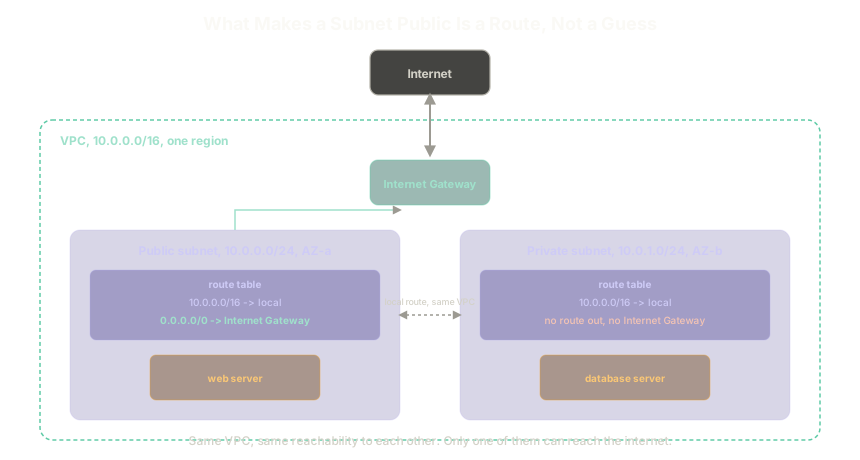 ExpandA VPC with a public subnet, whose route table sends 0.0.0.0/0 to an Internet Gateway, next to a private subnet whose route table has only the local VPC route
The Internet Gateway itself is a managed, highly available service, nothing to plan redundancy around. It also performs the network address translation that makes public IP addressing work at all: an Elastic IP sits at the gateway, and the gateway maps that public address to whichever private address inside the subnet the traffic is actually meant for. That's also what keeps two different customers' VPCs from colliding even when both happen to use the identical private range, the public-facing address at each gateway is unique even when the private ranges behind them aren't.
With the web server sitting in the public subnet and the database server in the private one, the on-premises design is now modeled correctly, minus one thing: nothing is actually locked down yet, and the database still can't reach the internet for its own updates. Both of those come next.
Letting a private subnet reach the internet, without being reachable from it
A private subnet with genuinely zero internet access can't update itself, ever. What it actually needs is a one-directional door: able to reach out, never reachable from outside. That door is NAT (network address translation), and it runs from inside the public subnet even though it exists to serve the private one. A private subnet's route table gets one more entry: 0.0.0.0/0 pointed at the NAT device instead of at an Internet Gateway directly.
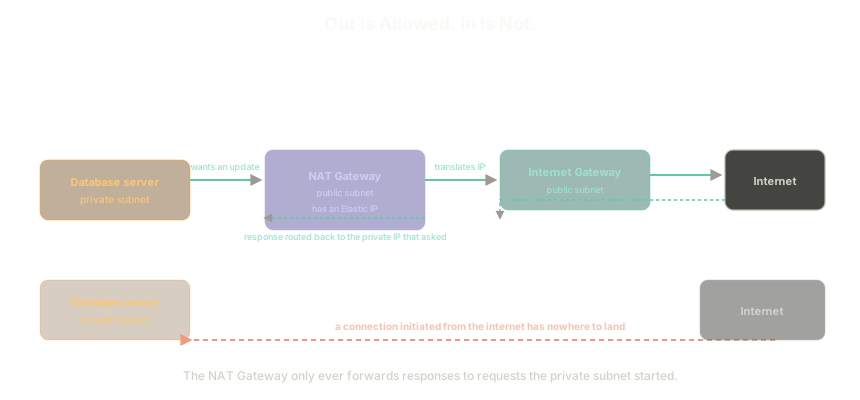 ExpandThe database server's request goes out through the NAT Gateway to the internet and the response comes back to it, but a connection initiated from the internet has nowhere to land
The database sends its request, the NAT device translates the private IP into its own public one and forwards it to the internet through the Internet Gateway, and the response comes back the same way, translated back to the private address that asked for it. A connection initiated from the internet side has nothing to attach to. There's no NAT session waiting for it, so it goes nowhere.
There are two ways to run it.
- NAT Gateway, the managed option. Redundant within its Availability Zone, up to 45 Gbps of throughput, no patching. It requires an Elastic IP specifically, not just any public address, and once assigned that IP can't be disassociated from it. It can't have a security group attached, AWS controls that layer, and it can't double as a bastion host into the private subnet.
- NAT Instance, a self-managed EC2 box doing the same job. Its bandwidth is whatever the chosen instance type provides, and high availability, failover across multiple instances if one dies, is something to build by hand, not something included. It can use either a public IP or an Elastic IP and switch later, needs its own security group configured correctly, and unlike a NAT Gateway, can be used as a bastion host, since its security group is fully under your control.
The one gotcha specific to running a NAT Instance: every EC2 instance validates by default that traffic it sends or receives actually names it as the source or destination, the source/destination check. A NAT instance breaks that assumption on purpose, forwarding traffic on behalf of other instances by translating their IPs. That check has to be explicitly disabled, or the instance won't function as a NAT at all.
AWS's own default recommendation is NAT Gateway. The extra surface a NAT Instance adds, patching, hand-built HA, remembering to disable that check, a hand-written security group, is real ongoing work for a marginal benefit, worth it only when the bastion-host use case specifically calls for it.
Setting one up needs three things: a public subnet to live in, an Elastic IP assigned to it, and a 0.0.0.0/0 route in the private subnet's route table pointing at it. It also isn't free to leave running. A NAT Gateway (and the Elastic IP attached to it) accrues cost the entire time it exists, whether it's actively forwarding traffic or sitting idle. Delete it, and release the Elastic IP, the moment it's genuinely done being needed.
Security groups vs NACLs
With the network topology rebuilt, one thing is still missing: a route existing doesn't mean traffic is allowed through it. That's a separate layer, and it's a layer with two different tools that are easy to confuse.
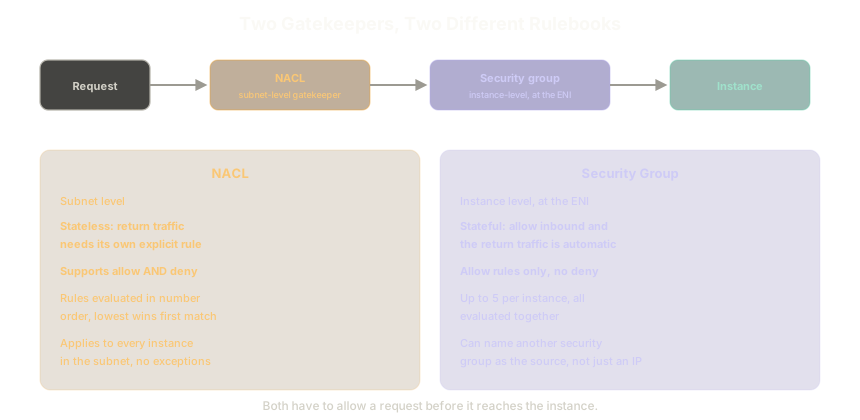 ExpandA request passes through the subnet-level NACL first, then the instance-level security group, before reaching the instance. Security groups are stateful and allow-only; NACLs are stateless and support both allow and deny
- Security groups operate at the instance level, specifically at its Elastic Network Interface (ENI, the virtual equivalent of a physical network card). They're stateful: allow inbound traffic on a port, and the matching outbound return traffic is automatically allowed too, no separate rule required. They only support allow rules, there's no explicit deny, traffic simply isn't permitted if nothing matches. An instance can have up to 5 security groups attached at once, evaluated together. A rule can also name another security group as its source instead of an IP range, "allow traffic from anything with the web-server security group attached" is exactly how a backend server accepts traffic only from the web tier without hardcoding an address.
- NACLs operate at the subnet level, a gatekeeper for everything inside it, evaluated before traffic ever reaches a security group. They're stateless: allowing traffic in one direction does nothing for the other, inbound and outbound each need their own explicit rule. NACLs support both allow and deny, the tool to reach for specifically when something needs to be blocked, since a security group can't do that at all. Rules are evaluated by number, lowest first, and the first match wins, so the numbering is part of the design, not an afterthought. A newly created VPC's default NACL allows everything until it's deliberately locked down.
Back to the web and database servers: the web server's security group gets two inbound rules, port 80 and port 443, both from 0.0.0.0/0. The database server's security group gets one inbound rule, on whatever port the backend listens on, with the web server's security group as the source instead of an IP range, so only the web tier gets through. Neither needs an explicit outbound rule, that's what statefulness buys, and neither needs a NACL change, the default "allow everything" is enough as long as security groups are doing the real filtering.
Two gotchas that catch people every time: security group changes take effect immediately on running instances, no restart required, safe to iterate on live. And ICMP, what ping uses, needs its own explicit rule, allowing HTTP, HTTPS, and SSH says nothing about whether an instance responds to a ping.
A stable public IP, and reaching a private instance safely
An EC2 instance's auto-assigned public IPv4 address isn't permanent, stopping the instance releases it, restarting hands out a new one. An Elastic IP is the fix when a stable public address actually matters, it stays associated until deliberately released.
Reaching the database server for maintenance means hopping through the public web server first, and copying a private key onto that server to make the final hop is a real risk: if the web server is ever compromised, every server that key opens is compromised with it. SSH agent forwarding is the fix: ssh-add the key locally, connect to the web server with ssh -A, and the key gets forwarded for that session only, available to jump onward into the database server, never written to disk on the web server at any point in between.
The Essentials
- A VPC is pinned to one region, a subnet to one Availability Zone. Neither can span beyond that boundary.
- CIDR math is always
2^(32 - prefix)./16is the largest block a VPC allows,/28the smallest, and the block can never change after creation. - A public subnet is defined by one specific route:
0.0.0.0/0pointed at an Internet Gateway. Nothing else makes a subnet public. - NAT lets a private subnet reach out without being reachable. NAT Gateway is the managed default; NAT Instance trades that for control, mainly for the bastion-host case.
- Security groups are stateful and instance-level, allow-only. NACLs are stateless and subnet-level, and support both allow and deny, evaluated in rule-number order.
- SSH agent forwarding reaches a private instance without ever leaving the private key on the instance in between.