Triggers, Runners, and Why CI Is the Source of Truth
What 'on' and 'runs-on' actually mean in a GitHub Actions workflow, why every job starts on a blank machine, and when to stop writing logic in YAML.
The build job from the last post had two lines I skipped past: on: push and runs-on: ubuntu-latest. They look like configuration. They're actually the two questions every workflow has to answer.
"On" answers when. "Runs-on" answers where.
Get comfortable separating those two, and most of what looks confusing about GitHub Actions stops being confusing.
There's no server to configure
A GitHub Actions workflow is just a YAML file sitting in .github/workflows/. Name it whatever you want, add as many as you want, GitHub reads every file in that folder and tries to run it.
Compare that to running your own CI server. Someone has to patch it, scale it, and get paged when it falls over at 2am. The moment you're spending real time managing the thing that manages your builds, you've built a second project you didn't sign up for.
That's the actual pitch for a managed CI platform, not "it's easier" in the abstract. It's one less system that can wake you up.
"On" decides when, "runs-on" decides where
The smallest possible workflow is a single job that echoes "hello world." Strip away everything else and every workflow reduces to that: a job, triggered by something, running somewhere.
on:
  push:
    branches: [main]

jobs:
  build:
    runs-on: ubuntu-latest
    steps:
      - run: echo "hello world"
on is the scheduling half. It decides whether this workflow cares about a push to main, a push to a tag, a pull request, or nothing automatic at all.
runs-on is the machine half. It decides whether that job runs on Linux, macOS, or Windows, which matters a lot less often than people expect, since most projects live entirely on ubuntu-latest and never think about it again.
Keeping those two ideas separate in your head is the single most useful mental model for reading any workflow file you didn't write yourself.
Every job starts from nothing
Each job in a GitHub Actions workflow runs on its own fresh virtual machine. Nothing carries over between jobs unless you explicitly pass it along, through an artifact or an output.
That's inconvenient right up until it saves you. A brand new machine every run means "it works on my machine" can never quietly become "it works in CI too" without actually being true.
This argument plays out on almost every team at some point. A developer insists their laptop is fine and the pipeline is wrong, push it to CI, and it breaks.
CI is the source of truth. A laptop is not. Developers should be able to run everything locally, but the moment CI disagrees with a laptop, CI wins the argument, not the other way around.
Push, pull request, and the loop between them
You'll spend most of your time with three triggers, and the first two work together as a pair.
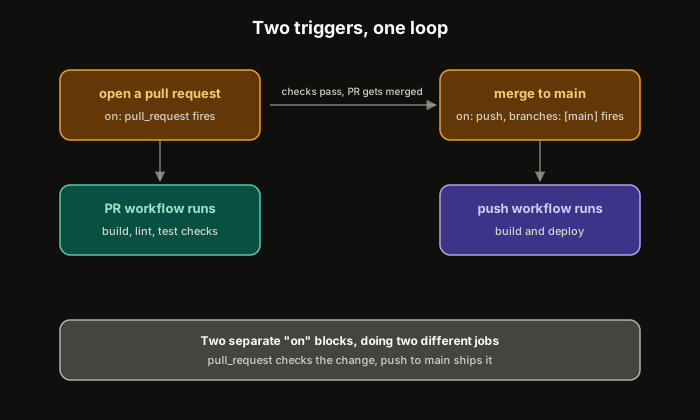 ExpandThe pull_request trigger checks a change, the push trigger to main ships it
pull_request fires when a PR is opened, where build, lint, and test checks live, the ones that have to pass before a reviewer even looks at the code. push to main fires once that PR gets merged, where the actual build-and-deploy pipeline lives. workflow_dispatch adds a manual button in the GitHub UI, a fail-safe for triggering a deploy without a new commit.
Those two triggers, pull_request and push, form a loop. Open a PR, the check workflow runs. Merge it, the deploy workflow runs. Repeat on the next change. Splitting "verify this change" from "ship this change" into two separate triggers is what makes that loop safe to repeat without thinking about it.
This is also the mechanism that turns a proof-of-concept pipeline into a stage-two one: the day a pull_request check becomes required before merge is the day the pipeline stops trusting a single person's judgment and starts trusting the check instead.
Context and expressions, used sparingly
YAML is a plain data format. It has no real concept of "the person who pushed this" or "only run this if the branch is main," until GitHub Actions layers logic on top with ${{ }} expressions.
steps:
  - name: Deploy only from main
    if: github.ref == 'refs/heads/main'
    run: ./deploy.sh
github is one of several built-in contexts. It tells you who triggered the run, what changed, and what event caused it. runner tells you what OS or architecture the job is running on, useful if you're building for more than one platform. secrets holds encrypted values you can reference but never read back in plain text.
One rule matters more than the syntax: secrets go in secrets, never in vars. Repo and org-level vars render in plain text in the workflow, exactly where you don't want a credential to show up.
Here's the part that took me longer to accept: the moment if conditions start nesting, or an expression needs a second expression to make sense of the first one, stop. Write a bash script instead, and call that script from the step.
An if statement in a workflow file grows the same way one in application code grows: small at first, then wrapped in another condition, then another, until the logic is scattered across YAML that's harder to test than the script it replaced.
Expressions exist for a one-line dynamic check, not for your whole pipeline's logic.
The Essentials
- A managed CI platform's real benefit is one less server to operate. The moment you're managing the thing that manages your builds, you've taken on a second project.
- A fresh VM on every job is what makes CI the source of truth, not a developer's laptop. Nothing carries over unless you explicitly hand it off.
- Secrets go in secrets, never in
vars. Repo and org variables render in plain text in the workflow. - When
ifconditions start nesting, write a bash script instead. YAML logic grows the same way application logic grows, just harder to test.
Further Reading and Watching
Keep reading