Tokens and Context Windows
Tokens are the currency LLMs think in. Context windows are their working memory. Here's what both mean for you in practice.
Before writing better prompts, you need to understand the medium: LLMs don't read words -- they process tokens. And they don't have memory -- they have a context window.
What Is a Token?
A token is roughly 0.75 words on average. But that's just an average.
- Punctuation, spaces, and code may tokenize differently than plain prose
- Capitalization matters:
JavaScriptandjavascriptare different tokens - Code tends to use more tokens per character than natural language
LLMs use token IDs, not raw text. When you write a prompt, your words are first converted to token IDs, processed, then converted back to text for the response. You'll never need to count tokens manually for normal prompting -- but understanding that this conversion exists helps explain why models can behave unexpectedly with unusual capitalization, symbols, or niche jargon.
Token estimator: ~1,000 words ≈ 750 tokens. For quick estimates, multiply your word count by 0.75.
What Is a Context Window?
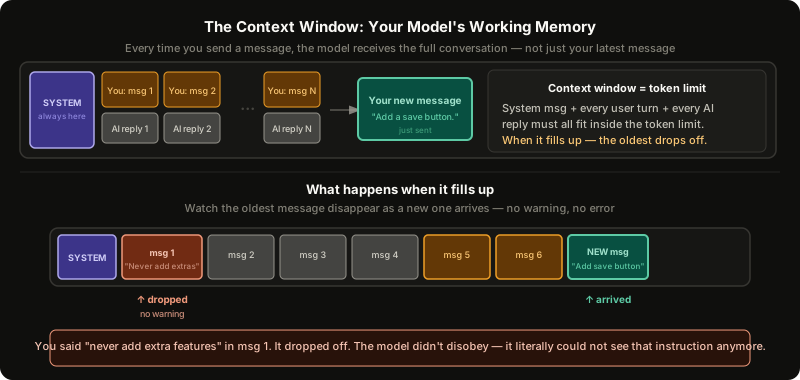 ExpandContext window diagram showing message positions, silent drop-off, and the lost-in-the-middle effect
An LLM has no persistent memory. It doesn't "remember" you from last week, or even from the start of your chat session -- unless that history is re-sent with every message.
The context window is the maximum number of tokens a model can process at once. This window contains:
- The system message (set by the provider -- you usually can't see it)
- Your entire conversation history (every message, both directions)
- Any attached files or code you've pasted in
Every time you send a message, the full conversation history goes along with it. That's how the model appears to "remember" earlier turns.
Message 1: "What color is the sky?"
Model: "Blue."

Message 2: "What about at sunset?"
What the model actually receives:
  [Your message 1] + [Model response 1] + [Your message 2]
What Happens When You Hit the Limit
When the cumulative tokens in the conversation exceed the context window, the oldest content drops off silently. No warning. No error message.
This is dangerous when you've front-loaded critical instructions early in a conversation:
You (message 1):     "Never add extra features I didn't ask for."
...
[800 more tokens of conversation]
...
You (later):         "Add a save button."
Model:               "I added save, export, search, and a favorites tab!"
The original constraint was gone. The model didn't disobey -- it literally couldn't see it anymore.
What to do
- Repeat important constraints periodically in long sessions
- Start a new chat when you notice quality degrading -- key context has likely been lost
- Summarize before switching: Ask the model to summarize the conversation, paste the summary into a new chat
- Be selective with context: Don't paste your entire codebase when you only need two files
A note on context compaction
Some AI tools now handle this more gracefully than silent truncation. Claude Code, for example, automatically compacts the context when it gets close to the limit: instead of just dropping the oldest messages, it summarizes the older parts of the conversation and keeps that summary in the window. This preserves key decisions and constraints even after hours of back-and-forth.
Claude.ai also offers a similar feature. Not every tool does this -- check your tool's documentation rather than assuming either behaviour. Even with compaction, the best habit is still to keep context focused and repeat important constraints in long sessions.
The System Message
Every AI application (Claude.ai, GitHub Copilot, Cursor, ChatGPT) has an invisible system message that runs before your conversation. You can't see it. It:
- Defines how the model behaves ("you are a helpful coding assistant")
- Takes up part of your context window
- Never drops off -- it's always present
This is why the same model (Claude Sonnet 4.6) behaves differently in Claude chat vs. Copilot. Different tools set different system messages.
A system message is also more reliable than a user message for shaping behaviour. An instruction in the system message is harder for the model to override than the same instruction typed by a user. But "harder" is not "impossible" -- system messages from major tools have been publicly leaked through prompt injection, and jailbreaks exist. Never put API keys, confidential business logic, or anything sensitive in a system message. Some newer APIs call this a "developer message" instead, but it's the same concept.
Practical Context Limits
Here is where the top models sit right now:
| Model | Provider | Context Window | Access |
|---|---|---|---|
| Llama 4 Scout | Meta | 10 million tokens (effective recall degrades past ~1M) | Open source |
| Claude Opus 4.6 | Anthropic | 1 million tokens | Paid |
| Claude Sonnet 4.6 | Anthropic | 1 million tokens | Paid (free tier with limits) |
| Gemini 3.1 Pro | 1 million tokens | Paid | |
| GPT-5.4 | OpenAI | 272K standard (up to 1M via API at double pricing) | Paid |
For most conversations, you will never get close to these limits. But context problems happen sooner than you would expect because:
- The system message is already consuming some tokens
- In coding tools (Copilot, Cursor), attached files compound quickly
- Pasting
@codebasein a monorepo can immediately fill a context window
Rule of thumb: Provide the minimal context needed to get a good output. If you only need a test file and a frontend component, add just those -- not the entire repo.
There's also an important distinction between pasting code inline and attaching a file in a tool like Copilot or Cursor. Pasted code lives in your conversation history and drops off with context like everything else. A properly attached file may be re-read by the tool on each request, keeping it in context longer. This is provider-dependent -- check your tool's behaviour rather than assuming either way.
The "Lost in the Middle" Effect
Even when content is technically inside the context window, LLMs don't attend to everything equally. Research from the paper "Lost in the Middle: How Language Models Use Long Contexts" found that models perform worse when the relevant information is buried in the middle of a long context -- sometimes worse than if they'd been given no context at all.
| Position of relevant info | Model accuracy |
|---|---|
| Beginning of context | High |
| End of context | High |
| Middle of context | Lower than baseline |
This isn't a bug -- it mirrors human psychology. We have a primacy bias (remembering the start of a list) and a recency bias (remembering the end). LLMs, trained on human-generated data, exhibit the same pattern.
Practical implications
- Put critical instructions at the start of your prompt
- Put supporting details at the end
- If a conversation runs long, re-state the important stuff -- don't assume it's still being "heard"
- For any task with a clear single answer, shorter context often beats longer context
The continue Pattern
If a model cuts off mid-response (output truncated), just type continue and press send. Most models will pick up where they left off. Some providers show a "Continue" button directly in the UI.
Quick reference
| Concept | What it means | What to do |
|---|---|---|
| Token | ~0.75 words; unit LLMs process | Estimate length at 0.75× word count |
| Context window | Max tokens the model holds at once | Keep prompts focused; don't paste whole repos |
| Context drop-off | Oldest content disappears silently when limit is hit | Re-state critical info; start new chats |
| System message | Invisible behavior config; takes context space | Never put secrets in it |
| Lost in the middle | Model ignores middle content | Put key info at start and end |
Further Reading and Watching
- Video: How ChatGPT Works Technically -- ByteByteGo
- Tool: OpenAI Tokenizer -- visualize how text splits into tokens
- Paper: Lost in the Middle: How Language Models Use Long Contexts -- Liu et al., 2023
Practice
0/5 doneKeep reading