The Soul Of Oop Encapsulation And The Dot Dream
Object-Oriented Programming is more than just syntax; it's a paradigm for keeping your code easy to reason about as it grows to 100,000 lines.
After mastering the asynchronous delegation of the browser, we're moving into the architecture of our own code. How do we use Object-Oriented Programming to structure complex applications so they don't become a nightmare to maintain?
We're entering the world of Classes, Prototypes, and Object-Oriented JavaScript.
The Essentials
- The Two Goals of Programming: Save data and do stuff to it (functionality).
- The 100k Line Problem: As codebases grow, finding the right function for the right data becomes a needle-in-a-stack problem.
- Encapsulation: Bundling data and the functions that use it into a single package.
- The "Dot Dream": The ability to run functionality directly on a data object using the
.operator (e.g.,user.increment()).
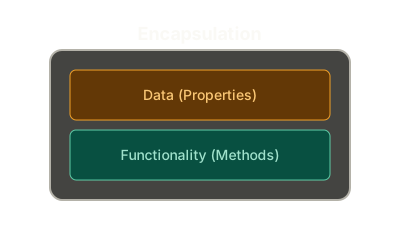 ExpandEncapsulation: Bundling Data and Logic
Why OOP?
At its heart, programming is just two things:
- Saving Data: Scores, user names, game boards, API results.
- Running Instructions: Increasing a score, logging in a user, rendering a view.
In a small app, this is easy. But in a 100,000-line codebase, it's a conspiracy. You have user data in one place and an incrementScore function somewhere else. How do you make sure incrementScore is only used on user data and not accidentally on a "Quiz League Board" object?
Two Rival Paradigms
There are two main ways to solve this:
- Functional Programming: Uses Closure (functions with persistent memories) to keep data and functionality together.
- Object-Oriented Programming: Uses Objects to bundle data and functionality together.
We've already seen how Closure works. Now, we're looking at the rival: The Object.
The Soul of OOP: Encapsulation
The principle of Encapsulation means putting your functions and their associated data in one neat package.
Solution 1: The Object Literal
The simplest way to achieve this is the Object Literal. We literally define the object and its contents right there in memory.
const user1 = {
  name: "Denver",
  score: 3,
  increment: function() {
    user1.score++;
  }
};

user1.increment(); // The "Dream"
In this example, name and score are properties, and increment is a method (a function stored on an object).
The Trace
When we run user1.increment(), JavaScript does a lookup:
- Look for
user1in global memory. Found it. - Look for
incrementon that object. Found it. - Create a new Execution Context and run the code inside.
Step 1:We store the entire object in global memory. The increment function is now a method.
The "Dream" Realized
Our goal is simple: we want our functionality to be available to the right-hand side of a dot on our data. This makes code incredibly easy to reason about. You don't have to search through 100,000 lines of code; you just look at the object and see what it can do.
But creating every user manually with an object literal is tedious and error-prone. In the next part, we'll look at the other tools in our Object Creation Toolbox.
Further Reading and Watching
- Video: Object-Oriented JavaScript Intro
- MDN: Object basics
- Concept: Encapsulation in Programming
Keep reading