AWS IAM
Users vs roles and credentials, trust and permission policies, STS, identity-based vs resource-based policies, SCPs, policy evaluation order, and identity federation, all in one place.
Identity and Access Management governs who, or what, is allowed to do what in AWS, through three entities: users, groups, and roles, each with permission policies attached.
Every other service in this reference list sits on top of IAM somewhere: a Lambda's execution role, an API Gateway authorizer's trust policy, a DynamoDB access policy.
Groups exist to avoid repeating permission setup per user. Attach a policy to a group once; every member inherits it, and adding a new person to the team is just adding them to the group, not re-granting everything by hand.
A Lambda's execution role starts nearly empty
Every Lambda function has its own execution role, created automatically alongside it, and that role starts with just enough permission to write logs to CloudWatch, nothing else. Calling any other AWS service, DynamoDB, S3, SQS, whatever, requires an explicit permission added to that role first. Skipping this isn't a silent failure: the call throws immediately with an access-denied error naming the exact missing action, dynamodb:PutItem, dynamodb:GetItem, whichever one wasn't granted.
One shared role across every function is the fast way to stop seeing that error, and the wrong fix. Attaching every permission any function needs to one role that all functions use means a function that only ever creates records also holds permission to delete them, because some other function in the same deployment needed delete access. That's the opposite of least privilege: every function's blast radius, if it's ever compromised or simply misbehaves, is now every permission the whole deployment has ever needed, not just its own.
The fix is one execution role per function, each scoped only to what that specific function calls, a create-note function's role holds PutItem and nothing else; a delete-note function's role holds DeleteItem and nothing else. Some IaC tools need an extra step to get this (Serverless Framework, for instance, creates one shared role by default and needs a plugin to split it per function); CDK does this automatically, every function construct gets its own role from the start, and a helper like table.grantWriteData(fn) grants exactly the needed actions, scoped to that exact table's ARN, without hand-writing an IAM statement at all.
A permanent key vs a key that expires
An IAM user's credentials, an access key and secret key, are long-lived and never expire on their own. An IAM role's credentials are temporary, issued fresh to whatever assumed the role, and they expire.
That's why a role, not a user, is what an AWS service uses to call another AWS service. A Lambda function accessing DynamoDB does it through a role, picking up short-lived credentials at invocation time, not a permanent key sitting in its configuration. A leaked long-lived user credential is a standing liability. A leaked role credential is only useful until it expires.
What actually happens when a role gets assumed
Creating a role means first defining its trusted entity, the thing allowed to assume it: a specific AWS service, another AWS account, a web identity provider (Facebook, Google, Cognito), or a SAML-based provider like an on-premises Active Directory. That trust is scoped tightly. A role trusted for Lambda can only be assumed by a Lambda function, not by an EC2 instance, even within the same account.
Behind the scenes, assuming a role always means IAM calling AWS's Security Token Service (STS), which is what actually issues the temporary credential object.
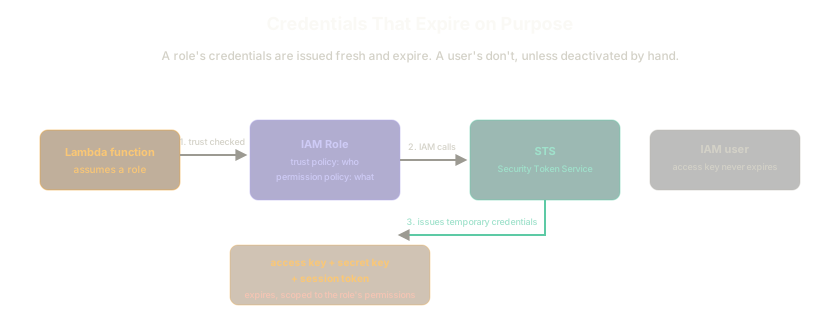 ExpandAssuming a role means IAM calls STS, which issues temporary credentials scoped to the role's permissions and set to expire. A user's access key, by contrast, never expires on its own
That object contains an access key, a secret key, a session token, and an expiration, scoped down to whatever the role's permission policy actually allows. A role has two halves that do different jobs: the trust policy decides who can assume it, the permission policy decides what they can do once they have.
Policy anatomy
A permission policy is a JSON document: a Version, and a Statement array holding one or more statement objects. Each has an Effect (Allow or Deny), an Action (what's allowed, or a wildcard * for everything, that wildcard on both action and resource is what AdministratorAccess actually is), a Resource (what it applies to), and, on resource-based policies specifically, a Principal.
Managed policies vs inline policies
The axis that matters here is reusability, not who wrote the policy.
- Managed policies (AWS-managed like
AdministratorAccess, or customer-managed, written for a specific need) attach to multiple users, groups, or roles and get reused across all of them. - Inline policies embed directly in one specific entity and can't be attached anywhere else.
Reach for a managed policy when the same permission set will be reused, AWS's own for moving fast in a sandbox, a custom one for anything real. Reach for inline only when a permission genuinely belongs to exactly one entity and nowhere else.
Identity-based policies vs resource-based policies
An identity-based policy attaches to a user, group, or role. It never needs a Principal, the entity it applies to is already implied by what it's attached to.
A resource-based policy attaches directly to a resource, an S3 bucket policy being the clearest example. Because a bucket can be reached by all kinds of callers, an IAM user, a role, another account, the public, it has to spell out its Principal explicitly.
The nonobvious difference shows up on cross-account access. When a user assumes a role in another account, they drop every permission from their home account for the duration and operate purely under the role's permissions. When a resource-based policy grants cross-account access instead (a bucket policy naming another account as principal), the user keeps their home account's permissions and gains the resource-level access on top, which is why they might be able to view an object through the bucket policy but also copy it somewhere in their own account, something the assumed-role path alone wouldn't allow.
Service Control Policies set the ceiling, not the grant
SCPs apply at the AWS Organizations level, to an organizational unit or an individual account. They don't grant any permission on their own, they restrict what's possible underneath them, no matter what IAM policies say inside the account. A Deny SCP on EC2 for an entire organizational unit blocks EC2 access for every account in it, including that account's own root user.
New accounts joining an organization get a default FullAWSAccess SCP automatically, so nothing breaks the moment an account is added, until an SCP is deliberately attached to restrict something.
The actual evaluation order
When a request comes in, AWS walks a fixed sequence, worth knowing cold rather than guessing at.
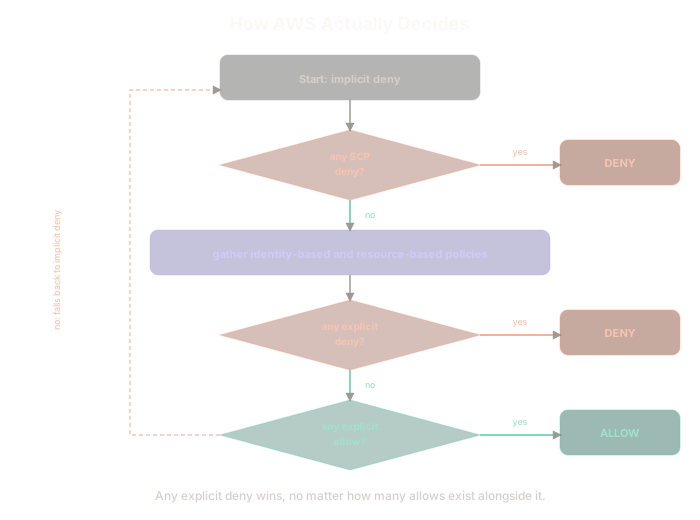 ExpandThe evaluation starts at implicit deny, checks SCPs first (a deny there ends it immediately), then checks identity and resource policies for an explicit deny (which also ends it), then an explicit allow, falling back to deny if neither is found
- Start from an implicit deny. Nothing is allowed by default.
- Check applicable SCPs first. A deny here ends the evaluation immediately, deny, regardless of anything else attached.
- Otherwise, gather every applicable identity-based and resource-based policy.
- Any explicit
Denyanywhere in that set wins. It doesn't matter how many explicit allows exist alongside it. - No explicit deny? Any explicit
Allowgrants access. - Neither found? Falls back to the implicit deny from step 1.
This is the rule worth internalizing above all the others: an explicit deny always wins, no exceptions, regardless of how many allows are stacked against it or which account they came from.
Local credentials, for deploying from your own machine
Deploying infrastructure from a laptop, whether through the AWS CLI, CDK, or any other tool, needs credentials sitting somewhere on that machine. The standard path: create an IAM user with programmatic access only (no console password needed if a human is never logging into the AWS UI as that user), generate an access key pair for it, and configure that pair locally with aws configure.
That command writes two files under ~/.aws/: credentials (the access key and secret key, under a named profile, default unless another name is given) and config (the default region and output format). Every AWS CLI call, and every tool built on the AWS SDK, CDK included, reads from those same two files unless told otherwise.
Attaching AdministratorAccess directly to that user is the fast way to get moving, and the wrong way to leave things. It's the same mistake covered in Long-Lived Credentials Are the Original Sin: a user's access key is permanent by default (see above), so a broad policy attached to it isn't a temporary convenience, it's a standing risk that sits on a laptop indefinitely. Scope the policy down to what the deployment actually touches (Lambda, API Gateway, DynamoDB, CloudFormation, and whatever else the stack creates) once past the initial "get it working" phase, rather than leaving AdministratorAccess attached long-term.
Identity federation, for when creating IAM users doesn't scale
Individual IAM users for every person in a large organization runs into a hard cap (around 5,000 per account) long before it becomes an administrative headache. Federation solves both by trusting an external identity source instead of duplicating users into IAM.
- SAML-based federation, commonly an on-premises Active Directory. Once AWS and the directory trust each other, a user logging in with their existing domain credentials gets AWS console or API access without an IAM user ever being created for them.
- Web identity federation, an external OIDC-style provider (Facebook, Google) or, more commonly on AWS, Amazon Cognito sitting in front of them. A mobile app letting users sign in with Facebook and then upload a profile photo to S3 is this pattern end to end.
The Essentials
- Users get permanent credentials. Roles get temporary ones, issued by STS on assumption. That's the real reason services use roles, not users, to call each other.
- A role has a trust policy (who can assume it) and a permission policy (what they can do). Two different questions, two different documents.
- Managed policies are reusable across entities. Inline policies aren't.
- Identity-based policies imply their principal. Resource-based policies must state it explicitly.
- Assuming a cross-account role drops your home account's permissions. A resource-based grant doesn't. That's the difference that actually matters in practice.
- SCPs restrict, they never grant. A default
FullAWSAccessSCP is why nothing breaks when an account joins an organization. - An explicit deny always wins, at any point in the evaluation, over any number of explicit allows.
- Federation avoids IAM's user-count ceiling by trusting an external identity source instead of duplicating it.