Why I Made QR Code Delivery Asynchronous
Turning a real app's launch-day failure into a requirements list, and the one change to a synchronous flow that would have prevented it.
Closing that gap starts with writing down two different kinds of requirements, then being willing to change one of them.
I don't have access to the real fuel pass system's internals, so everything below is my own read of it, built from the UI and from actually registering on the app myself. That's normal for this kind of exercise. You rarely get the full picture before you start designing, and you design anyway.
What the system has to do
The functional requirements are what a user actually experiences.
- Register and log in with an OTP, not a password. There's no username or password field anywhere in the app. A one-time password sent by SMS is the only credential, for both registration and every login after.
- Store personal and vehicle information. Name, address, national ID, vehicle plate, type, and chassis number, all collected during registration.
- Verify that information against an external system. Before a registration can succeed, the personal and vehicle details get checked against the Department of Motor Traffic's records.
- Deliver a QR code after a successful registration. This is the one requirement I changed from what the real app does, and it's the important part.
The one-line change that matters
In the real app, you get your QR code the moment registration finishes. I'm changing that to run in the background instead.
Under the new version, a successful registration doesn't hand you a QR code right away. It queues the request, and you get an SMS once the code is ready. From there, you log in and pick it up.
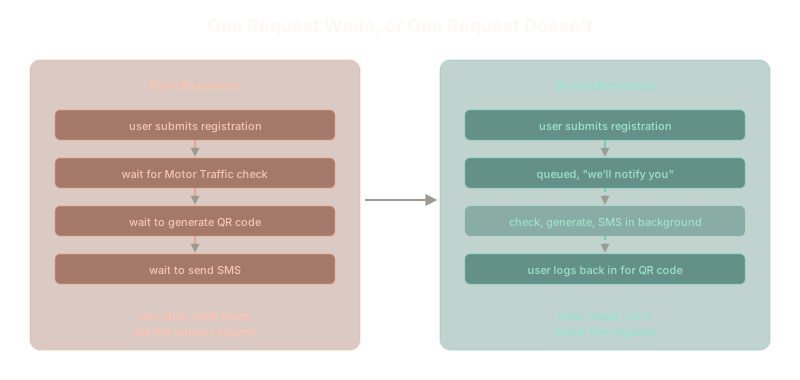 ExpandA synchronous flow makes one slow step time out the whole request. An asynchronous flow lets slow steps run in the background instead.
Here's why that one change matters. A synchronous registration has to complete an external verification call, generate a QR code, and send an SMS, all before it can tell the user "done." Any one of those three steps being slow makes the entire request slow, and if it's slow enough, it times out and fails.
That's a strong candidate for what actually happened on launch day. A million people registering at once means a million requests all waiting on the same external verification system and the same SMS gateway, at the same time, inside the same request-response cycle. One bottleneck anywhere in that chain, and the whole flow backs up behind it.
Making QR delivery asynchronous breaks that chain. The user gets an immediate acknowledgment that their registration was received, and the slow parts get to be slow without holding a live HTTP connection open while they work.
What the system has to be
Alongside what the app does, there are three qualities it has to have regardless of the feature list.
- High scalability. This isn't optional for a system that has to handle a million registrations showing up in the same few hours.
- High security. A weak spot here doesn't just mean bad data, it means someone can register a fuel pass they shouldn't have, or read personal details that aren't theirs.
- Minimal operational cost. A government system serving the whole population has to be affordable to run continuously, not just affordable to demo.
Functional requirements describe the features. Non-functional requirements decide whether those features survive contact with a million real users on day one. The async QR delivery change above exists entirely because of the scalability requirement, not because the feature itself needed to change.
With both lists written down, the next step is turning them into an actual architecture, starting with the piece the user sees first: the frontend.
The Essentials
- Passwordless auth doesn't reduce load, it just changes what has to scale. OTP delivery becomes a dependency in its own right.
- An external verification call is a hard dependency you don't control. Its speed becomes part of your system's speed, whether you plan for that or not.
- One synchronous step can time out an entire request. Chaining a verification call, a QR generation step, and an SMS send inside one request means the slowest one sets the pace for all of them.
- Making the slow parts asynchronous breaks that chain. The user gets a fast acknowledgment, and the slow work happens without holding a connection open.
- Non-functional requirements are what make functional requirements survive real load. Scale, security, and cost decide whether a working feature stays working.
Further Reading and Watching
Keep reading