Amazon DynamoDB
Single-table design, prefixed keys, inverted indexes, GSI overloading, sparse indexes, filter expressions vs indexes, streams, capacity modes, conditional writes, and TTL, all in one place.
A managed NoSQL database with a single-digit millisecond latency guarantee at any scale. DAX (DynamoDB Accelerator) sits in front as an optional read-through cache, for when even single-digit milliseconds isn't fast enough.
That latency guarantee only holds if the table is designed around how the application actually queries data, not designed first and queried however happens to come up later.
Two databases optimizing for different things
Relational databases optimize for storage: normalize the data across tables, eliminate duplicate copies, pay the cost back in joins at query time. That tradeoff made sense when storage was the expensive resource.
DynamoDB optimizes for the opposite: duplicate data across items so a query never needs a join, because compute per request is what actually costs money at scale, not storage. Designing a DynamoDB table like a relational schema is the single most common way newcomers end up with a surprise bill, paying for joins a document database was never built to do cheaply.
Start from the queries, not the entities
The single most important step in modeling a DynamoDB table: list out almost every access pattern the application needs before deciding on a single key or index. Not the entities, the actual queries. Get one item. List all of a parent's children. Filter by status. Whatever the application genuinely does.
Most applications, per AWS's own guidance, only need one table. Every entity type, organizations, projects, employees, whatever a given app has, lives in the same table as differently-shaped items, instead of a separate table per entity, each with its own throughput to provision and pay for.
A repeatable process
- Draw an entity diagram. Map the real-world entities before touching a key.
- Identify the relationships between them. One-to-many, many-to-many. A many-to-many is usually worth splitting into two one-to-many relationships through a junction entity (a
project-employeeitem, say), so each side can be queried directly off a key. - List every access pattern, per entity. The step worth spending the most time on.
- Pick the primary key for each entity. A good key alone should satisfy most of the access patterns from step 3, no index required.
- Add secondary indexes for whatever the primary key still can't answer. Covered below.
One table, told apart by prefixed keys
A single table holding multiple entity types needs a way to tell them apart and to fetch related ones together. The common pattern: prefix key values by entity type, ORG#<id> as a partition key, PROJECT#<id> or EMPLOYEE#<id> as a sort key.
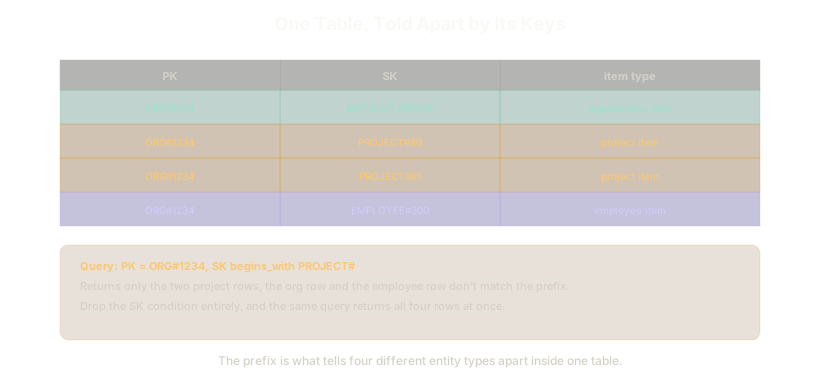 ExpandA query filtering by sort-key prefix returns only project items; dropping that condition returns every item under the same organization
That prefixing does two jobs at once.
- A
begins_withcondition on the sort key filters to one entity type. QueryPK = ORG#1234, SK begins_with PROJECT#and get only that organization's projects. Drop the sort-key condition entirely, and the same query returns every child item, projects and employees together, in one request. - Child entities inherit the parent's ID as their partition key. A project's partition key is its organization's ID, not its own. That keeps every query naturally scoped to the right organization without an extra filter, and it mirrors the real hierarchy: a project can't exist without an organization, so it doesn't get a partition of its own.
Two shapes for a primary key
- A hash key alone (a simple partition key), when one attribute uniquely identifies an item.
- A hash key plus a range key (a composite key), when items need to be grouped under a partition and then queried within it, sorted by the range key.
Getting this right matters because DynamoDB doesn't let arbitrary attributes be queried efficiently by default, only the key.
Only the key's attributes need declaring up front, nothing else does. Creating a table means specifying an attribute definition (name and type, string/number/binary) and a key schema (hash, or hash plus range) for the key alone. Every other attribute an item might ever hold, a note's title, its body, whatever comes later, is never declared in the table's schema at all. Two items in the same table can hold entirely different sets of non-key attributes, added freely at write time, which is the whole reason DynamoDB is called schemaless: the schema that exists is only ever about the key.
Using the SDK: the Document Client, not the raw client
AWS SDK for JavaScript v3 talks to DynamoDB through two layers, and picking the wrong one means hand-writing work the other layer already does.
@aws-sdk/client-dynamodb— the low-level client. Every value sent or received is a raw DynamoDB attribute value,{ S: "hello" }for a string,{ N: "42" }for a number, not a plain JavaScript string or number. Marshalling a JS value into that shape before every write, and unmarshalling it back after every read, is on you.@aws-sdk/lib-dynamodb— wraps the low-level client with aDynamoDBDocumentClient, built withDynamoDBDocumentClient.from(client). It marshals and unmarshals automatically, so a write takes a plain{ id: "123", title: "..." }object and a read hands one back, no attribute-value wrapper in sight.
Default to the Document Client. The only reason to reach for the raw client is needing that attribute-value shape directly, which is rare application code.
Both packages are only installed locally as devDependencies. The Node.js 20.x Lambda runtime ships AWS SDK v3 built in, so a deployed function already has it available at runtime without it being part of the uploaded bundle; installing it locally exists purely so imports resolve and types work while writing the code.
Querying an attribute that isn't part of the key
An attribute outside the key can still be read with a Scan and a filter expression, but a scan reads the whole table and filters after the fact. That's a correctness path, not a performance one.
The efficient path is an index.
- Global Secondary Index (GSI): a different primary key layout over the same data, queryable independently of the base table's key. Can be added any time, even after the table already has data in it.
- Local Secondary Index (LSI): shares the base table's hash key but defines a different range key. Can only be created when the table itself is created, not added later, worth deciding on upfront rather than discovering the need for one after the fact.
Inverted index: the other side of a many-to-many relationship
A table keyed to answer "which employees are on this project" can't also answer "which projects is this employee on" using that same key. A GSI that swaps the table's partition key and sort key answers the reverse question, same underlying data, opposite lookup direction.
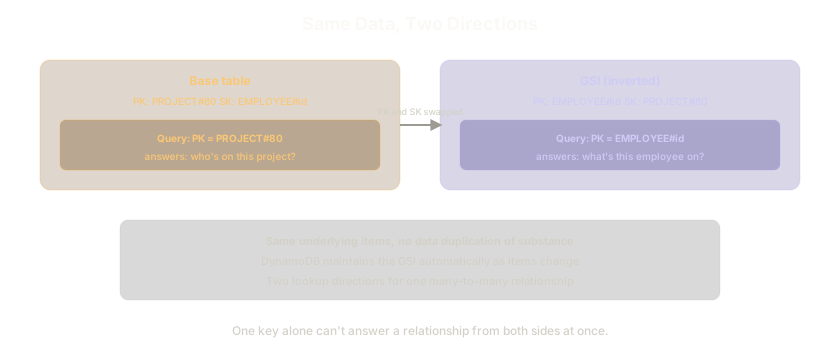 ExpandThe base table answers "who's on this project," keyed by project. A GSI with the keys swapped answers "what's this employee on," keyed by employee, same data, opposite direction
DynamoDB keeps the GSI in sync automatically as items change, there's no manual duplication to maintain. One relationship, two lookup directions, because one key was only ever built to answer one of them.
GSI overloading: one index, several entity types
A GSI's own partition and sort key don't have to be the table's key attributes at all, they can be entirely different attributes. One nameIndex GSI, keyed on an organization-scoped partition key plus a generic filterName attribute (ORG#hi, PROJECT#name, EMPLOYEE#name), can answer "find by name" for every entity type through a single index instead of building one per entity.
Sparse index: cheap filtering on a rarely-set attribute
An index only contains items that actually have the attribute it's keyed on. Add an isOnHold GSI, and only the handful of items where that flag is actually set get written into the index, not every item in the table. Querying that GSI returns just the on-hold projects directly, and cheaply, because the index itself stays small.
For search that goes beyond exact-match and prefix lookups, text search, fuzzy matching, the better tool is usually outside DynamoDB entirely: enable Streams (below), catch every change with a Lambda function, and index it into a service built for that, like Elasticsearch. Writes still go straight to DynamoDB; only the search-shaped reads go to the search index.
The real cost tradeoff: filter expression vs index
A filter expression looks like it narrows a query, but it runs after DynamoDB has already read every item matching the key condition. Querying 100 items and filtering down to 3 still consumes the read capacity for all 100, the filter reduces what gets returned, not what gets read.
- A secondary index costs its own capacity to maintain, worth it when that access pattern gets queried often.
- A filter expression costs nothing extra to set up but pays the full read cost of the underlying query every time, which can actually be cheaper for a pattern that's queried rarely.
Check the query's actual frequency before assuming an index is automatically the right answer.
Streams
Enabling Streams means every write, insert, update, delete, gets emitted as an event, configurable as key attributes only, the full new item, the full old item, or both. A Lambda function can listen directly, which is what makes DynamoDB a natural event-driven trigger, not just a place data ends up.
Capacity modes
- On-demand: no capacity planning, pay per request. Absorbs a large volume of writes without pre-provisioning, the right default when traffic is spiky or unpredictable.
- Provisioned: set read/write capacity ahead of time, cheaper at steady, predictable volume.
Conditional writes
attribute_not_exists makes an insert idempotent for free: write only if this record doesn't already exist, and a duplicate insert attempt fails cleanly instead of creating a second copy. It only covers the insert case, an action with a side effect (charging a card) needs an explicit idempotency key and lookup table instead. Lambda Powertools ships a utility for that rather than hand-rolling it.
attribute_exists is the mirror image, for update and delete. An update or delete should only succeed against a record that's actually there, attribute_exists(<partition key>) as the condition expression makes that explicit instead of assumed. Without it, an update against a missing key silently creates a new, mostly-empty item instead of failing, and a delete against a missing key just succeeds having done nothing, neither of which is usually what the caller meant.
A plain read behaves differently: it doesn't throw on a miss. A GetCommand against a key that doesn't exist returns a response with no Item field at all, not an error. Checking for that absence explicitly (if (!data.Item)) before using the result is the caller's job, an unguarded read against a missing key fails later, further down the code, with a confusing error about reading a property off undefined, not a clear one about the record being missing.
Update expressions need placeholders for reserved words
An UpdateCommand's UpdateExpression describes what changes, SET title = :title, body = :body, but writing attribute names directly into that string risks colliding with DynamoDB's own reserved words (status, name, size, and dozens more). The fix is a level of indirection: reference every attribute name and value through a placeholder instead of writing either literally into the expression.
UpdateExpression: "SET #title = :title, #body = :body",
ExpressionAttributeNames: { "#title": "title", "#body": "body" },
ExpressionAttributeValues: { ":title": data.title, ":body": data.body },
ExpressionAttributeNames maps a #-prefixed placeholder to the real attribute name; ExpressionAttributeValues maps a :-prefixed placeholder to the real value. Neither placeholder can ever collide with a reserved word, since it's never treated as an attribute name literal. Using this pattern by default, even for attribute names that aren't currently reserved, avoids a later DynamoDB update turning a working expression into a broken one.
Scan vs Query
Both return more than one item; they get there completely differently.
- Query fetches by a known partition key (optionally narrowed further by a sort key condition). It only ever reads the items that actually match that key, cheap and fast regardless of table size.
- Scan reads every item in the table (or index), then applies whatever filter comes after, cheap to write, expensive to run, and the cost scales with the table's total size, not the result size.
A table with only a partition key, no sort key, can't use Query to get "all items." The partition key has to be unique per item by definition, so a Query against it can only ever return the single matching item. Getting every item out of a hash-only table means Scan is the only option, there's no key to query across.
Pagination: LastEvaluatedKey and ExclusiveStartKey
Both Scan and Query cap a single response at 1MB of data. A table with more data than that behind one request doesn't error, it returns a partial result plus a LastEvaluatedKey, DynamoDB's way of saying "there's more, resume from here."
Getting everything means looping: check for a LastEvaluatedKey in the response, and if present, feed it back in as the next request's ExclusiveStartKey before issuing that request. Repeat until a response comes back with no LastEvaluatedKey at all, that's the signal there's nothing left.
let lastEvaluatedKey;
let allItems = [];

do {
  if (lastEvaluatedKey) params.ExclusiveStartKey = lastEvaluatedKey;
  const data = await docClient.send(new ScanCommand(params));
  allItems = allItems.concat(data.Items);
  lastEvaluatedKey = data.LastEvaluatedKey;
} while (lastEvaluatedKey);
The same Limit parameter that caps items per page (rather than waiting for the 1MB ceiling) triggers the exact same LastEvaluatedKey behavior, useful for testing this loop without needing megabytes of real data to trigger it naturally.
TTL (time to live)
An attribute that tells DynamoDB when to delete an item automatically, no scheduled cleanup job required. Used for a circuit breaker heartbeat (a status: down record with a short TTL, checked before calling an external system) and for idempotency table entries.
Other built-in features
- Encryption at rest, on by default.
- Point-in-time recovery, restore to any point in the retention window.
- Global Tables, multi-region replication, for disaster recovery and multi-region architectures.
The Essentials
- DynamoDB optimizes for compute, relational databases optimize for storage. Modeling one like the other produces the wrong bill.
- List access patterns before picking a key. Most applications need exactly one table, with entities told apart by prefixed keys.
- A
begins_withcondition and inheriting the parent's ID as partition key are what make a single table queryable per entity type or all together. - Scan is a correctness path, not a performance one. GSIs can be added any time; LSIs only at table creation.
- Inverted indexes, GSI overloading, and sparse indexes cover the access patterns a good primary key alone can't reach.
- A filter expression still pays full read cost for everything scanned. Weigh index cost against actual query frequency.
attribute_not_existsmakes inserts idempotent for free; TTL deletes items automatically, useful for heartbeat and idempotency tables alike.
Where this showed up
- The token gets checked first: the user table write.
- Check the fuse before you try the call: the heartbeat table and TTL.
- Same request twice should mean nothing changes: conditional writes and idempotency keys.
Further Reading and Watching
- Video: AWS re:Invent 2021 - DynamoDB deep dive: Advanced design patterns
- Video: AWS re:Invent 2018 - Amazon DynamoDB Deep Dive: Advanced Design Patterns for DynamoDB (DAT401)
- Docs: Best practices for designing and using partition keys effectively (AWS docs)
- Docs: Global secondary indexes (AWS DynamoDB docs)